
Skip to content
new ogbongeblog logo
  • Advertise
  • Blog
  • Contact

Your Blogspot Redirecting to .ng and Ads Not Showing On Desktop? Try This..

September 9, 2015

·

Uncategorized
jidetheblogger Avatar
jidetheblogger

Blogger Nnadi Nnaemeka Donatus contacted me few days back to complain that Google ads generated from his hosted Google Adsense account are no longer displaying on the desktop view of his blogspot blog.

I checked his blog and discovered that the ads were ONLY showing on mobile view. I also noticed that his blog keeps redirecting to .blogspot.com.ng. Before I could figure out what’s wrong, he sent me another message that the problem has been fixed.

So how?

Copy and paste the code below to the head section of your blog’s html. It will stop the redirection and ads will display on the desktop view.

<script type=”text/javascript”>
var blog = document.location.hostname.split(“.”);
if (blog[blog.length – 1] != “com”) {
var ncr = “http://” + blog[0] + “.blogspot.com/ncr”;
window.location.replace(ncr + document.location.pathname);
}
</script>


Don’t know where to add the code?

==> Sign in to your Blogspot dashboard
==> Go to “Template” > “Edit HTML”
==> Click inside the html
==> Press CTRL F on your keyboard to find  <head> or  </head>
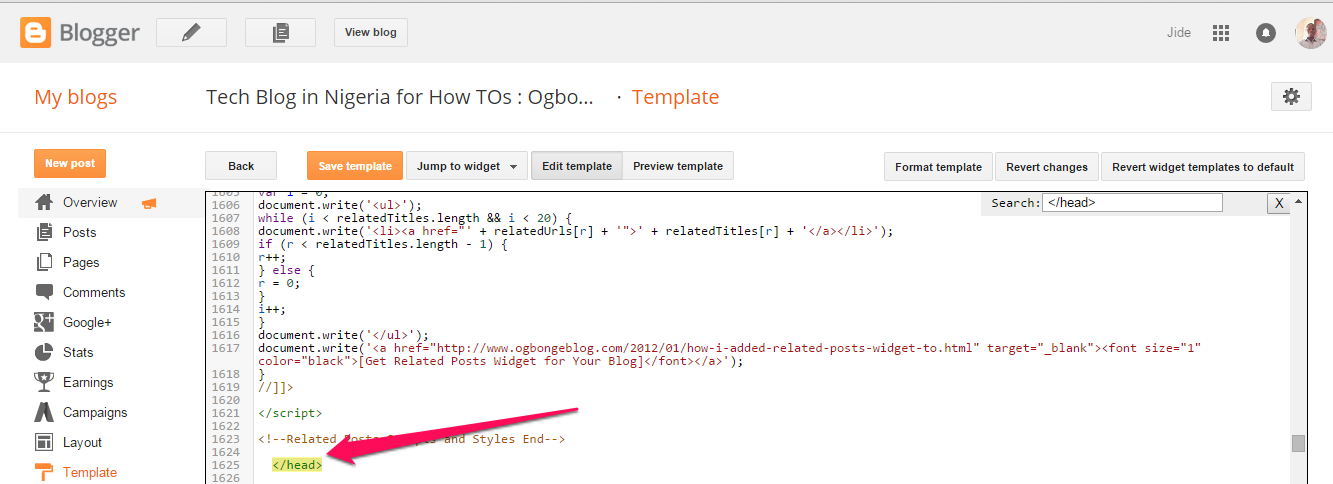
code in blogspot header

==> Copy the code directly below <head> or  above </head>
==> Click “Save Template”

View your blog and you should see the Google ads.

I hope it works for you.

Thanks to Nnadi Nnaemeka Donatus for sharing this.

Below is a video tutorial that will guide you :

https://youtu.be/lPWoRK1b5zQ

NB : Ensure the code you pasted in your blog’s html appear exactly as the code in this tutorial, If a strange – or .  appears in the code before javacript, in between pathname, hostname and replace, delete them. If not this code won’t work for you.

Have fun!

Please Share :
adsense blogger tips

Like What You Read?

Sign Up to get similar articles delivered to your email inbox.

Leave a Reply Cancel reply

Your email address will not be published. Required fields are marked *

44 responses to “Your Blogspot Redirecting to .ng and Ads Not Showing On Desktop? Try This..”

  1. Simi Avatar
    Simi
    September 5, 2015

    It worked. You're a life saver boss. God bless you loads..

    Loading…
    Reply
    1. Jide Oguns Avatar
      Jide Oguns
      September 6, 2015

      Glad it worked for you.

      Loading…
      Reply
    2. Efukikata Efet Avatar
      Efukikata Efet
      September 12, 2015

      No more redirecting issues on adsense hosted accounts. Google Nigeria have fixed the issues for us. I just tried it with my blog http://efukikata.blogspot.com.ng . Am currently using a google hosted account. All same kudos to Jide for helping us.

      What do u think went wrong then that the ads were not showing?

      Loading…
      Reply
  2. Amebo Guy Avatar
    Amebo Guy
    September 5, 2015

    Its not working here sir

    Loading…
    Reply
    1. Amebo Guy Avatar
      Amebo Guy
      September 5, 2015

      Working Perfectly Sir….Found My Mistake..Thanks Sir.

      Loading…
      Reply
    2. corper Avatar
      corper
      September 6, 2015

      pls it is not working here. i used the real code an the parse one but i still have .com.ng. pls someone should help me out

      Loading…
      Reply
    3. Jide Oguns Avatar
      Jide Oguns
      September 6, 2015

      @Amebo …mind sharing the mistake so others can learn from you?

      Loading…
      Reply
    4. Amebo Guy Avatar
      Amebo Guy
      September 6, 2015

      Guys, if u copy and paste…it myt not work.Recheck the script well.

      Loading…
      Reply
    5. Ben Avatar
      Ben
      September 6, 2015

      @Amebo. Please be specific, what is it that you did that made it work? What should I recheck? It is not working from my end.

      Please paste your corrected script.

      Thanks

      Loading…
      Reply
  3. Gist Arena Avatar
    Gist Arena
    September 5, 2015

    I have tried it and its not working for me, what else should i do Oga jide

    Loading…
    Reply
    1. Efukikata Efet Avatar
      Efukikata Efet
      September 6, 2015

      Exactly @Celebrity Gossip. Parse it first here http://www.blogcrowds.com/resources/parse_html.php and it will work.

      It worked here http://9ja-gist.blogspot.com/

      Loading…
      Reply
    2. Jide Oguns Avatar
      Jide Oguns
      September 6, 2015

      Am surprised it's not working for you and working for others. Pls ensure you copy the right code and paste it below <head> or above </head>

      Loading…
      Reply
    3. Gist Arena Avatar
      Gist Arena
      September 6, 2015

      Jide yes, i tried both tags but still did not work.

      Loading…
      Reply
    4. Jide Oguns Avatar
      Jide Oguns
      September 6, 2015

      Something is wrong at your end. Create a test blog using a default Blogger template and try this code on it to see if it won't STOP the redirection. You should also trying using another browser…

      Loading…
      Reply
  4. Godwin Okon Avatar
    Godwin Okon
    September 5, 2015

    Oga jide it is not working for me oh.. It still redirects me to .com.ng

    Loading…
    Reply
    1. Godwin Okon Avatar
      Godwin Okon
      September 5, 2015

      Oga jide your on top i done it now working. i Salute u infact from 2day am now ur fan

      Loading…
      Reply
    2. Jide Oguns Avatar
      Jide Oguns
      September 6, 2015

      lol..anytime bro. Glad to know it is now working for you. Have fun bro!

      Loading…
      Reply
  5. Celebrity Habit Avatar
    Celebrity Habit
    September 5, 2015

    Pls how did you guys do yours, i have tried the way he wrote but not working still

    Loading…
    Reply
    1. Efukikata Efet Avatar
      Efukikata Efet
      September 6, 2015

      I think you need to parse the script first

      Loading…
      Reply
    2. Efukikata Efet Avatar
      Efukikata Efet
      September 6, 2015

      Exactly @Celebrity Gossip. Parse it first here http://www.blogcrowds.com/resources/parse_html.php and it will work.

      It works here http://9ja-gist.blogspot.com/

      Loading…
      Reply
    3. Celebrity Habit Avatar
      Celebrity Habit
      September 6, 2015

      Bros i have done it and its still giving me code error.

      Loading…
      Reply
    4. corper Avatar
      corper
      September 6, 2015

      i parse the code and as well used the code directly but yet it is not working.

      Loading…
      Reply
    5. George Emmanuel Avatar
      George Emmanuel
      September 6, 2015

      I encountered this problem some months ago then i use the code above and it worked one hand. For those that it did not work for, just change your template and apply it again.

      Loading…
      Reply
  6. Kenneth Nwafor Avatar
    Kenneth Nwafor
    September 5, 2015

    Been following your blog for sometime now…u are good at what you do bro, thanks for all tutorials..

    Meanwhile …Catch up with Latest from Entertainment News and Celebrity Gossip at: http://www.kennwaforsblog.com

    Loading…
    Reply
    1. Jide Oguns Avatar
      Jide Oguns
      September 6, 2015

      You're welcome bro. Thanks for following…

      Loading…
      Reply
  7. Don Pafegs Avatar
    Don Pafegs
    September 6, 2015

    Thanks for sharing Jide

    REAVEALED!!! 5 Sexual Acts That May Cause Cancer

    Loading…
    Reply
    1. Jide Oguns Avatar
      Jide Oguns
      September 6, 2015

      Thanks for the appreciation.

      Loading…
      Reply
  8. corper Avatar
    corper
    September 6, 2015

    pls it is not working here. i used the real code an the parse one but i still have .com.ng. pls someone should help me out

    Loading…
    Reply
    1. Jide Oguns Avatar
      Jide Oguns
      September 6, 2015

      You are probably not doing something right. Ensure you paste the right code below <head> or above </head>

      Loading…
      Reply
  9. Nnadi Donatus Avatar
    Nnadi Donatus
    September 6, 2015

    Nice one Baba Jide..

    Loading…
    Reply
    1. Jide Oguns Avatar
      Jide Oguns
      September 6, 2015

      I should thank you more. God bless you bro.

      Loading…
      Reply
  10. Anonymous Avatar
    Anonymous
    September 6, 2015

    Any body having that issue…? if you are using mtn simple server to blog..change to a normal subscirbed sim and check your blog will stop rdireting…

    Loading…
    Reply
  11. Gist Arena Avatar
    Gist Arena
    September 6, 2015

    Oga Jide thank you so much for this post. finally its .ng is not showing on my blog again. i had to source for another codeThank so much boss. God Will bless you the more

    Loading…
    Reply
    1. Jide Oguns Avatar
      Jide Oguns
      September 7, 2015

      Glad it's now working. Are you also using MTN simper server to surf the net?

      Loading…
      Reply
  12. Memodreal Avatar
    Memodreal
    September 7, 2015

    I just put my youtube adsense on my blog , butt it shows blank. I applied what's above now it doesn't redirect to .ng but still showing blank. Is it because i just palced youtube adsense on the blog , Does it take a while before your youtube adsense start to show on blogspot ?

    Loading…
    Reply
    1. Jide Oguns Avatar
      Jide Oguns
      September 7, 2015

      What is your blog URL?

      Loading…
      Reply
    2. Gist pluz Avatar
      Gist pluz
      September 7, 2015

      oga Jide.. does youtube adsense Display Ads on .blogspo.comt domain?

      Loading…
      Reply
  13. Orimisan temidayo Avatar
    Orimisan temidayo
    September 12, 2015

    Please oga jide, I need a better template for my site http://www.temmyguru.com
    Can you please send a template to my email temidayoorimisan@gmail.com
    Thanks.

    Loading…
    Reply
    1. Jide Oguns Avatar
      Jide Oguns
      September 21, 2015

      Mail me

      Loading…
      Reply
  14. Jide Oguns Avatar
    Jide Oguns
    September 21, 2015

    @All…if not working for you, ensure you delete the – if it appears in your copied code before the word "javascript", and in between the words "replace" and "pathname".

    Loading…
    Reply
  15. Emmanuel Avatar
    Emmanuel
    May 18, 2017

    Thanks it worked wonders after a single try on my new blog on my new blog

    Loading…
    Reply
  16. List of Reasons Avatar
    List of Reasons
    June 17, 2017

    Oga Jide, it worked like charm. My blog is now a clean .com site. Thanks a million.

    Loading…
    Reply
  17. Easy healthy dinner ideas Avatar
    Easy healthy dinner ideas
    July 5, 2017

    thanks. it worked

    Loading…
    Reply
  18. J Olusanya Avatar
    J Olusanya
    October 6, 2017

    thank you so much. It works completely when i copy the redirect com code into html editor on my blog, https://investment4business.blogspot.com . it is just 2 minutes. I tried the code from another blogger on the redirect url till i find it from you. Thank you so much.

    Loading…
    Reply

WANT TO ADVERTISE?

Chat on WhatsApp

RELATED POSTS

  • Your Blogspot address ends with .in (or any country-specific URL) instead of .com? The Solution.
  • How To Display Adsense On Mobile Templates of Blogger/Blogspot blogs
  • How to add Google Ads to Blogger/Blogspot Blog

FEATURED


  • CREDICORP launches C.L.I.C.K.D. Scheme with FG’s 3MTT Programme, expanding affordable consumer credit for locally-assembled laptops and devices for digital workers

    CREDICORP launches C.L.I.C.K.D. Scheme with FG’s 3MTT Programme, expanding affordable consumer credit for locally-assembled laptops and devices for digital workers

  • What Happens to Your Online Accounts When You Die?

    What Happens to Your Online Accounts When You Die?

JOIN AI WEB DESIGN GROUP


  • AI Website Design Training Whatsapp Group by Jidetheblogger

    AI Website Design Training Whatsapp Group by Jidetheblogger

← Lenovo Unveils New YOGA Series of Convertible Laptops in Nigeria
Infinix Hot 2 becomes Africa’s first Android One Smartphone →

Join 25,000+ subscribers

Receive our latest blog posts in your inbox.

Search

Social

Facebook

Instagram

Twitter

new ogbongeblog logo

Copyright © 2026 | About | Advertise | Featured | Sitemap | Privacy Policy | Powered by WordPress

Your cart (items: 0)

Products in cart

Product
Details
Total
Subtotal ₦0.00
Shipping and discounts calculated at checkout.
View my cart
Go to checkout

Your cart is currently empty!

Start shopping

Notifications

%d

    LIKE My Fan Page

    Privacy Policy | Copyright © 2012,OgbongeBlog.All Rights Reserved. Powered by Blogger .
    Create a Mobile Site
    View Site in Mobile | Classic
    Share by:


