
Skip to content
new ogbongeblog logo
  • Advertise
  • Blog
  • Contact

How To Change The Adsense Account Linked To YouTube Channel

January 25, 2016

·

Uncategorized
jidetheblogger Avatar
jidetheblogger

If you’ve linked an AdSense account to your YouTube channel, you can remove it and link another existing Adsense account to it. Even if you don’t have an existing Google AdSense account, you can easily create a new one using the YouTube channel, although it will be an “hosted” AdSense account till you upgrade it.

I’ve done same. So, I decided to share the steps with you.

How To Get Started

==> Sign in to your YouTube channel

==> Go to the monetization tab here

==> Click on the “ review or change Adsense association ….” link

removeadsenselinkedtoyoutube

You will be redirected to a new page where you will see the ID of the linked AdSense account, the status and the date it was associated with your YouTube channel.

==> Click on “Change”
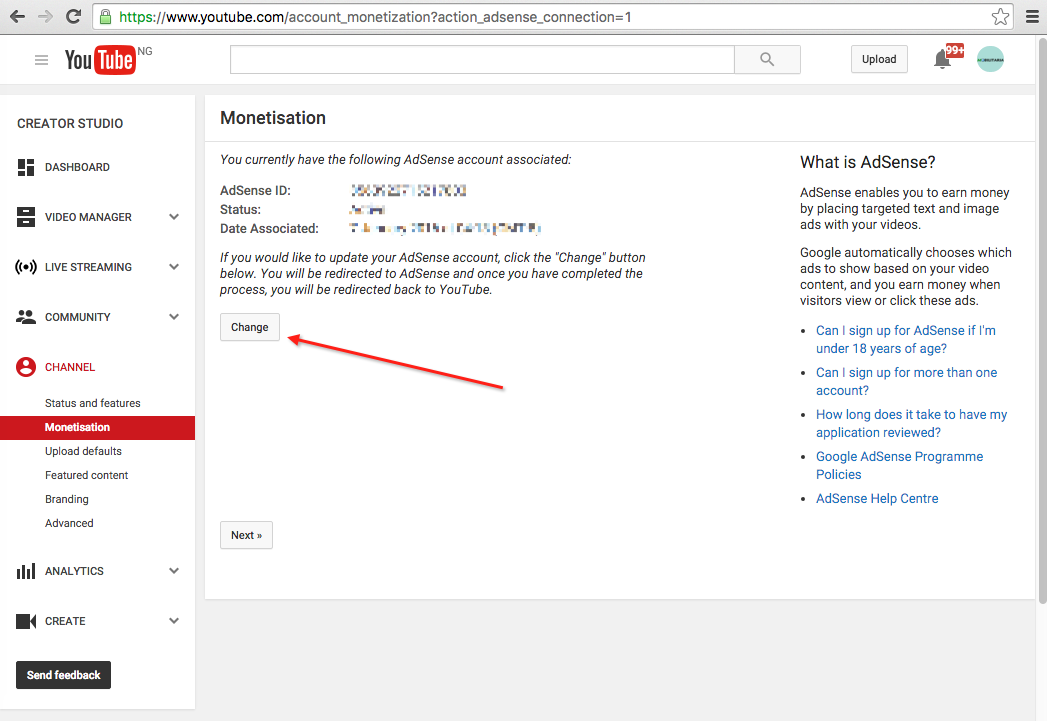
change youtube google adsense account

The linked AdSense account will be removed.

Thereafter, you can link another existing AdSense account or create a new one to link to the YouTube channel.

I hope this helps.

Recommended: 

==> How I Place Google Ads On My YouTube Videos
==> How To Create Multiple YouTube Channels On One Google Account

Please Share :

Like What You Read?

Sign Up to get similar articles delivered to your email inbox.

Leave a Reply Cancel reply

Your email address will not be published. Required fields are marked *

2 responses to “How To Change The Adsense Account Linked To YouTube Channel”

  1. bucho Avatar
    bucho
    January 26, 2016

    hi jide…..please if u have an adsense account on youtube but they disapproved your website from showing ads but u still have the one on youtube, how can you earn? what should be done. Thanks

    Loading…
    Reply
  2. Tracy Jackson Avatar
    Tracy Jackson
    February 27, 2020

    Thank you sir for this information….sir the problem I have is that I have forgotten the user name and password of the admob on my YouTube channel……so I am looking for a possible way to kick out the account to put a fresh one…..thank you hoping to hearing from you

    Loading…
    Reply

WANT TO ADVERTISE?

Chat on WhatsApp

RELATED POSTS

  • How I track my top Adsense-performing blog posts
  • How to UNlink Google Adsense account from Google Analytics
  • How to link AdSense account to Google Analytics

FEATURED


  • CREDICORP launches C.L.I.C.K.D. Scheme with FG’s 3MTT Programme, expanding affordable consumer credit for locally-assembled laptops and devices for digital workers

    CREDICORP launches C.L.I.C.K.D. Scheme with FG’s 3MTT Programme, expanding affordable consumer credit for locally-assembled laptops and devices for digital workers

  • What Happens to Your Online Accounts When You Die?

    What Happens to Your Online Accounts When You Die?

JOIN AI WEB DESIGN GROUP


  • AI Website Design Training Whatsapp Group by Jidetheblogger

    AI Website Design Training Whatsapp Group by Jidetheblogger

← Adsense And Analytics Show Different Earnings Data? Here is Why
Blog Of The Week : Maverick Excel Blog →

Join 25,000+ subscribers

Receive our latest blog posts in your inbox.

Search

Social

Facebook

Instagram

Twitter

new ogbongeblog logo

Copyright © 2026 | About | Advertise | Featured | Sitemap | Privacy Policy | Powered by WordPress

Your cart (items: 0)

Products in cart

Product
Details
Total
Subtotal ₦0.00
Shipping and discounts calculated at checkout.
View my cart
Go to checkout

Your cart is currently empty!

Start shopping

Notifications

%d

    LIKE My Fan Page

    Privacy Policy | Copyright © 2012,OgbongeBlog.All Rights Reserved. Powered by Blogger .
    Create a Mobile Site
    View Site in Mobile | Classic
    Share by:


