
Skip to content
new ogbongeblog logo
  • Advertise
  • Blog
  • Contact

How To Copy Layer Groups from One Psd File To Another in Photoshop

how to

\

Written by

jidetheblogger Avatar
jidetheblogger

Published :

August 17, 2015

Last Modified :

January 20, 2025

Layer group in photoshop is simply a folder that you can place similar or related layers into. It enables you to organize layers, thereby keeping things organized.

Besides that, Layer group makes it easy to turn several layers on or off at once in a photoshop document. And groups enable you to apply opacity settings, blend modes, and layer styles to multiple layers at a time.

In this tutorial. I’m sharing with you, how to transfer or copy layers groups from one psd file to another in Adobe photoshop. You will find this very useful if you have a bunch of layer groups in one .PSD file and would like to put those layer groups into another psd file.

How To Get Started

==> Open both psd files
==> Right click on the layer group you want to transfer to another psd
==> Click “duplicate group”

duplicate layers groups in adobe photoshop

==> A new window similar to the screenshot below will pop up. Select the destination psd file in the “document” drop down box.
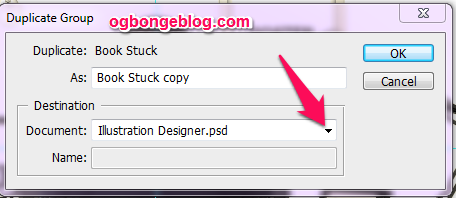
copy layers in adobe photoshop

==> Click OK

That’s all.

This trick works for me in CS4 and you can apply similar trick if you would like to copy layers from one psd to another.

Please Share :
graphic design

Like What You Read?

Sign Up to get similar articles delivered to your email inbox.

Leave a Reply Cancel reply

Your email address will not be published. Required fields are marked *

4 responses to “How To Copy Layer Groups from One Psd File To Another in Photoshop”

  1. Ernest Steve Avatar
    Ernest Steve
    August 17, 2015

    Thank you

    Loading…
    Reply
    1. Jide Oguns Avatar
      Jide Oguns
      August 18, 2015

      You're welcome

      Loading…
      Reply
  2. Gerald S Avatar
    Gerald S
    October 9, 2015

    That's very impressive post.

    Loading…
    Reply
  3. Richard C. Lambert Avatar
    Richard C. Lambert
    January 19, 2016

    Layer group in photoshop is simply a folder that you can place similar or related layers into. It enables you to organize layers, thereby keeping things organized. html coder

    Loading…
    Reply

WANT TO ADVERTISE?

Chat on WhatsApp

RELATED POSTS

  • How To Unlink Facebook Group from Facebook Page and Link To Another Pageunlink facebook page from facebook group
  • Download New Twitter Background Template
  • How To Stop Facebook GROUPS Email Notifications

FEATURED


  • CREDICORP launches C.L.I.C.K.D. Scheme with FG’s 3MTT Programme, expanding affordable consumer credit for locally-assembled laptops and devices for digital workers

    CREDICORP launches C.L.I.C.K.D. Scheme with FG’s 3MTT Programme, expanding affordable consumer credit for locally-assembled laptops and devices for digital workers

  • What Happens to Your Online Accounts When You Die?

    What Happens to Your Online Accounts When You Die?

JOIN AI WEB DESIGN GROUP


  • AI Website Design Training Whatsapp Group by Jidetheblogger

    AI Website Design Training Whatsapp Group by Jidetheblogger

← Photos from Social Media Summit 2015, At Sheraton Abuja
Windows Hosts File Not Saving After Modification? Try this Fix… →

Join 25,000+ subscribers

Receive our latest blog posts in your inbox.

Search

Social

Facebook

Instagram

Twitter

new ogbongeblog logo

Copyright © 2026 | About | Advertise | Featured | Sitemap | Privacy Policy | Powered by WordPress

Your cart (items: 0)

Products in cart

Product
Details
Total
Subtotal ₦0.00
Shipping and discounts calculated at checkout.
View my cart
Go to checkout

Your cart is currently empty!

Start shopping

Notifications

%d

    LIKE My Fan Page

    Privacy Policy | Copyright © 2012,OgbongeBlog.All Rights Reserved. Powered by Blogger .
    Create a Mobile Site
    View Site in Mobile | Classic
    Share by:


