
Skip to content
new ogbongeblog logo
  • Advertise
  • Blog
  • Contact

How To Create Matched Content Unit From Your Adsense Account

March 23, 2016

·

Uncategorized
jidetheblogger Avatar
jidetheblogger

Once Google approves your blog for Matched content , you can start generating Matched Content unit from your Adsense account. By placing the code of the matched content unit on your blog, Google will be able to display relevant articles (below your blog posts) to visitors of your site based on topic similarity.

To create a new Matched content unit:

==> Sign in to your AdSense account .
==> Click the “ My ads ” tab.
==> On the sidebar, click “Content”.
==> Click +New ad unit .
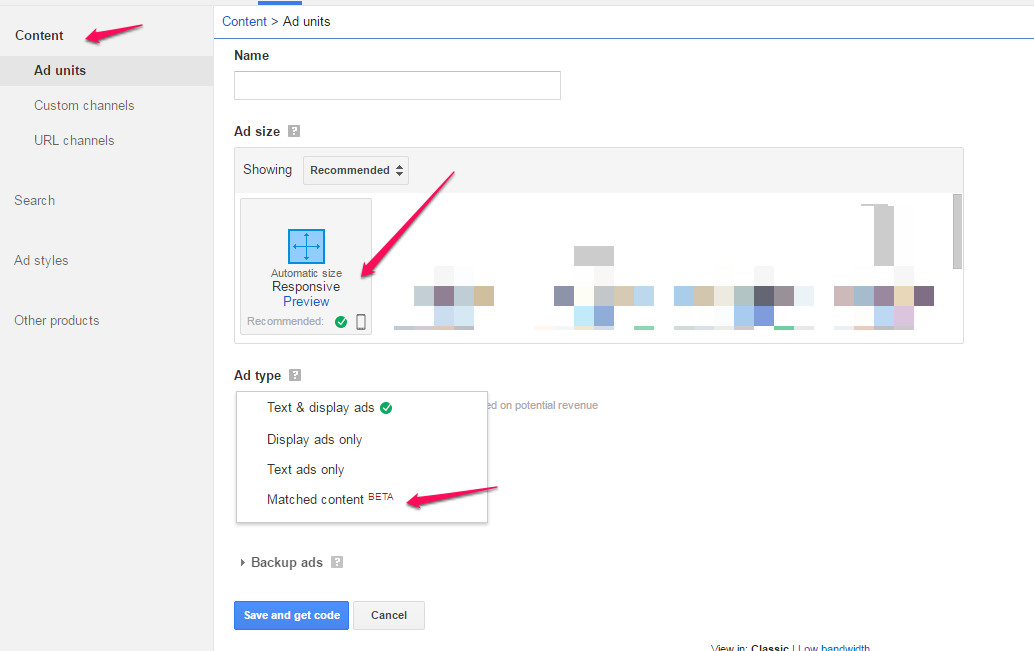
create adsense unit for matched content

==> Give your Matched content unit a name.
==> In the “ Ad size ” section, choose an ad size that fits your layout. Automatic Size ( Responsive ) recommended!

==> From the “ Ad type ” drop-down, select “ Matched content ” only.

==> (Optional) In the “Text ad style” section, apply a style for your Matched content unit.==> (Optional) Set up a custom channel to track your Matched content unit. Learn more about custom channels.

==> Click Save and get code.

Copy and paste the ad code into the HTML source code of  your approved site.


Google recommends that you place your Matched content unit directly below your article (below the fold), and either above or below an ad unit.

While your Matched content settings are propagating across Google systems, standard ads may serve in your Matched content unit. To avoid this, please wait 15 minutes before putting this code on your site.

For best results, Google recommends placing your Matched content unit directly below the article (below the fold) and either above or below your ad unit. When placed directly above or below an ad unit, Matched content units can improve the visibility and engagement rate of your ad units.

NB : Matched content units don’t count towards your Google content ad limit per page .

Recommended : How To Check If Your Blog is Approved For Adsense Matched Content

Please Share :
adsense

Like What You Read?

Sign Up to get similar articles delivered to your email inbox.

Leave a Reply Cancel reply

Your email address will not be published. Required fields are marked *

13 responses to “How To Create Matched Content Unit From Your Adsense Account”

  1. Gistfree Official Avatar
    Gistfree Official
    March 23, 2016

    Plz, which code do i search for on my template if am to add it below article?

    Loading…
    Reply
    1. Jide Oguns Avatar
      Jide Oguns
      March 23, 2016

      If you've placed an ad below your blog posts, place the code of the matched content unit, directly below it.

      Loading…
      Reply
  2. Mazino Oyolo Kigho Avatar
    Mazino Oyolo Kigho
    March 23, 2016

    I placed mine below the ad unit after the post..

    Loading…
    Reply
  3. Gistfree Official Avatar
    Gistfree Official
    March 23, 2016

    Which code will i search for in my template if am to place it where u placed urs @Mazino?

    Loading…
    Reply
  4. haxar tguru Avatar
    haxar tguru
    March 23, 2016

    Is it available to all publishers?

    Loading…
    Reply
    1. Jide Oguns Avatar
      Jide Oguns
      March 24, 2016

      No, that's why you need to check if your site is eligible.

      Loading…
      Reply
  5. Anonymous Avatar
    Anonymous
    March 26, 2016

    even while i m eleigble for match content i have places it in my site but i cant see any match content in my blog kindly tell me how to place it in blogger

    Loading…
    Reply
  6. Okechukwu Solomon Avatar
    Okechukwu Solomon
    April 3, 2016

    Please I need help on how to verify my adsense pin

    Loading…
    Reply
    1. HENRY Avatar
      HENRY
      July 31, 2017

      it depends on the type of adsense account you are verifying.Is it Naija adsense or US or UK.You need the address where the PIN can be sent to..thats all

      Loading…
      Reply
  7. Aaron Gilbert Avatar
    Aaron Gilbert
    June 15, 2016

    Nice one,Seems Google has changed their add sites layout, didn't see the matched content region, on Skilztools.com

    Loading…
    Reply
  8. Loveth Cynthia Loveth Avatar
    Loveth Cynthia Loveth
    October 9, 2016

    Thanks for this awesome post herein. Hope this brings some earnings cause my blog is approved for matched content but I wanted to know more about adding it to blogger.

    Thanks all the same

    Loading…
    Reply
  9. Tech Zone Avatar
    Tech Zone
    January 31, 2017

    Boss please reply me as soon as possible. where i place the ad code on my wordpress website. Please reply me.Thanks in advance

    Loading…
    Reply
  10. Microsoft Tutorials Avatar
    Microsoft Tutorials
    December 20, 2017

    Jide Thanks for this great info. It is really helpful

    Loading…
    Reply

WANT TO ADVERTISE?

Chat on WhatsApp

RELATED POSTS

  • How To Hide A WordPress Widget On Mobile Devices
  • How To Add Adsense Into WordPress Blog Posts
  • How to put Adsense link unit in your blog header

FEATURED


  • CREDICORP launches C.L.I.C.K.D. Scheme with FG’s 3MTT Programme, expanding affordable consumer credit for locally-assembled laptops and devices for digital workers

    CREDICORP launches C.L.I.C.K.D. Scheme with FG’s 3MTT Programme, expanding affordable consumer credit for locally-assembled laptops and devices for digital workers

  • What Happens to Your Online Accounts When You Die?

    What Happens to Your Online Accounts When You Die?

JOIN AI WEB DESIGN GROUP


  • AI Website Design Training Whatsapp Group by Jidetheblogger

    AI Website Design Training Whatsapp Group by Jidetheblogger

← How To Check If Your Blog is Eligible To Use Adsense Matched Content
Huawei Signs Lionel Messi as Brand Ambassador (Photos & Video) →

Join 25,000+ subscribers

Receive our latest blog posts in your inbox.

Search

Social

Facebook

Instagram

Twitter

new ogbongeblog logo

Copyright © 2026 | About | Advertise | Featured | Sitemap | Privacy Policy | Powered by WordPress

Your cart (items: 0)

Products in cart

Product
Details
Total
Subtotal ₦0.00
Shipping and discounts calculated at checkout.
View my cart
Go to checkout

Your cart is currently empty!

Start shopping

Notifications

%d

    LIKE My Fan Page

    Privacy Policy | Copyright © 2012,OgbongeBlog.All Rights Reserved. Powered by Blogger .
    Create a Mobile Site
    View Site in Mobile | Classic
    Share by:


