
Skip to content
new ogbongeblog logo
  • Advertise
  • Blog
  • Contact

How To Get DNS Zone File for Godaddy Blogger DNS Set Up

May 27, 2015

·

digital marketing
jidetheblogger Avatar
jidetheblogger

GoDaddy DNS service supports the Blogger DNS settings file, which contains all the DNS settings you need to set up a custom domain for your blogspot blog. This simply means you can easily change from .blogspot to .com by uploading the Blogger DNS zone file to your Godaddy DNS manager.
So, in this post, I will show you how to get the DNS zone file for Godaddy Blogger DNS set up.

How To Get Started

I assume you have an existing blog and you have already purchased a domain name on GoDaddy.com.

==> Sign in to your blog dashboard via www.blogger.com
==> Go to “ Settings ” > “Basic”
==> Click “ + Setup a 3rd party URL for your blog “

add blogger custom domain

==> Enter the URL you would like to use for your blog (eg www.ogbongeblog.com)==> Click ‘Save”.

You will see an error.

blogger dns zone file

Now click on the “DNS settings file” link and save the DNS settings file.

That is the DNS zone file you will upload to godaddy to complete your Blogger custom domain set up.

How To Upload Blogger DNS Zone File To Godaddy

==> Sign in to godaddy.com
==> Click on “Domains” and click on the the domain name you want to set up
==> Click the “DNS Zone File” tab
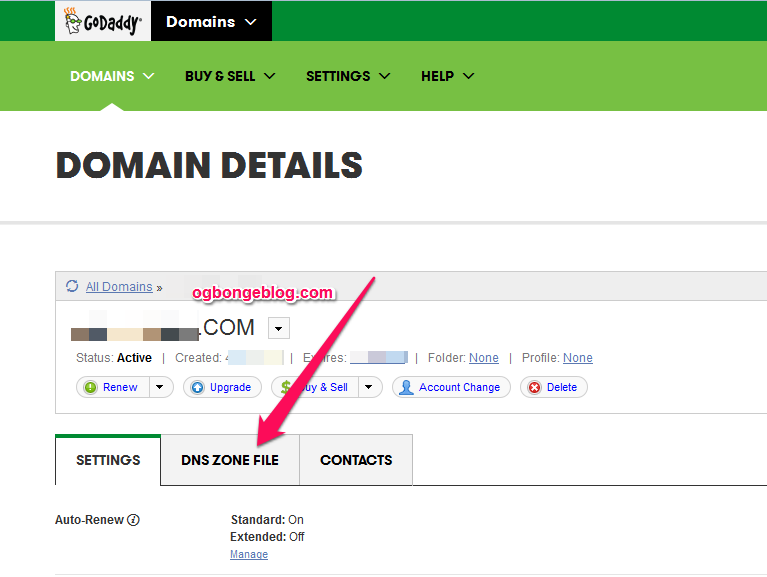
godaddy blogger dns zone file

==> Click “Use classic DNS Manager”==> Click the “Import/Export” button
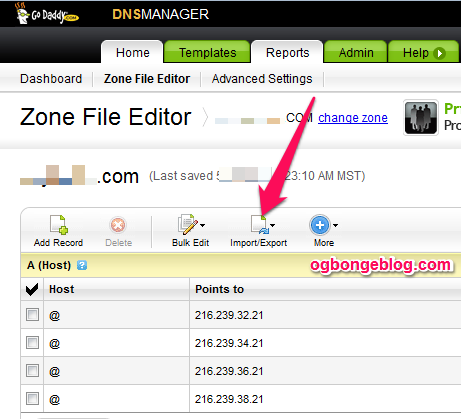
godaddy import dns zone file

==> Click “Import” and follow the instructions.

Once successfully imported, go back to Blogger settings to re-save your custom domain name.

If saved successfully without displaying the error, your custom domain name will start working.

Remember to delete some of the existing records that GoDaddy adds by default.

Recommended : How To Push or Transfer Godaddy Domain To Another User

Please Share :
domain registration godaddy

Like What You Read?

Sign Up to get similar articles delivered to your email inbox.

Leave a Reply Cancel reply

Your email address will not be published. Required fields are marked *

10 responses to “How To Get DNS Zone File for Godaddy Blogger DNS Set Up”

  1. Gadget ReviewsNG Avatar
    Gadget ReviewsNG
    May 27, 2015

    Its a bit technical , thanks for sharing

    Loading…
    Reply
  2. Daayur Avatar
    Daayur
    May 27, 2015

    its great

    Loading…
    Reply
  3. Gloria Okaimam Avatar
    Gloria Okaimam
    May 27, 2015

    Thanks for sharing your ideas. Please check your mail.

    Loading…
    Reply
  4. Mazino Oyolo Kigho Avatar
    Mazino Oyolo Kigho
    May 27, 2015

    Like seriously this is the easiest way of make blogspot a custom domain. Depending on your connection, it doesn't take 3 minutes to set up.

    I also published a post too on that some weeks back Easy Way To Redirect Blogger On Godaddy

    Loading…
    Reply
  5. TAUFIN AHMED Avatar
    TAUFIN AHMED
    September 13, 2015

    Thank you very much for your help. Through your help I perfectly set my blogger http://www.pricelistbd57.blogspot.com TO http://www.e-priceinbd.com . Check if you wish. Thanks once again for your nice help.
    THANKS

    Loading…
    Reply
  6. Kamrul Hasan Zibon Avatar
    Kamrul Hasan Zibon
    September 22, 2015

    Hi Dear,Thank you very much for your great help. I just Implied your instruction to my blog. Thank you once again, its really a big help for me. Thats why I always like to read you.

    Do it work for http://www.bdpricelists.com

    Loading…
    Reply
  7. Shariful Islam Razu Avatar
    Shariful Islam Razu
    February 4, 2016

    Hi Dear,Thank you very much for your great help. Thank you once again, its really a big help for me.

    Do it work for http://www.amarfon.com

    Loading…
    Reply
  8. Opemiposi Avatar
    Opemiposi
    July 28, 2016

    ou are a life saver bro. Been on this all day. It really helped me.

    Loading…
    Reply
  9. Chinemelum Mbonu Avatar
    Chinemelum Mbonu
    April 21, 2017

    i have never used any thing from your post but this post and your floating share button ,its so so good and easy i love ur blog and from now on i will be your biggest fan check my blog out to tell me if i can now apply for adsense account splitng.com

    Loading…
    Reply
  10. TECH MAHATO Avatar
    TECH MAHATO
    December 13, 2018

    Hey, your blog is very beautiful and knowledgeable. We appreciate your hard work. Your suggestion is very helpful to the new blogger.thanks

    Loading…
    Reply

WANT TO ADVERTISE?

Chat on WhatsApp

RELATED POSTS

  • Managed WordPress On GoDaddy.com. What It Meansmanaged wordpress hosting on godaddy
  • How I Use Mobstac To Create Mobile Custom Domain (m.ogbongeblog.com)
  • How To Start a .Com Blog at ₦2699 with DomainKing.NGopen domain king account

FEATURED


  • CREDICORP launches C.L.I.C.K.D. Scheme with FG’s 3MTT Programme, expanding affordable consumer credit for locally-assembled laptops and devices for digital workers

    CREDICORP launches C.L.I.C.K.D. Scheme with FG’s 3MTT Programme, expanding affordable consumer credit for locally-assembled laptops and devices for digital workers

  • What Happens to Your Online Accounts When You Die?

    What Happens to Your Online Accounts When You Die?

JOIN AI WEB DESIGN GROUP


  • AI Website Design Training Whatsapp Group by Jidetheblogger

    AI Website Design Training Whatsapp Group by Jidetheblogger

← How To Push or Transfer Godaddy Domain To Another User
How To Enable Contact Form 7 Acceptance Checkbox Error Message →

Join 25,000+ subscribers

Receive our latest blog posts in your inbox.

Search

Social

Facebook

Instagram

Twitter

new ogbongeblog logo

Copyright © 2026 | About | Advertise | Featured | Sitemap | Privacy Policy | Powered by WordPress

Your cart (items: 0)

Products in cart

Product
Details
Total
Subtotal ₦0.00
Shipping and discounts calculated at checkout.
View my cart
Go to checkout

Your cart is currently empty!

Start shopping

Notifications

%d

    LIKE My Fan Page

    Privacy Policy | Copyright © 2012,OgbongeBlog.All Rights Reserved. Powered by Blogger .
    Create a Mobile Site
    View Site in Mobile | Classic
    Share by:


