
Skip to content
new ogbongeblog logo
  • Advertise
  • Blog
  • Contact

Download Adobe Reader app for iPad and iPhone

  1. Home
  2. Blog
  3. Uncategorized
  4. Download Adobe Reader app for iPad and iPhone
October 22, 2011

Written by

jidetheblogger Avatar
jidetheblogger

Last Modified :

October 8, 2017

Adobe Reader app for iOS ( iPhone and iPad ) has finally been released. I now quickly and efficiently view pdf files on my iPad without having to reply only on ” iBooks” and “CloudReader” apps.
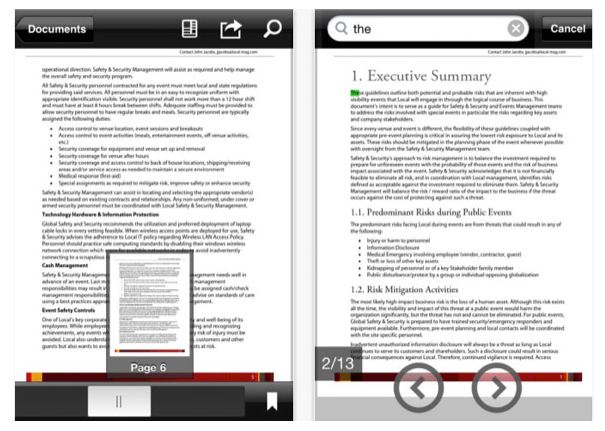
AdobeReader for iPad

Once installed, you can use the app to open PDF files from any other
application, including email, that supports the “Open In … ” action. Youcan  also zoom in on text or images and navigate large documents via
thumbnails.

As with other PDF applications, you can wirelessly print PDFs from
within Adobe Reader using AirPrint. You can also share PDF files with
other applications using “Open In…” as well as via an e-mail attachment.

Opening PDF documents with Adobe reader is as simple as tapping your finger. You can swipe up and down OR swipe left and right to change pages.

Compared to similar iOS PDF readers, Adobe Reader is lacking in many
features, such as annotation and markup tools as at the time of
publishing this post but it is still an industry standard. 

Click Here to Download Adobe reader from iTunes App Store NOW!

Cheers!

Please Share :
ipad tutorials

Like What You Read?

Sign Up to get similar articles delivered to your email inbox.

Leave a Reply Cancel reply

Your email address will not be published. Required fields are marked *

4 responses to “Download Adobe Reader app for iPad and iPhone”

  1. Junaid Avatar
    Junaid
    October 22, 2011

    Thanks for sharing. I am transferring ebooks from my pc to the app now.

    Loading…
    Reply
  2. Jide Ogunsanya Avatar
    Jide Ogunsanya
    October 22, 2011

    Good. I have done that too.

    Loading…
    Reply
  3. chike Avatar
    chike
    October 28, 2011

    pls how do i get microsoft office on my i-pad

    Loading…
    Reply
  4. Jide Ogunsanya Avatar
    Jide Ogunsanya
    October 30, 2011

    NO official Microsoft office app for iPad but there are alternatives. I use the free "Documents" app for reading my Microsoft office files

    Loading…
    Reply

WANT TO ADVERTISE?

Chat on WhatsApp

RELATED POSTS

  • How I Download PDF Files to iPad
  • How To Change The Default Program For Opening pdf Files on Windows 7
  • Microsoft Office for the iPad Free Alternative: CloudOn App

FEATURED


  • How to Pay Chinese Suppliers in RMB (Alipay & WeChat Pay) or Swap Naira, Kenyan Shillings, Ghana Cedis & USDT in Minutes

    How to Pay Chinese Suppliers in RMB (Alipay & WeChat Pay) or Swap Naira, Kenyan Shillings, Ghana Cedis & USDT in Minutes

JOIN AI WEB DESIGN GROUP


  • AI Website Design Training Whatsapp Group by Jidetheblogger

    AI Website Design Training Whatsapp Group by Jidetheblogger

RANDOM POSTS


    I Got One Free Month of Meta Verified After I Tried to Cancel My Subscription


    How To Make Money On Bamboo App: 5 Proven Ways


    How To Use Vibe Coding To Make Money


    How I Earn $100 Per Referral from Affiliate Marketing


    Bluetooth Printer That Connects To Phone


    Can I Use OPay Card for Facebook Ads?


    Why I Moved My Websites From Namecheap To Interserver.net


    How I Earn $50 Per Sale


MORE RANDOM POSTS
← Globacom FREE Browsing: How I legally configured it on my Phone, laptop and iPad
Facebook Profile ID : How to get it →

Join 25,000+ subscribers

Receive our latest blog posts in your inbox.

Search

Social

Facebook

Instagram

Twitter

new ogbongeblog logo

Copyright © 2026 | About | Advertise | Featured | Sitemap | Privacy Policy | Powered by WordPress

Your cart (items: 0)

Products in cart

Product
Details
Total
Subtotal ₦0.00
Shipping and discounts calculated at checkout.
View cart
Go to checkout

Your shopping cart is empty

Return to shop

Notifications

%d

    LIKE My Fan Page

    Privacy Policy | Copyright © 2012,OgbongeBlog.All Rights Reserved. Powered by Blogger .
    Create a Mobile Site
    View Site in Mobile | Classic
    Share by: