


Mailbox app
; the free email-sorting app, is now available for download to the Apple iPad from the iTunes Store. You can now stop staring at emails you can’t deal with now, so you can focus on what’s important now.
The email management app
lets you quickly manage current and incoming inbox messages by swiping
them to your archive
or thrash
. You can also swipe to snooze emails
for later. Snoozed messages will be delivered back into your Inbox at a time you assign them. For example, snoozing a message to “Later Today” will bring that email back to your Inbox in 3 hours.
According to the developers, Mailbox checks your email from the cloud, then delivers it to your iPad securely. You can even get push notifications for new messages.

How To Use Mailbox App
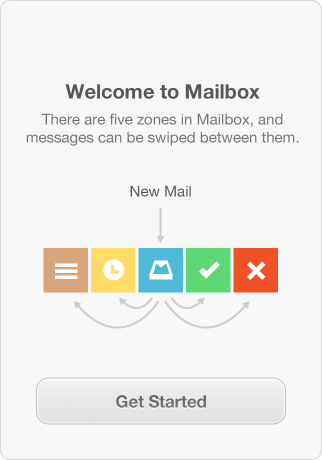
There are five zones in Mailbox and messages can be swiped between them.
To get started, you will need to add a Gmail account . You can add up to 5 Gmail or Google Apps accounts to Mailbox. Once you successfully add your account, you can start managing your emails with the Mailbox app.
- You can archive a message by swiping the cell to the right. Swiping a message further will skip Archive and put it in the trash .
- Swipe left to snooze an email while swiping a message further will skip Later and add it to a list .
There are two ways to archive an email . From the list view of emails, swipe a message right ( GREEN ) to move it directly to your archive. The green color of your swipe denotes it’s headed to archive. You can also archive from inside a message by tapping the checkmark at the top of your screen.
To delete a message from a list view, long swipe to the right . Start with your finger at the far left and drag it all the way across the screen to the right. When you see the swipe color turn from green (Archive) to red (Delete), pause your finger momentarily and then release your finger. The deleted message will move to your Trash folder. To delete a message from an open email view simply tap the ‘ X ‘ at the top right of your screen.
If you want to snooze an email , swipe left to prompt the snooze screen . You can snooze an email to a specific date or a time frame (like Later Today, Tomorrow, This Weekend or Next Week). You’ll see yellow as you swipe to indicate you’re about to Snooze an email, then a picker will appear
There are two ways to move an email to a list . From a list view of emails you can long swipe left ( BROWN ). Start with your finger at the far right and drag it all the way across the screen. When the the swipe color turns from yellow to brown, release your swipe and the list picker will appear. Tap the list you’d like to send the message to and off it goes! From an open email view, simply tap the list icon at the top left of the screen (three horizontal bars) to pop up your list picker menu.
Remember, everything you do in Mailbox is reflected in Gmail, so your desktop client will be as clean and delightful as your Mailbox.
You can download Mailbox for iPad here . It requires iOS 6 or later.
Feel free to check out the Mailbox tricks and tips at the Mailboxapp.com.








Leave a Reply