
Skip to content
new ogbongeblog logo
  • Advertise
  • Blog
  • Contact

How I Download Videos From Facebook To PC Without Software

April 17, 2017

·

how to
jidetheblogger Avatar
jidetheblogger

I download videos from Facebook to my PC without using software. In fact, the original quality of the Facebook videos are intact after downloading them to my computer. I use two tricks for downloading the Facebook videos and that’s what I will be sharing with you in this blog post.

Method 1

Find the video you want to download — then click on it to play it.

Right click on it while it’s playing and click “show video URL”

show video url facebook

A small pop-up window should appear, with the video URL. Use CTRL C to copy the URL

Use CTRL V to paste the video URL in your browser address bar

Modify the video URL, changing the “www” at the beginning of the URL to “m” (i.e “https://www” to “https://m”) and press Enter.

For instance, if the URL of the video is :

https:// www .facebook.com/netdivoepinmanager/videos/273371716398493/

So I replace the https://www with “m”, like this:

https:// m .facebook.com/netdivoepinmanager/videos/273371716398493/

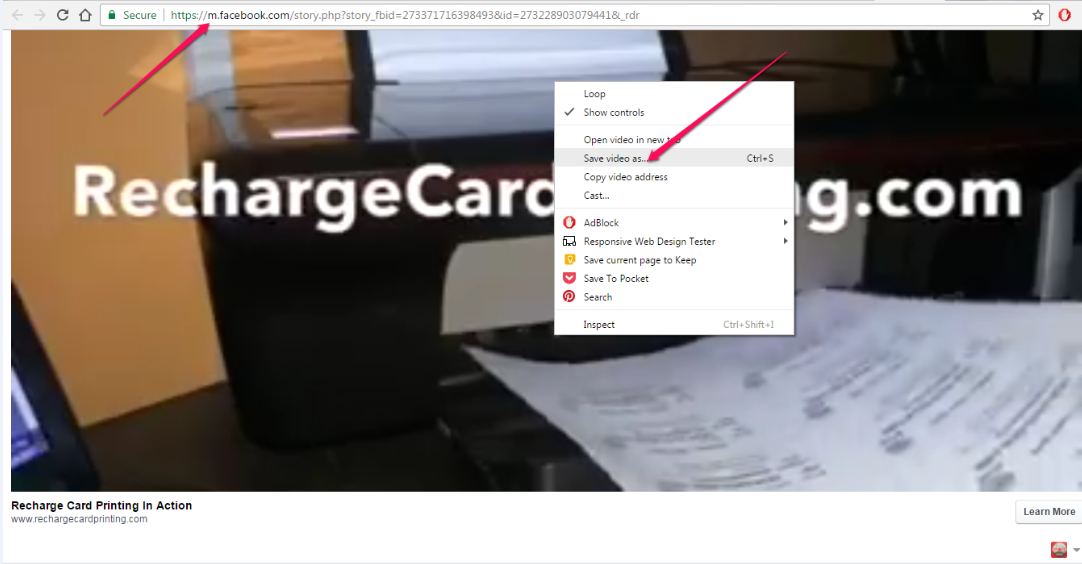
Now after you hit “Enter” on your keyboard, you will see the mobile view, which fills the whole screen, like this:
netdivorechargecardprintingsoftwarevideo

Now all you need to do is play the video, right click on it and choose the “Save video as” option as seen above.

You will then see the MP4 option. Choose a name for the file and save to your computer.

It’s that simple.

Method 2 

This will let you download Facebook video in HD i.e video quality remains intact.

Go to http://www.video-fb.com/

video fb

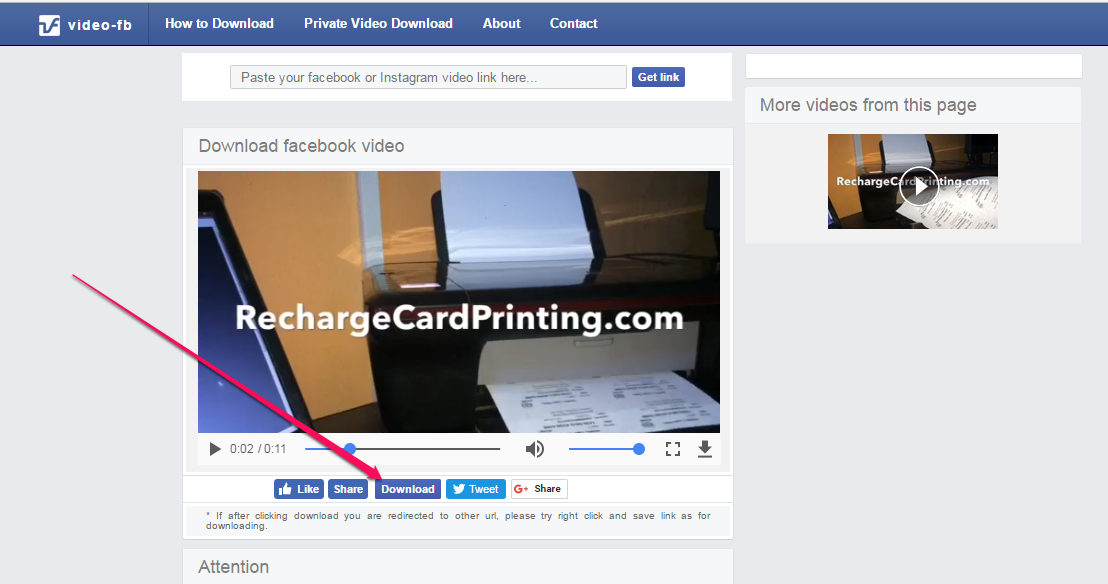
Paste your video URL in the box and click “Get Link”
fb video

Click “download’ and save the Facebook video to your PC

That’s all.

Please Share :
facebook

Like What You Read?

Sign Up to get similar articles delivered to your email inbox.

Leave a Reply Cancel reply

Your email address will not be published. Required fields are marked *

11 responses to “How I Download Videos From Facebook To PC Without Software”

  1. Blessing Noah Avatar
    Blessing Noah
    April 17, 2017

    That's lovely. So I can now download my favourite Facebook videos without a third-party software. Very informative post I must say. Thanks for sharing,

    Loading…
    Reply
  2. lawson james Avatar
    lawson james
    April 17, 2017

    Useful info. Thanks for sharing tihs on your Tech blog

    Loading…
    Reply
  3. Olabiyi Malik Avatar
    Olabiyi Malik
    April 17, 2017

    Nice One
    Commenting From
    Gurusfound

    Loading…
    Reply
  4. Adeyinka Falade Avatar
    Adeyinka Falade
    April 17, 2017

    Well i am certainly glad to have found another website to do my youtube downloading from. Thumbs up sir Jide!. Infobiz is where i do my thing.

    Loading…
    Reply
  5. Adesina James Olanrewaju Avatar
    Adesina James Olanrewaju
    April 17, 2017

    Thanks

    Loading…
    Reply
  6. nigerianscitizens Avatar
    nigerianscitizens
    April 17, 2017

    Very insightful

    Loading…
    Reply
  7. Marx Oduogu Avatar
    Marx Oduogu
    April 18, 2017

    What a wonderful Tutorial you have clearly stated here. Great You Sir!!! This is HOW TO LOG INTO YOUR FACEBOOK ACCOUNT WITHOUT SMS ALERT

    Loading…
    Reply
  8. Anyaogu Ikechukwu Joshua Avatar
    Anyaogu Ikechukwu Joshua
    April 19, 2017

    Thanks for sharing this. But how can you download it with your android phone?
    From That Gent Mark

    Loading…
    Reply
  9. CyracksInternetBiz Avatar
    CyracksInternetBiz
    April 21, 2017

    Thanks for this tips. Very useful to me.

    Loading…
    Reply
  10. Anonymous Avatar
    Anonymous
    June 17, 2017

    great

    Loading…
    Reply
  11. Gloria Chimezie Avatar
    Gloria Chimezie
    June 10, 2020

    Very nice post Mr. Jide. Although there are a lot of software for downloading videos these days.

    Loading…
    Reply

WANT TO ADVERTISE?

Chat on WhatsApp

RELATED POSTS

  • How To Download Facebook Videos Using Greasemonkey
  • How I Save Youtube Videos to My Computer
  • Simple Trick For Saving YouTube Video To Phones

FEATURED


  • CREDICORP launches C.L.I.C.K.D. Scheme with FG’s 3MTT Programme, expanding affordable consumer credit for locally-assembled laptops and devices for digital workers

    CREDICORP launches C.L.I.C.K.D. Scheme with FG’s 3MTT Programme, expanding affordable consumer credit for locally-assembled laptops and devices for digital workers

  • What Happens to Your Online Accounts When You Die?

    What Happens to Your Online Accounts When You Die?

JOIN AI WEB DESIGN GROUP


  • AI Website Design Training Whatsapp Group by Jidetheblogger

    AI Website Design Training Whatsapp Group by Jidetheblogger

← How To Upload Feedburner Emails List As Facebook Custom Audience
Sulvo Ad Network Lets You Monetize Your Blog With Sticky Ads →

Join 25,000+ subscribers

Receive our latest blog posts in your inbox.

Search

Social

Facebook

Instagram

Twitter

new ogbongeblog logo

Copyright © 2026 | About | Advertise | Featured | Sitemap | Privacy Policy | Powered by WordPress

Your cart (items: 0)

Products in cart

Product
Details
Total
Subtotal ₦0.00
Shipping and discounts calculated at checkout.
View my cart
Go to checkout

Your cart is currently empty!

Start shopping

Notifications

%d

    LIKE My Fan Page

    Privacy Policy | Copyright © 2012,OgbongeBlog.All Rights Reserved. Powered by Blogger .
    Create a Mobile Site
    View Site in Mobile | Classic
    Share by:


