


When visitors to your blog reach a non-existent page on your blog (because t hey’ve clicked on a broken link
, the page has been deleted
, or they’ve mistyped a URL
), they see a 404 Page
as Blogger returns a 404 ( Page Not Found
) error.
Confronted by a 404 page, they may then attempt to manually correct the URL, click the back button, or even navigate away from your blog. However, there are various ways to help your visitors get out of the dead-end situation, one of which is by creating a custom 404 Page
.
Yesterday, while trying to read about 404s and how they do (or do not) affect sites , I stumbled on a Webmaster Tools 404 widget that can be used in embedding a search box on custom 404 pages.
The widget simply helps your visitors find what they’re looking for by providing suggestions based on the incorrect URL. I tried it on my blog and works fine.
With the 404 widget added to my Blogger blog, if you try to access a non-existing page on my blog e.g www.ogbongeblog.com/facebook , you will see a search box with a site search query suggestion as seen in the screenshot below:
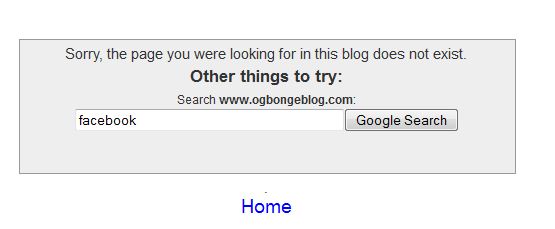
If you click the “ Google Search ” button, it will return search result pages with alternatives to the incorrect URL. You will definitely agree with me that this will make it easier for users to find the information they need (and makes it less likely that they’ll leave your blog to look elsewhere).
So, How Do I add Search Box To Blogger Custom 404 Page?
==> Log in to your Blogger dashboard
==> Go to Settings
> Search preferences
> Custom Page not Found
.
==> Click “ Edit
” to open the text box.
==> Copy and paste the highlighted text below: (Be sure to replace the URL https://www.ogbongeblog.com
with the URL of your blog).
Sorry, the page you were looking for in this blog does not exist.
<br>
<script type=”text/javascript”>
var GOOG_FIXURL_LANG = ‘en’;
var GOOG_FIXURL_SITE = ‘ https://www.ogbongeblog.com
‘
</script>
<script type=”text/javascript”
src=”http://linkhelp.clients.google.com/tbproxy/lh/wm/fixurl.js”>
</script>
</br>
<br>.
</br>
<br>.
</br>
==> Click Save Changes .
Try to visit a non-existing page on your blog and you should see the search box on your blog’s 404 page.
I hope it works for you.
Before this week runs out, I will try to share with you how I capture the intended traffic from dead links by redirecting misspelled URL to the correct URL . Subscribe to this blog if you don’t want to miss it.
Cheers!







Leave a Reply