


Google Chrome is a browser that is used by millions. It has so many functions that simplify life on the internet: viewing favorite web pages, creating PDF-pages with one click, built-in calculator, currency converter, business tools etc
Let us look at the most useful and convenient features.
Browsing through the passwords.
Each social media, every forum, and email require you to come up with a password, which should be very strong. It is easy to forget them. Instead of verifying the identity via SMS or a link to the mail, you can enter “chrome://settings/passwords“ in the address bar of chrome browser and click the “Show” button. After these actions, the built-in password manager displays all your accounts and passwords to them.
PDF with one click.
The PDF format not only takes up little space but also is also ideal for printing. If it is necessary to save any page in the browser in this format, just press Ctrl + P (for Windows) or Cmd + P (for IOS) and choose “Save as PDF” in the list of functions.
Notepad in the browser.
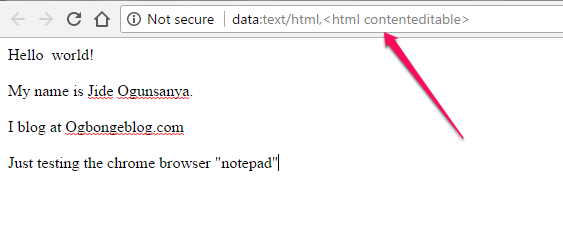
One of the chips of Google Chrome is a quick access to popular tools. Nevertheless, it is not always simple and obvious. For example, if you need to write something urgently, enter some simple character set, like “data:text/html,<html contenteditable>” in the address bar and you will open a tab that can be used as a notepad.
Mail from the address bar.
In order to send messages via Chrome, you do not have to open the mail. You do not need anything but to enter the “mailto: receiver@domain.com” in the address bar and create a new letter in the next window.
Hotkeys.
A modern user does not like to type and dig through the settings. Google Chrome has all the conditions to do it even less. Here you can specify a hotkey for any extension. Just enter in the address bar “chrome://extensions”. You can find the link “Quick keys” at the bottom of the list and do fun stuff to the full or, in other words, set the necessary extensions.
Gestures for navigation.
Many people learn VR helmets, but they are still familiar with a single gesture in the browser – “pull up the updating.” Meanwhile, in Google Chrome, you can safely navigate between tabs with swiping from right to left. Moreover, if you pull the address bar down, a list of tabs opens. Scaling the pages is even easier – make a double tap on the screen.
Smart search.
Google knows how to search, and it will be strange if it is not be used it in its browser. The “Quick Search” feature will help you find additional information with just one click of any of the words on the open web page. Moreover, at the bottom of the page there will be not just a panel with search results but also many links on request.
Another mechanism “Search and suggestions of URLs” offers quick answers and prompts for queries. For example, you can find out the depth of the Seine, the weather in the city or just find out the truth about Russian brides .
Sync of tabs.
It happens that you find some interesting information on the PC but you do not have enough time to read it and it is necessary to go to work. In Chrome, on Android devices, you can continue to view the tabs that were previously opened on your PC or a tablet. The function of saving tabs works automatically. The list of the last pages is displayed at the bottom of the page or in the browser menu. Naturally, you need to log into your Google account before this and turn the synchronization on.
Calculator and measurements converter.
Google Chrome can perform simple arithmetic operations right in the search bar. It is enough to enter the necessary calculations, and the browser will give the correct answer. It is easy to convert units of measure, using the same method. There is one “but”, it works only if Google is the default search engine.







Leave a Reply