
Skip to content
new ogbongeblog logo
  • Advertise
  • Blog
  • Contact

Google+: How To Mention People In Blogger Posts

December 20, 2012

·

Uncategorized
jidetheblogger Avatar
jidetheblogger

You can now add a link to a Google+ profile or page when you want to mention someone in a post on your Blogger blog. Google announced the new feature as a new way to grab someone’s attention from a Blogspot blog. If you share your post from Blogger to Google+ after mentioning someone, Google makes it easier to notify your mentions by including them in the sharebox.

So,  How Do I Mention Someone in My Posts?

==> Log in to your Blogger dashboard and click on “ New Post “

==> To mention someone, just type “ + ” before their name while you’re using the Blogger post editor.
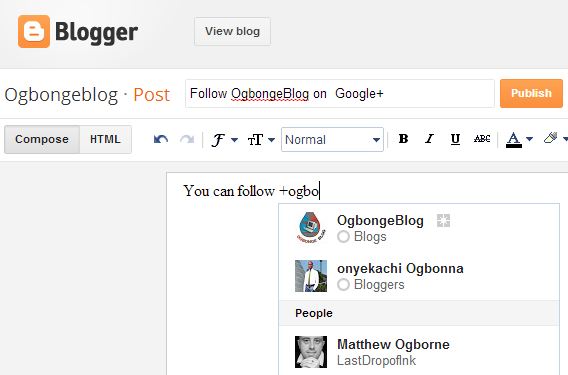
Google mention

==> The profile or page will show up as a link in your published post.

After you might have published the post , hovering over the link to the Google+ profile or page will show a card with more info and an ‘Add to circles’ button. Clicking the link takes you straight to the Google+ profile or page.

So, whether you want to credit a co-author (thanks +Adesoji Adegbulu   !) or me ( +Jide Ogunsanya   ), ask a question, or just kick off a conversation, connect your blog to Google+ and try mentioning someone in your next post!

Cool..huh? Please, let me hear from you.

You can read the Google+ User’s Guide here and follow +OgbongeBlog  .

Please Share :
blogger tips Google+

Like What You Read?

Sign Up to get similar articles delivered to your email inbox.

Leave a Reply Cancel reply

Your email address will not be published. Required fields are marked *

4 responses to “Google+: How To Mention People In Blogger Posts”

  1. Ismail Avatar
    Ismail
    December 20, 2012

    Another nice feature for Blogger blogs but how can I do it on a WordPress blog?

    Loading…
    Reply
    1. Jide Oguns Avatar
      Jide Oguns
      December 20, 2012

      You can give it a try if it will work.

      Loading…
      Reply
  2. mathew Avatar
    mathew
    December 21, 2012

    This is a nice one Jide. I saw this on Google Team site and was happy for this new development. It makes it much easier for bloggers on blogger platform to mention someone for quick action on conversation. Weldone.

    Loading…
    Reply
  3. collizo4sky Avatar
    collizo4sky
    December 28, 2012

    nice post sir. how i wish am on blogger.

    Loading…
    Reply

WANT TO ADVERTISE?

Chat on WhatsApp

RELATED POSTS

  • Google+Badge and +1 Button Now Available As Blogger GadgetsPicture f people showing in Google search results
  • Reasons Why You Can Choose Blogger as Blogging Platform
  • Google Plus One Counter added to New Blogger Dashboard

FEATURED


  • CREDICORP launches C.L.I.C.K.D. Scheme with FG’s 3MTT Programme, expanding affordable consumer credit for locally-assembled laptops and devices for digital workers

    CREDICORP launches C.L.I.C.K.D. Scheme with FG’s 3MTT Programme, expanding affordable consumer credit for locally-assembled laptops and devices for digital workers

  • What Happens to Your Online Accounts When You Die?

    What Happens to Your Online Accounts When You Die?

JOIN AI WEB DESIGN GROUP


  • AI Website Design Training Whatsapp Group by Jidetheblogger

    AI Website Design Training Whatsapp Group by Jidetheblogger

← BloggersLab Get-Together: Come and Meet Bloggers One-on-One
Blackberry Protect App Lets You Back Up, Secure and Track Stolen BB →

Join 25,000+ subscribers

Receive our latest blog posts in your inbox.

Search

Social

Facebook

Instagram

Twitter

new ogbongeblog logo

Copyright © 2026 | About | Advertise | Featured | Sitemap | Privacy Policy | Powered by WordPress

Your cart (items: 0)

Products in cart

Product
Details
Total
Subtotal ₦0.00
Shipping and discounts calculated at checkout.
View my cart
Go to checkout

Your cart is currently empty!

Start shopping

Notifications

%d

    LIKE My Fan Page

    Privacy Policy | Copyright © 2012,OgbongeBlog.All Rights Reserved. Powered by Blogger .
    Create a Mobile Site
    View Site in Mobile | Classic
    Share by:


