
Skip to content
new ogbongeblog logo
  • Advertise
  • Blog
  • Contact

How Apple Affiliates Generate Ad Banners

January 15, 2015

·

Uncategorized
jidetheblogger Avatar
jidetheblogger

Recently, I published a post about the Apple Affiliate Program . If you’ve applied and your application have been approved, then you need to start promoting Apple products for you to start earning commissions asap. So, in this post, I’ve decided to guide you on how Apple Affiliates generate ad banners to promote songs — as well as books, movies, TV shows, apps and more.

Apple Affiliate program offers a number of powerful tools to fully integrate store links and content into your blog. They include: Link Maker , auto Link Maker , Widget builder and Banner builder .  You can easily access them via the “Tools” tab once you sign in to your account.

If you want to generate ad banners of different sizes, then you need to use the Banner Builder tool . Banner Builder lets you generate banner art instantly for nearly all content on iTunes, the App Store, the iBookstore and the Mac App Store.

Below of a sample of what the 300×250 ad banner looks like:
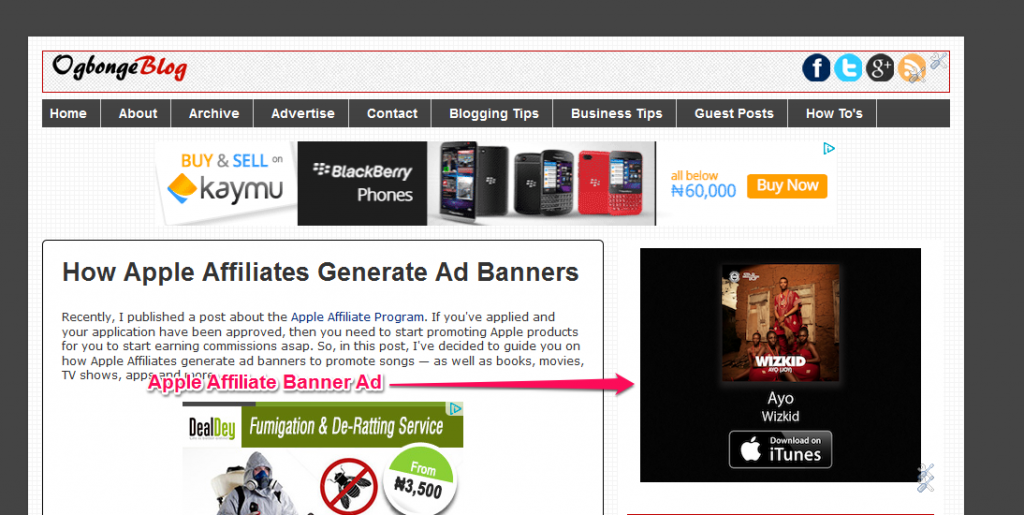
Apple Affiliate Banner ad 300x250

How To Use Apple Affiliate Banner Builder

==> Sign in to your Apple Affiliate account
==> Click on “Tools”
==> Click on “Banner Builder”

Now, lets assume you want to generate 300 x250 ad banner to promote Wizkid Album on your blog,
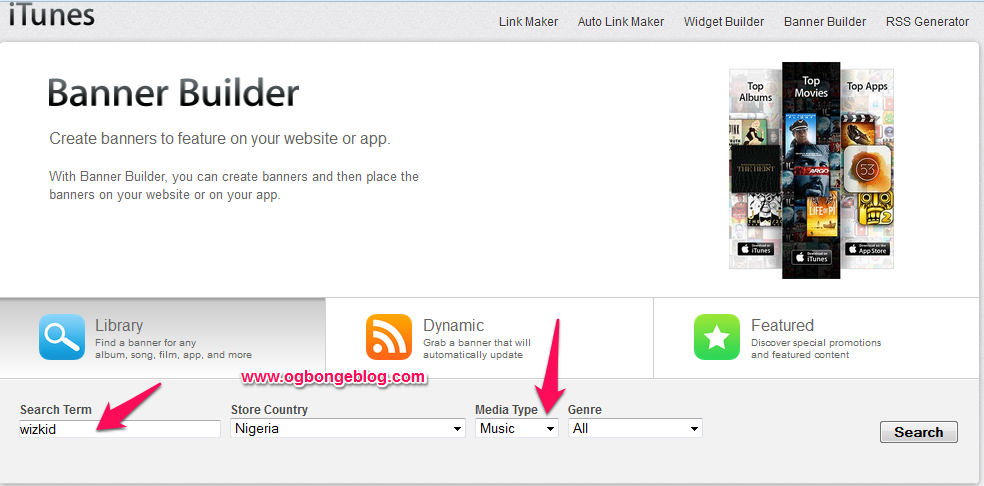
Apple Affiliate banner builder

==> Enter “wizkid” as search term
==> Select “music” from the “Media Type” drop down box==> Click “ Search ”

==> You should see Wizkid albums and songs available for you to promote

==> Click on the Music Album you want to promote eg WizKid – Ayo music album
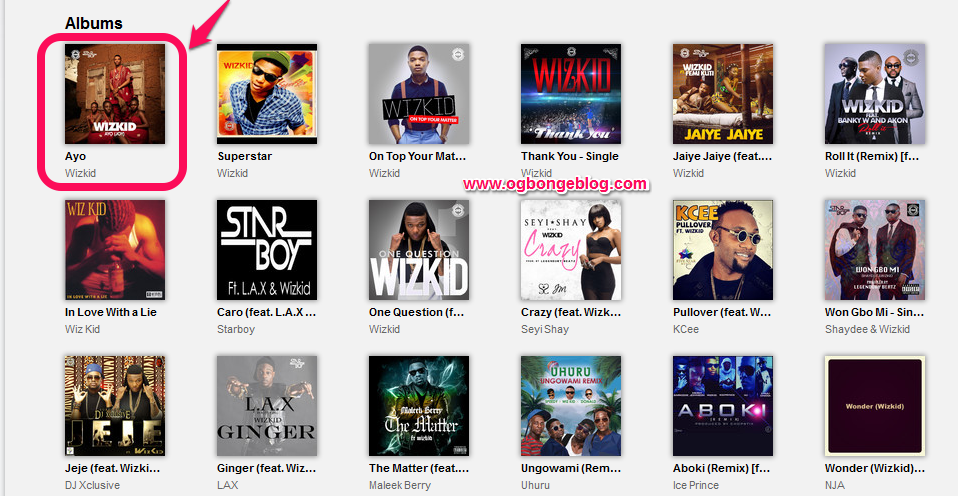
wizkid ayo album

==> A new page will open where you can select the ad banner size you want as highlighted in the screenshot below. You will also see the preview of the ad banner on the page.

generate Apple affiliate banner code

==> Copy the code and place the code on your blog.

==> If you are using Blogger, copy and paste it in HTML/Javascript gadget. If WordPress, copy and paste the code in a Text gadget.

That’s all.

I hope this helps.

NOTE : You can generate ad banners for nearly all content on iTunes, the App Store, the iBookstore and the Mac App Store. So, don’t limit yourself to promoting only music.

If you’ve got questions, relay them via comments.

Cheers!

Please Share :
affiliate marketing apple affiliate program

Like What You Read?

Sign Up to get similar articles delivered to your email inbox.

Leave a Reply Cancel reply

Your email address will not be published. Required fields are marked *

4 responses to “How Apple Affiliates Generate Ad Banners”

  1. James Avatar
    James
    January 15, 2015

    Nice one Oga Jide. God bless

    Loading…
    Reply
  2. Azeez jimoh Avatar
    Azeez jimoh
    January 17, 2015

    JIDE my readers keep telling me whenever the want to comment on my post it keeps redirecting them to Google sign in page and they don't have all that time so what do I do

    Loading…
    Reply
  3. Reginald Avatar
    Reginald
    February 17, 2015

    same problem

    Loading…
    Reply
  4. Akpene Jacob Avatar
    Akpene Jacob
    March 31, 2015

    Thank you very much, i am promoting Apple stuff on my blog now

    Loading…
    Reply

WANT TO ADVERTISE?

Chat on WhatsApp

RELATED POSTS

  • Jumia Affiliates Program Portal For Login and SignUp/Registrationjumia affiliates marketing portal for login registration in nigeria
  • Jumia Affiliate Program : How To Get Ads Banners and Affiliate Linksjumia affiliate program deeplink generator
  • Pixlr.com Editor: Create Banners and Edit Images Online

FEATURED


  • CREDICORP launches C.L.I.C.K.D. Scheme with FG’s 3MTT Programme, expanding affordable consumer credit for locally-assembled laptops and devices for digital workers

    CREDICORP launches C.L.I.C.K.D. Scheme with FG’s 3MTT Programme, expanding affordable consumer credit for locally-assembled laptops and devices for digital workers

  • What Happens to Your Online Accounts When You Die?

    What Happens to Your Online Accounts When You Die?

JOIN AI WEB DESIGN GROUP


  • AI Website Design Training Whatsapp Group by Jidetheblogger

    AI Website Design Training Whatsapp Group by Jidetheblogger

← Discover How To Make Huge Money From Mobile Marketing Services and Not Merely Bulk SMS
Finally Receives Konga Nigeria Affiliate Commissions In My Bank Account →

Join 25,000+ subscribers

Receive our latest blog posts in your inbox.

Search

Social

Facebook

Instagram

Twitter

new ogbongeblog logo

Copyright © 2026 | About | Advertise | Featured | Sitemap | Privacy Policy | Powered by WordPress

Your cart (items: 0)

Products in cart

Product
Details
Total
Subtotal ₦0.00
Shipping and discounts calculated at checkout.
View my cart
Go to checkout

Your cart is currently empty!

Start shopping

Notifications

%d

    LIKE My Fan Page

    Privacy Policy | Copyright © 2012,OgbongeBlog.All Rights Reserved. Powered by Blogger .
    Create a Mobile Site
    View Site in Mobile | Classic
    Share by:


