


One of my blog readers contacted me yesterday, asking me for where to buy a domain name
. After recommending some cheap domain name registrars
to him, he replied again asking me how he can buy domain name from the recommended sites. So, I decided to come up with this tutorial.
In this tutorial, I will be explaining how to buy a domain name at Namecheap.com
. Though, you can purchase your domain name elsewhere but I highly recommend Namecheap because of the great freebies you will get with your domain name which include free full dns management
, customized email address
etc
How To Get Started
I believe you already have a name you want to register and already have your credit card handy for payment. You can check out: “ free domain name generator ” if you need domain name suggestions and if you are a Nigerian, you can pay using GTB Naira Mastercard and Zenith Visa Prepaid Card . I have successfully used those cards at Namecheap.
==> Go to Namecheap website here and sign up for your account. Important !
==> Once you successfully sign up, log in to your account and click on “ Domains ” >> “ Register a domain “
==> You will see a form like the one in the screenshot below:
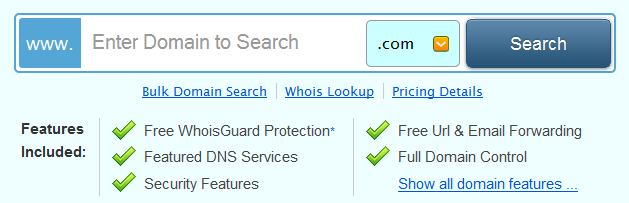
==> Enter your domain name (without “www” ) and click the search button
NOTE: You can click the drop down button beside the “.com” if you want .net, .org etc
==> You will see a new page, telling you if the domain name is available or not. If available, click the “ add to cart ” button
==> You should see a new page, displaying your shopping cart items and the total price. Right on this page, you can apply your Namecheap coupon code to get discount on your order.
==> To proceed, click on “ checkout “
==> You will see a new page asking you to enter registrant contact information . Fill the forms accordingly and click on “ Save and Continue “
==> A new page will come up, where you can make some changes to the settings of your domain name. Leave them as they are and click “ Save and continue “. You can modify the settings though.
==> You should now see the “payment options” page where you can choose to pay with your Namecheap funds , Paypal or credit card . Select your choice of payment and follow the instructions to complete your order.
==> If your payment is successful, Namecheap will let you know and you will receive an email confirmation.
==> Thereafter, you can always log in to your Namecheap account to manage your registered domain name.
That’s all.
NOTE
==> If you want to use it as custom domain for your Blogger blog, registering it this way will not make it work with your blog automatically . You will still have to make some DNS changes for it to work with your blogspot blog. I can do it for you as stated here .
==> You can check out : “ Where to Buy Domain Names with Naira and Liberty Reserve ” if you will prefer using your LR funds in buying your domain names.
I hope this helps.
Do you also use Namecheap to host your websites and for registering your domain names? Do you know other domain name registers where I can buy domain names online? Please, let me hear from you via comments.







Leave a Reply