
Skip to content
new ogbongeblog logo
  • Advertise
  • Blog
  • Contact

How I Added Related Posts Widget To Blogger Blog

  1. Home
  2. Blog
  3. Uncategorized
  4. How I Added Related Posts Widget To Blogger Blog
January 31, 2012

Written by

jidetheblogger Avatar
jidetheblogger

Last Modified :

October 8, 2017

Many readers of your blog will spend more time on our blog after reading a post, if they see more related posts. If you really want to increase the page views of your blog, then you must be showing related posts under each post on your blog. In this post, I am sharing with you, how I added a widget/plugin to my blog , which displays list of related posts below each post on my Blogger blog.

The related posts widget will show a new related posts section below your post. The related posts widget fetches the related posts from those posts having the same label as the current post .
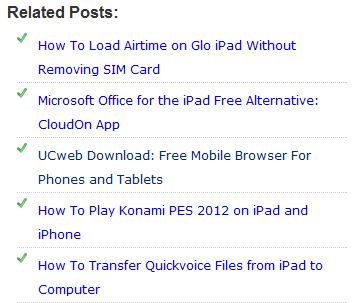
related posts widget for blogger

To add the related posts widget you will have to follow the steps below:.


==> Log in to your blogger dashboard
==> From there go to Layout > Edit HTML and tick the expand your widget templates box (option on the right). If you are using new Blogger dashboard , go to Template > Edit HTML
==> Click inside the HTML and use CTRL+ F to find  </head>

Right above </head> , paste the code below.

<!–Related Posts Scripts and Styles Start–>
<style>
#related-posts {
float : left;
width : 350px;
margin-top:20px;
margin-left : 5px;
margin-bottom:20px;
font : 11px Verdana;
margin-bottom:10px;
}
#related-posts .widget {
list-style-type : none;
margin : 5px 0 5px 0;
padding : 0;
}
#related-posts .widget h2, #related-posts h2 {
font-size : 20px;
font-weight : normal;
margin : 5px 7px 0;
padding : 0 0 5px;
}
#related-posts a {
text-decoration : none;
}
#related-posts a:hover {
text-decoration : none;
}
#related-posts ul {
border : medium none;
margin : 10px;
padding : 0;
}
#related-posts ul li {
display : block;
background : url(https://2.bp.blogspot.com/_u4gySN2ZgqE/SnZhv_C6bTI/AAAAAAAAAl4/Rozt7UhvgOo/s200/greentickbullet.png) no-repeat 0 0;
margin : 0;
padding-top : 0;
padding-right : 0;
padding-bottom : 1px;
padding-left : 21px;
margin-bottom : 5px;
line-height : 2em;
border-bottom:1px dotted #cccccc;
}
</style>

<script type=’text/javascript’>
//<![CDATA[
var relatedTitles = new Array();
var relatedTitlesNum = 0;
var relatedUrls = new Array();
function related_results_labels(json) {
for (var i = 0; i < json.feed.entry.length; i++) {
var entry = json.feed.entry[i];
relatedTitles[relatedTitlesNum] = entry.title.$t;
for (var k = 0; k < entry.link.length; k++) {
if (entry.link[k].rel == ‘alternate’) {
relatedUrls[relatedTitlesNum] = entry.link[k].href;
relatedTitlesNum++;
break;
}
}
}
}
function removeRelatedDuplicates() {
var tmp = new Array(0);
var tmp2 = new Array(0);
for(var i = 0; i < relatedUrls.length; i++) {
if(!contains(tmp, relatedUrls[i])) {
tmp.length += 1;
tmp[tmp.length – 1] = relatedUrls[i];
tmp2.length += 1;
tmp2[tmp2.length – 1] = relatedTitles[i];
}
}
relatedTitles = tmp2;
relatedUrls = tmp;
}
function contains(a, e) {
for(var j = 0; j < a.length; j++) if (a[j]==e) return true;
return false;
}
function printRelatedLabels() {
var r = Math.floor((relatedTitles.length – 1) * Math.random());
var i = 0;
document.write(‘<ul>’);
while (i < relatedTitles.length && i < 20) {
document.write(‘<li><a href=”‘ + relatedUrls[r] + ‘”>’ + relatedTitles[r] + ‘</a></li>’);
if (r < relatedTitles.length – 1) {
r++;
} else {
r = 0;
}
i++;
}
document.write(‘</ul>’);
document.write(‘<a href=”https://www.ogbongeblog.com/2012/01/how-i-added-related-posts-widget-to.html” target=”_blank” rel=”nofollow”><font size=”1″ color=”black”>[Get Related Posts Widget for Your Blog]</font></a>’);
}
//]]>

</script> 

<!–Related Posts Scripts and Styles End–>

Click on Save template

Now use CTRL+F to find this line of code

<div class=’post-footer-line post-footer-line-1′>
OR 
<p class=’post-footer-line post-footer-line-1′>

Now paste the code below immediately after any of these lines (whichever you could find): 

<!– Related Posts with Thumbnails Code Start–>
<b:if cond=’data:blog.pageType == &quot;item&quot;’>
<div id=’related-posts’>
<font face=’Arial’ size=’3′><b>Related Posts: </b></font><font color=’#FFFFFF’><b:loop values=’data:post.labels’ var=’label’><data:label.name/><b:if cond=’data:label.isLast != &quot;true&quot;’>,</b:if><b:if cond=’data:blog.pageType == &quot;item&quot;’>
<script expr:src=’&quot;/feeds/posts/default/-/&quot; + data:label.name + &quot;?alt=json-in-script&amp;callback=related_results_labels&amp;max-results=5&quot;’ type=’text/javascript’/></b:if></b:loop> </font>
<script type=’text/javascript’> removeRelatedDuplicates(); printRelatedLabels();
</script>
</div>
</b:if>
<!– Related Posts with Thumbnails Code End–>

Click on Save Template .

Now, go ahead to view one of your blog posts. You should see the Related posts below it.

Note : If you did not add a label (category) to a post, you might not see the related posts below it.

You can alter the CSS rules if you want to customize the look and feel

Feel free to share your recommendations or or questions via the comment form.

You can also check out:

“ How to Add Related Posts With Pictures Under Each Blogger Post “

How To Add Related Posts Widget To Blogger Mobile View

Cheers!

Please Share :
blogger tips

Like What You Read?

Sign Up to get similar articles delivered to your email inbox.

Leave a Reply Cancel reply

Your email address will not be published. Required fields are marked *

76 responses to “How I Added Related Posts Widget To Blogger Blog”

  1. globalwalyy Avatar
    globalwalyy
    January 31, 2012

    wao this is really lovely bro keep it up..thumbs up http://www.cashdove.com

    Loading…
    Reply
    1. Jide Oguns Avatar
      Jide Oguns
      January 31, 2012

      thanks for the comment bro. A great blog you have there. keep it up man.

      Loading…
      Reply
  2. Abdul Avatar
    Abdul
    February 1, 2012

    Thanks bro, great development for my blog.

    Loading…
    Reply
    1. Jide Oguns Avatar
      Jide Oguns
      February 5, 2012

      Thanks for your comment bro

      Loading…
      Reply
  3. Anonymous Avatar
    Anonymous
    February 1, 2012

    thank you and remain bless till we meet again.

    Loading…
    Reply
    1. Jide Oguns Avatar
      Jide Oguns
      February 5, 2012

      Stay blessed too

      Loading…
      Reply
  4. Lawrence Abiodun Avatar
    Lawrence Abiodun
    February 5, 2012

    Jaido! Jaido!
    The Midas Touch Blogger…I hope to become popular like you one day…
    Keep the works on bro!

    Loading…
    Reply
    1. Jide Oguns Avatar
      Jide Oguns
      February 5, 2012

      Thanks for your comment. I will keep trying my best bro..

      Loading…
      Reply
  5. Internet Investment Ideas Avatar
    Internet Investment Ideas
    July 3, 2012

    Thanks for sharing this info, but the one I implemented on my blog was gotten from Bloggersentral.Your blog seems to be putting on new looks in recent times.

    Loading…
    Reply
    1. Jide Oguns Avatar
      Jide Oguns
      July 4, 2012

      yes, trying to optimize it

      Loading…
      Reply
  6. Ajayi Kayode Avatar
    Ajayi Kayode
    July 30, 2012

    tanks

    nasvetkay.blogspot.com

    Loading…
    Reply
  7. Gabriel Avatar
    Gabriel
    December 11, 2012

    I think i am gonna prefer this to Linkwithin on my blog. thanks bro. you are the best. http://www.dailyhealthylifestyletips.com

    Loading…
    Reply
  8. Prince Avatar
    Prince
    January 17, 2013

    Wao. Jst did it @ http://www.mgmcash.com/blog

    Loading…
    Reply
  9. cor techclub Avatar
    cor techclub
    January 23, 2013

    Thank u.

    Loading…
    Reply
  10. Innocent Avatar
    Innocent
    February 25, 2013

    I have retry it and is now fully showing. Thanks so much for this guide

    Loading…
    Reply
  11. oke umurhohwo Avatar
    oke umurhohwo
    March 24, 2013

    I have done everything according on http://www.stalyfblog.com but its still not working. please what can be the problem?

    Loading…
    Reply
    1. Nicholas Hon Avatar
      Nicholas Hon
      June 9, 2013

      1.Search for this line in your template
      div class='post-footer'
      2.Paste the second code before this line. Most templates have 2 of this code(div class='post-footer') so if you try in the first one and it does not work try the second one. I had thesame problem but it works now on my blog http://www.baba2023.com
      Let me know if it works

      Loading…
      Reply
    2. Riwo Adhuze Avatar
      Riwo Adhuze
      May 31, 2015

      Thanks Nicholas Hon, your suggestion worked for me after battling for some days with the same issue Oke Uumurhohwo posted.

      Loading…
      Reply
  12. blessing Avatar
    blessing
    July 11, 2013

    I like this related post widget, i embedded it on my blog and makes some modification to my standard. you can check it here . thank you ogbongeblog

    Loading…
    Reply
  13. Antonio Omeihe Avatar
    Antonio Omeihe
    August 28, 2013

    Hi Jide. How did you make it show on your Mobile View Too? Thanks.

    Loading…
    Reply
    1. Jide Oguns Avatar
      Jide Oguns
      August 30, 2013

      Read : how to make related posts show on blogger mobile view

      Loading…
      Reply
  14. afripoint Avatar
    afripoint
    August 30, 2013

    thanks

    Loading…
    Reply
  15. omas kay Avatar
    omas kay
    September 20, 2013

    hello mr jide good work, am trying to use it on my blog is not work, and i have created categories lebels, pls help me

    Loading…
    Reply
  16. Adoga Godwin Avatar
    Adoga Godwin
    September 30, 2013

    Great information Jide. I have tried it and have seen that it worked perfectly well on the custom mobile template. However I am very keen to know how to costumize the default mobile version of my blogger blog. For example, the default mobile version of this blog(ogbongeblog) shows ads, related posts and many other valuable widgets. I have faith that you will reveal this mystery to me and those intrested.

    Sincerely, Adoga | TIPCYCLOPEDIA

    Loading…
    Reply
  17. Emmanuel Ozigi Avatar
    Emmanuel Ozigi
    October 12, 2013

    Hmm… Don't know what the problem is but it didn't work for me.

    Loading…
    Reply
  18. Monsur Bakare Avatar
    Monsur Bakare
    December 2, 2013

    i dunno what i'm doing wrong but its still not working on my blog

    Loading…
    Reply
  19. Chima Godson Avatar
    Chima Godson
    December 4, 2013

    is not working on my blog.

    Loading…
    Reply
  20. akpa chigozie Avatar
    akpa chigozie
    December 10, 2013

    i cant find my post footer any more,my template has scatered while trying to apply this method,any help

    Loading…
    Reply
  21. Aniekeme Adolf Umoh Avatar
    Aniekeme Adolf Umoh
    March 3, 2014

    am not cin d code 4 d 2nd 1 pls help wit screen shot

    Loading…
    Reply
  22. Kaysy Amadi Avatar
    Kaysy Amadi
    March 11, 2014

    Thanks Sir Jide… Nice Lesson

    Loading…
    Reply
  23. Pretty Happiness Avatar
    Pretty Happiness
    April 15, 2014

    i did exactly what u said but it doesn't work on my blog

    Loading…
    Reply
    1. Jide Oguns Avatar
      Jide Oguns
      April 29, 2014

      Guess you missed some steps or placed the code in the wrong location

      Loading…
      Reply
  24. Ibrahim Morowa Avatar
    Ibrahim Morowa
    June 11, 2014

    Hi…nice tutorial, i have implemented this on my blog bt i have discovered that the widget is not responsive to the mobile custom template.

    Can u enlighten us on how to make it responsive on every device coz i've been trying some tricks bt still havent come with solution.
    my blog http://bkuhabari.blogspot.com?m=1

    Loading…
    Reply
    1. Jide Oguns Avatar
      Jide Oguns
      June 12, 2014

      change the size of the width in the code above to something smaller.

      Loading…
      Reply
  25. Akuneme Christopher Avatar
    Akuneme Christopher
    June 18, 2014

    Thanks a lot bro, it finally worked

    Loading…
    Reply
  26. Funmy Kemmy Avatar
    Funmy Kemmy
    July 1, 2014

    It is not working on mine Oga Jide. What else can I do? I don't mind if you can assist me to put it at your free period. Thanks.

    Loading…
    Reply
  27. NaijaGroove Avatar
    NaijaGroove
    July 6, 2014

    So So Kul..thanx 4 dis bro

    Loading…
    Reply
  28. Beauty Geek Avatar
    Beauty Geek
    September 14, 2014

    Hello, This is not working for me and I think its because I have another related post widget with pictures. What do I do?

    Loading…
    Reply
  29. Farouk Ahmad Avatar
    Farouk Ahmad
    February 22, 2015

    Great thanks alot i follow d step, is now showing related post @ ufarblog.com

    Loading…
    Reply
    1. Jide Oguns Avatar
      Jide Oguns
      September 13, 2015

      Glad it worked for you

      Loading…
      Reply
  30. Egbo Ekene Avatar
    Egbo Ekene
    March 19, 2015

    please I added it but it only works on mobile view of the blog, I am using a custom template though

    Loading…
    Reply
  31. Omoniyi Kabir Avatar
    Omoniyi Kabir
    March 25, 2015

    i cant find the second code in my template pls wat should i do

    Loading…
    Reply
    1. Jide Oguns Avatar
      Jide Oguns
      September 13, 2015

      Reason I recommend Blogger default templates…

      Loading…
      Reply
  32. Rexzzy barry Avatar
    Rexzzy barry
    May 19, 2015

    sir pls i placed the code on my awesome blogger template, it showed on mobile view but didnt show up on pc view…. thanks as i ernestly await your reply.

    Loading…
    Reply
    1. Jide Oguns Avatar
      Jide Oguns
      September 13, 2015

      Read the post all over again bro.

      Loading…
      Reply
  33. Osundare Toheeb Avatar
    Osundare Toheeb
    September 12, 2015

    is not working ooo. unischolars.blogspot.com

    Loading…
    Reply
    1. Jide Oguns Avatar
      Jide Oguns
      September 13, 2015

      Probably you didn't get something right. Working perfectly bro.

      Loading…
      Reply
    2. Osundare Toheeb Avatar
      Osundare Toheeb
      September 16, 2015

      oh!!! i've discovered the fault, i searched what you pasted but it doesnt work, so i scrolled down and found something like that. so i saw something related, the <span….. which is below the first one is together with the code you pasted. So I did what you pasted again and it works. maybe that happen because im using the new blogger interface. im so glad! thanks!! and more grease to your elbow. i hope this will rectify those that didnt get it done.

      Loading…
      Reply
  34. Chimezie Peters Ozofor Avatar
    Chimezie Peters Ozofor
    December 5, 2015

    Done everything it's only showing on my mobile view but not showing on my PC view, please solution to this, I took my time to read it over and over still can't find how to make it show on my PC view

    Loading…
    Reply
    1. Gift Amadi Avatar
      Gift Amadi
      July 23, 2016

      It didn't appear on desktop view because you placed the code on mobile view post footer thats why. So just look for the desktop view post footer apply the thumbnail code. It should be below the first post footer 1.

      Loading…
      Reply
  35. Paul Damy Avatar
    Paul Damy
    January 20, 2016

    wow this is a great post thanks for this info.. also check DAMYTECHS blog

    Loading…
    Reply
  36. Aborisade Glory Avatar
    Aborisade Glory
    February 10, 2016

    this is so great bro. it works out for my blog. http://www.globalsquad.blogspot.com

    Loading…
    Reply
  37. MN Islam Avatar
    MN Islam
    February 16, 2016

    Great work bro

    Loading…
    Reply
  38. Imo Chinweizu Avatar
    Imo Chinweizu
    March 15, 2016

    nice…imocheezy.com

    Loading…
    Reply
  39. PRINCE JONZY Avatar
    PRINCE JONZY
    March 20, 2016

    Thanks bro

    Loading…
    Reply
  40. Admin Avatar
    Admin
    April 26, 2016

    Keep it up bro jide, visit my blog http://www.nwa9ja.blogspot.com

    Loading…
    Reply
  41. Anonymous Avatar
    Anonymous
    May 29, 2016

    I swear to God Mr Hide you are good…….. Your blog have helped my blogging life…..gisttrends.com

    Loading…
    Reply
  42. ABODE Avatar
    ABODE
    June 20, 2016

    thanks, its working perfectly.

    Loading…
    Reply
  43. Yahaya Bagudu Avatar
    Yahaya Bagudu
    July 13, 2016

    Thanks Oga Jide works perfectly… http://WWW.POP9JA.COM

    Loading…
    Reply
  44. Imo Chinweizu Avatar
    Imo Chinweizu
    August 11, 2016

    Wow, worked for me

    Commenting from vibertechs.com

    Loading…
    Reply
  45. swello gella Avatar
    swello gella
    October 25, 2016

    wow thanks bro..i got it done.. rufgist.com

    Loading…
    Reply
  46. Chidiebere Scofield Avatar
    Chidiebere Scofield
    November 2, 2016

    This is nice

    me too I have a problem

    Google isn't' crawling my WordPress blog : http://generalbaze.com.ng

    what will I do about it

    Loading…
    Reply
  47. Mtalula Mohamed Avatar
    Mtalula Mohamed
    December 26, 2016

    Hello sir thanks very much for this tip. Sorry i use weebly, how can i benefit from this widget? Please help me, any one there.This is my blog: mogriculture.weebly.com

    Loading…
    Reply
  48. Godson Obiazi Avatar
    Godson Obiazi
    January 31, 2017

    my related post max result is displaying more than 5, how can I fix this?

    Loading…
    Reply
  49. Uzoije Reward Avatar
    Uzoije Reward
    February 28, 2017

    my is only showing double on mobile view, its not showing on desktop view ,please why?

    Loading…
    Reply
  50. Johnpaul Onwueme Avatar
    Johnpaul Onwueme
    March 21, 2017

    This is cool

    Loading…
    Reply
  51. BusinessFirstFamily.com Avatar
    BusinessFirstFamily.com
    May 6, 2017

    You guys have a great tech blog. I was working on trying to implement related posts to get more traffic. This tutorial is very helpful to get the widget working. Thank you for the help.

    Loading…
    Reply
  52. idunuola Avatar
    idunuola
    June 4, 2017

    good evening sir…my bloggr new template is not saving HTML,,,anytime i change something …its not saving…

    Loading…
    Reply
  53. Yusuf Bitrus Avatar
    Yusuf Bitrus
    July 20, 2017

    I will just give it a try and see how it's going to be…but it's a great tutorial there.. commenting from zethag.com

    Loading…
    Reply
  54. Ola Geek Avatar
    Ola Geek
    September 2, 2017

    Wow, Thank you for sharing this… commenting from ZumaTech

    Loading…
    Reply
  55. FreedyGist Avatar
    FreedyGist
    December 12, 2017

    great work.. man…can i be ur friend??

    Loading…
    Reply
  56. kasedope Avatar
    kasedope
    January 28, 2018

    thanks man, working for http://www.kokowap24.com.ng

    Loading…
    Reply
  57. Deji Avatar
    Deji
    March 13, 2018

    First of all, great work you’re doing, Jide. However, I’ve tried to implement your codes and other codes especially concerning RELATED POST WIDGET, MAKING POST APPEARED SIDE BY SIDE ON MY BLOG DESKTOP AND CUSTOMIZED SHARE SOCIAL BUTTONS but to date none seems to work which could be because I’m not that coding savvy. Nevertheless I’m not giving up untill I get those three things implemented on my blog: My question is how can you be of help to get those things done personally or by referrals and at what cost? Thanks!

    Loading…
    Reply
  58. BloggingGuru Avatar
    BloggingGuru
    August 24, 2018

    Thanks bro, it works very well in my blog. https://blogtip360.blogspot.com

    Loading…
    Reply
  59. Rhoda Amapakabo Avatar
    Rhoda Amapakabo
    May 21, 2019

    Hello,I tried you process but it did not come out fine instead those words are appearing on my header when someone views my blog. How do I delete it please?

    Secondly,

    Couldn’t find the second code on my html page

    Loading…
    Reply
  60. Iee Avatar
    Iee
    March 11, 2020

    Hello,I succeeded in putting the first part into the script, but the second part failed.

    Loading…
    Reply

WANT TO ADVERTISE?

Chat on WhatsApp

RELATED POSTS

  • LinkWithin Related Posts Widget Set Up Guide for Blogspot Blogs
  • How To Put Related Posts In Blogger Posts: UpdateRELATED POSTS BLOGGER
  • How To Make Related Posts To Show On Blogger Mobile View

FEATURED


  • How to Pay Chinese Suppliers in RMB (Alipay & WeChat Pay) or Swap Naira, Kenyan Shillings, Ghana Cedis & USDT in Minutes

    How to Pay Chinese Suppliers in RMB (Alipay & WeChat Pay) or Swap Naira, Kenyan Shillings, Ghana Cedis & USDT in Minutes

JOIN AI WEB DESIGN GROUP


  • AI Website Design Training Whatsapp Group by Jidetheblogger

    AI Website Design Training Whatsapp Group by Jidetheblogger

RANDOM POSTS


    I Got One Free Month of Meta Verified After I Tried to Cancel My Subscription


    How To Make Money On Bamboo App: 5 Proven Ways


    How To Use Vibe Coding To Make Money


    How I Earn $100 Per Referral from Affiliate Marketing


    Bluetooth Printer That Connects To Phone


    Can I Use OPay Card for Facebook Ads?


    Why I Moved My Websites From Namecheap To Interserver.net


    How I Earn $50 Per Sale


MORE RANDOM POSTS
← Sharemobile.ro: Download Java, Symbian Applications and Games
Get a Valentine Hamper (Chocolate Cake, Chocolate Bars, Red Rose Bottle of Wine) →

Join 25,000+ subscribers

Receive our latest blog posts in your inbox.

Search

Social

Facebook

Instagram

Twitter

new ogbongeblog logo

Copyright © 2026 | About | Advertise | Featured | Sitemap | Privacy Policy | Powered by WordPress

Your cart (items: 0)

Products in cart

Product
Details
Total
Subtotal ₦0.00
Shipping and discounts calculated at checkout.
View cart
Go to checkout

Your shopping cart is empty

Return to shop

Notifications

%d

    LIKE My Fan Page

    Privacy Policy | Copyright © 2012,OgbongeBlog.All Rights Reserved. Powered by Blogger .
    Create a Mobile Site
    View Site in Mobile | Classic
    Share by: