
Skip to content
new ogbongeblog logo
  • Advertise
  • Blog
  • Contact

How I Make Windows PC Starts Directly Without Multiboot Option

  1. Home
  2. Blog
  3. Uncategorized
  4. How I Make Windows PC Starts Directly Without Multiboot Option
September 28, 2013

Written by

jidetheblogger Avatar
jidetheblogger

Last Modified :

October 8, 2017

Few days back, I gave out my HP 2140 Mini-Notebook PC to a friend to help me format it and load Windows 7 on it using his External DVD drive. On getting it back from him yesterday, I noticed he installed Windows 7 on the HD and Windows XP on a different partition, creating a Dual Boot.

On StartUp, it showed two OS options (Windows 7 and XP) to boot into and I have to select windows 7 to get started. Not satisfied with this, I decided to google how I can remove XP from dual boot and still be able to boot Windows 7.

Unfortunately, the guides I saw were so complex that I decided to just disable the multiboot option from showing up when Windows starts. This lets the PC boots directly with Win 7 although, the Windows XP still remains on the PC.

To make your PC boot directly With Windows 7 without prompting for boot screen,

==> Go to Control Panel
==> Click on “System” > Advanced System Settings (On left tab)
==> Select the “Advanced” tab and click Settings in “Startup and Recovery”
==> Select “Windows 7” as default operating system and Uncheck “Time to display list of Operating systems”
==> Select OK.
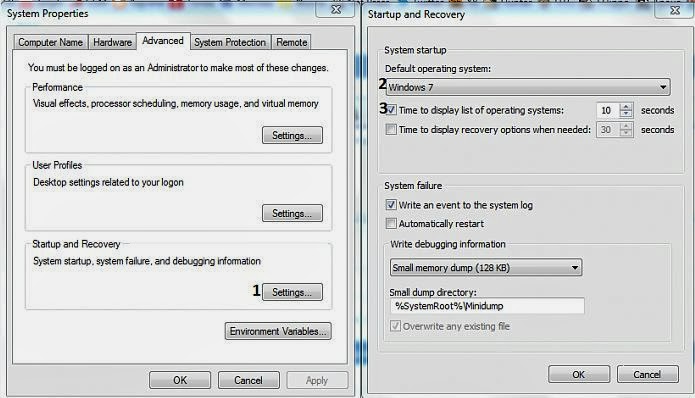
windows dual boot screenshot

That’s all.

Anytime you start your Windows PC, you will no longer see the dual boot option.

Since I have a fresh install of both OS on my netbook, I will erase it all and start over so I can have one OS on it.

If you won’t like to start all over, you can read how to remove the older version and just use Windows 7 or how to Uninstall Windows 7 on a multiboot system . You can also read more about having more than one operating system on a computer .

I hope this helps.

Please Share :
PC tips

Like What You Read?

Sign Up to get similar articles delivered to your email inbox.

Leave a Reply Cancel reply

Your email address will not be published. Required fields are marked *

2 responses to “How I Make Windows PC Starts Directly Without Multiboot Option”

  1. Mark Avatar
    Mark
    September 28, 2013

    Nice share but why do you still want to remove the XP from your PC? Any harm if you leave it on it with the Win 7?

    Loading…
    Reply
    1. Jide Oguns Avatar
      Jide Oguns
      September 29, 2013

      No harm. I only need the space occupied by the XP.

      Loading…
      Reply

WANT TO ADVERTISE?

Chat on WhatsApp

RELATED POSTS

  • Prevent virus attack by turning off Autoplay
  • Where Can I Find the Serial Number and Product Number of HP Laptop?
  • You Don’t Have Enough Privileges To Configure Internet Connection Sharing Error on Windows 7 Starter : The Solution

FEATURED


  • How to Pay Chinese Suppliers in RMB (Alipay & WeChat Pay) or Swap Naira, Kenyan Shillings, Ghana Cedis & USDT in Minutes

    How to Pay Chinese Suppliers in RMB (Alipay & WeChat Pay) or Swap Naira, Kenyan Shillings, Ghana Cedis & USDT in Minutes

JOIN AI WEB DESIGN GROUP


  • AI Website Design Training Whatsapp Group by Jidetheblogger

    AI Website Design Training Whatsapp Group by Jidetheblogger

RANDOM POSTS


    I Got One Free Month of Meta Verified After I Tried to Cancel My Subscription


    How To Make Money On Bamboo App: 5 Proven Ways


    How To Use Vibe Coding To Make Money


    How I Earn $100 Per Referral from Affiliate Marketing


    Bluetooth Printer That Connects To Phone


    Can I Use OPay Card for Facebook Ads?


    Why I Moved My Websites From Namecheap To Interserver.net


    How I Earn $50 Per Sale


MORE RANDOM POSTS
← Using Gmail Canned Responses and Filters To Reply Mails Automatically
AVG for Windows 8 Free Download →

Join 25,000+ subscribers

Receive our latest blog posts in your inbox.

Search

Social

Facebook

Instagram

Twitter

new ogbongeblog logo

Copyright © 2026 | About | Advertise | Featured | Sitemap | Privacy Policy | Powered by WordPress

Your cart (items: 0)

Products in cart

Product
Details
Total
Subtotal ₦0.00
Shipping and discounts calculated at checkout.
View cart
Go to checkout

Your shopping cart is empty

Return to shop

Notifications

%d

    LIKE My Fan Page

    Privacy Policy | Copyright © 2012,OgbongeBlog.All Rights Reserved. Powered by Blogger .
    Create a Mobile Site
    View Site in Mobile | Classic
    Share by: