
Skip to content
new ogbongeblog logo
  • Advertise
  • Blog
  • Contact

How I Schedule Posts in Blogger Blog

April 5, 2012

·

Uncategorized
jidetheblogger Avatar
jidetheblogger

Posts Scheduling helps me alot in keeping my blog updated with fresh content while busy at work and doing other things offline. If I won’t be on the computer to make a post on a certain date or going for holiday at a place where I might not be able to access the internet, scheduled post publishing helps me out.  In this post, I am sharing with you, how to schedule posts on Blogspot/Blogger blogs .

If you schedule post, it’ll be automatically published to your blog on the date and time that has been specified for it to be published to your blog. All you need to do is make sure to compose enough posts when you have the time and schedule each and everyone one of them to be published automatically to your blog at a certain future date and time.

Scheduling time a post should be a published is easy to do on a Blogger blog via the POST EDITOR: Under “Post Settings” on the right-hand side, just click on Schedule as seen in the picture below:
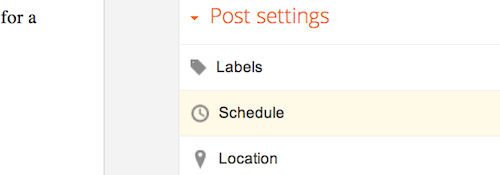
The Schedule option under Post Settings

If you select  Set date and time , you can choose a date and time on a calendar for your post to be automatically published.

Time scheduling blogger


Once you’ve selected a new date and time, be sure to click Done , then  Publish. Don’t worry — your post will only publish at the date and time that you’ve determined in the settings.

NOTE : Blogger don’t re-schedule posts that are already published . If you schedule a post that has already been published,it  will stay on your blog but sort to the very top.


Source: Blogger Help
Please Share :
blogger tips

Like What You Read?

Sign Up to get similar articles delivered to your email inbox.

Leave a Reply Cancel reply

Your email address will not be published. Required fields are marked *

5 responses to “How I Schedule Posts in Blogger Blog”

  1. Shawn Avatar
    Shawn
    April 5, 2012

    Quite helpful. Have not been aware of this. Thanks alot for the tip.

    Loading…
    Reply
  2. solomon Avatar
    solomon
    April 5, 2012

    this really is an eye opener. i have not been aware of this. thanks a lot for sharing. http://www.loseweighthealthytips.blogspot.com

    Loading…
    Reply
  3. Engr Abdul Avatar
    Engr Abdul
    April 10, 2012

    This would help me alot when exams approaches, thanks for this information

    Loading…
    Reply
  4. ganjar Avatar
    ganjar
    November 11, 2012

    Can u tell me please how to add bulk post with schedule date on blogspot? i have many article in .txt format,,

    thanks

    Loading…
    Reply
    1. Jide Oguns Avatar
      Jide Oguns
      November 11, 2012

      I don't know how you can do that on Blogger

      Loading…
      Reply

WANT TO ADVERTISE?

Chat on WhatsApp

RELATED POSTS

  • How To Start Blogging With Mobile Phones
  • Import Blog Posts To Facebook Notes for Free Traffic
  • Windows Live Writer : Free Blogging Tool for Blogger, WordPress, Typepad etcwindows live writer

FEATURED


  • CREDICORP launches C.L.I.C.K.D. Scheme with FG’s 3MTT Programme, expanding affordable consumer credit for locally-assembled laptops and devices for digital workers

    CREDICORP launches C.L.I.C.K.D. Scheme with FG’s 3MTT Programme, expanding affordable consumer credit for locally-assembled laptops and devices for digital workers

  • What Happens to Your Online Accounts When You Die?

    What Happens to Your Online Accounts When You Die?

JOIN AI WEB DESIGN GROUP


  • AI Website Design Training Whatsapp Group by Jidetheblogger

    AI Website Design Training Whatsapp Group by Jidetheblogger

← Glo Latest Promo: Recharge and Get Free Airtime, Data and SMS
What is MTN Pulse? →

Join 25,000+ subscribers

Receive our latest blog posts in your inbox.

Search

Social

Facebook

Instagram

Twitter

new ogbongeblog logo

Copyright © 2026 | About | Advertise | Featured | Sitemap | Privacy Policy | Powered by WordPress

Your cart (items: 0)

Products in cart

Product
Details
Total
Subtotal ₦0.00
Shipping and discounts calculated at checkout.
View my cart
Go to checkout

Your cart is currently empty!

Start shopping

Notifications

%d

    LIKE My Fan Page

    Privacy Policy | Copyright © 2012,OgbongeBlog.All Rights Reserved. Powered by Blogger .
    Create a Mobile Site
    View Site in Mobile | Classic
    Share by:


