
Skip to content
new ogbongeblog logo
  • Advertise
  • Blog
  • Contact

How I Transfer Videos To My iPad from My Computer

March 25, 2013

·

Uncategorized
jidetheblogger Avatar
jidetheblogger

The Apple iPad is an excellent tablet that is so amazing for watching movies. However, the video formats supported by the iPad are relatively limited. I easily copy movies from my computer to my iPad with ease using iTunes + a video converter, the same way you can transfer videos to iPhone from PC.

If you have an iPad, you cannot use bluetooth to transfer, photos, music and videos from your computer to the iPad. To copy videos from your computer to your iPad 1, iPad 2 , iPad 3 or the iPad Mini , you will have to go through some processes which I am sharing with you in this post.

Requirements

==> Computer with iTunes installed on it

==> Freemake Video Converter

You can download Freemake converter here and download iTunes here .

Not all videos are compatible with iPad, hence you have to make sure the video you want to copy from your computer to your iPad is in a format compatible with the iPad (mp4). If you are not sure of the format of the video, then you will need to use the freemake video converter to convert it to the Apple supported format.

How To Convert Videos to iPad Compatible Format

==> Launch the Freemake Video converter

==> Click the “ +Video ” button and add a video from your computer

==> Click the “ to Apple ” icon

==> Select “ iPad ” from the preset list

==> Select where you want to save it to on your PC eg desktop

==> Tick “ Export to iTunes “

==> Click “ Convert ” to get video in MP4 format that is supported by Apple iPad
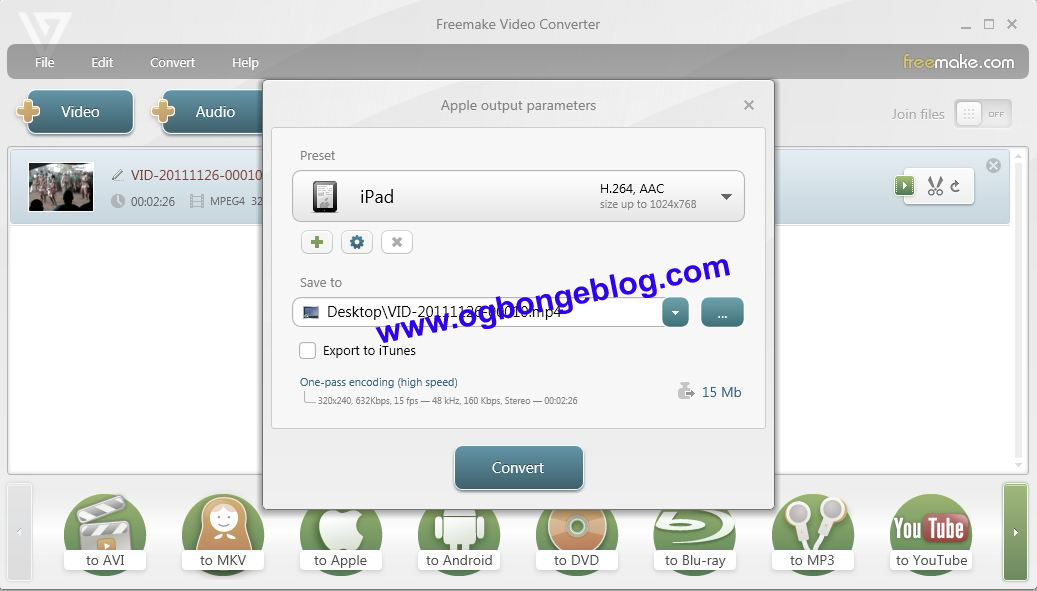
videoconverter for ipad

What next?

==> Launch the iTunes software on your computer

==> Click on the “ Films ” tab to ensure the converted video is in the list of the videos in the iTunes library

==> If you can’t find the converted video in the iTunes “films” library, click on “ File ” > “ Add File to Library ” to import the converted video from your computer to the iTunes library.

==> Now, plug in your iPad to the computer

==> Wait till the iTunes detects your iPad

==> Once detected, click on your iPad icon

==> Click on the “ Films ” tab

==> Tick “Sync films”

==> Tick “Automatically include all films”

MyiPad films library

==> Click the “ Sync ” button and wait for the process to be completed.

Once completed, you can unplug your iPad, tap the video app icon on your iPad and enjoy your video.

That’s all.

I hope this helps.

Do you know other free video converters for Apple iPad, iPhone?

Have contributions or questions to ask? Feel free to relay them via comments.

Cheers!

Please Share :
ipad tutorials

Like What You Read?

Sign Up to get similar articles delivered to your email inbox.

Leave a Reply Cancel reply

Your email address will not be published. Required fields are marked *

8 responses to “How I Transfer Videos To My iPad from My Computer”

  1. Franklin Avatar
    Franklin
    March 24, 2013

    Thanks alot Jide. You are a genius but is it possible to transfer selected films from the iTunes library and not all the films?

    Loading…
    Reply
  2. Anonymous Avatar
    Anonymous
    March 24, 2013

    please, can I also use this trick to transfer movies from my computer to my iPhone 4s?

    Loading…
    Reply
  3. Ibrahim Abdullahi Avatar
    Ibrahim Abdullahi
    March 24, 2013

    This tip also works with iPhone. Just wondering if there is any way i can use my iphone 4s as modem with my pc. Any heads up?

    Loading…
    Reply
  4. otobong Avatar
    otobong
    March 24, 2013

    Exactly the same way I use in transferring videos to my ipad. Welldone. In my case I don't use Freemake instead I use Total Video Converter, you can compress MP4 to low quality, high quality etc

    Loading…
    Reply
  5. Anonymous Avatar
    Anonymous
    March 25, 2013

    Txn Jide. Please, how do I transfer video from ipad to computer? your response will be appreciated.

    Loading…
    Reply
  6. Adenife Avatar
    Adenife
    March 25, 2013

    thank you for this… i think TVC works, though i have not tried it ooo. a friend told me so. Blessings

    Loading…
    Reply
  7. ayobami seun Avatar
    ayobami seun
    April 7, 2013

    Thanks for the infor http://www.247informations.com

    Loading…
    Reply
  8. Anavel Gato Avatar
    Anavel Gato
    January 21, 2015

    On the contrary, how do you transfer videos from iPad to computer ?

    Loading…
    Reply

WANT TO ADVERTISE?

Chat on WhatsApp

RELATED POSTS

  • How to convert movies/videos to iPad format with a FREE Software
  • How to activate new iPad with iTunes
  • How To Download iTunes for Windows 7

FEATURED


  • CREDICORP launches C.L.I.C.K.D. Scheme with FG’s 3MTT Programme, expanding affordable consumer credit for locally-assembled laptops and devices for digital workers

    CREDICORP launches C.L.I.C.K.D. Scheme with FG’s 3MTT Programme, expanding affordable consumer credit for locally-assembled laptops and devices for digital workers

  • What Happens to Your Online Accounts When You Die?

    What Happens to Your Online Accounts When You Die?

JOIN AI WEB DESIGN GROUP


  • AI Website Design Training Whatsapp Group by Jidetheblogger

    AI Website Design Training Whatsapp Group by Jidetheblogger

← How To Activate Unlimited Whatsapp on Airtel
How To Buy Glo Data Plan On iPad2 →

Join 25,000+ subscribers

Receive our latest blog posts in your inbox.

Search

Social

Facebook

Instagram

Twitter

new ogbongeblog logo

Copyright © 2026 | About | Advertise | Featured | Sitemap | Privacy Policy | Powered by WordPress

Your cart (items: 0)

Products in cart

Product
Details
Total
Subtotal ₦0.00
Shipping and discounts calculated at checkout.
View my cart
Go to checkout

Your cart is currently empty!

Start shopping

Notifications

%d

    LIKE My Fan Page

    Privacy Policy | Copyright © 2012,OgbongeBlog.All Rights Reserved. Powered by Blogger .
    Create a Mobile Site
    View Site in Mobile | Classic
    Share by:


