
Skip to content
new ogbongeblog logo
  • Advertise
  • Blog
  • Contact

How To Add ‘Blog’ tab to Facebook Pages Showing Latest Posts

October 7, 2012

·

Uncategorized
jidetheblogger Avatar
jidetheblogger

If you check the timeline of the Facebook Page of Ogbongeblog , you will notice a “ blog updates ” tab, which if you click on it, you will see the latest posts of OgbongeBlog been displayed. If you use Facebook ads to promote your blog, you can set up something similar for your Facebook page so you can use it as the landing page for your ad, thereby enabling you to get “ Facebook Likes ” + traffic to your blog posts.

Below is the tab on OgbongeBlog’s FB Page:
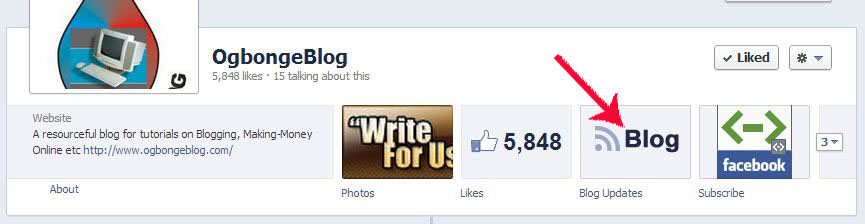
TimelineTabs

I created the tab from my NetworkedBlogs dashboard. Hence, you will have to add the NetworkedBlogs FB application to your Facebook profile for you to be able to to create the tab.

How To Get Started

==> Go to https://networkedblogs.appspot.com/blog to add your blog to NetworkedBlogs

==> If added successfully, click on it to view it

==> Click on the “ Add Tab to Facebook Page ” link under “ Blog management ” on the left sidebar

networkedblogsTAB

==> A window will pop up asking you to select the Facebook Page you want to add the tab to

==> Select the page and click on the “ ADD Page Tab ” button

==> Visit the Facebook page. You should see the “ Blog ” tab on your Facebook Page Timeline. If you can’t see the tab, click the arrow at the far right of the row of Apps

==> Click the “Blog” tab

==> Click the “ choose Blogs ” button and select your blog from the list and save .

Anytime you or a fan clicks on the tab, your latest posts will be seen (with thumbnails) as seen in the picture below:

ImportBlogTo facebook

NOTE

If you want to change the default tab name (BLOG), go to EDIT Page > Update info > apps . Click the “ edit settings ” under “ NetworkedBlogs ” and type the name you desire in the “ Custom Tab Name ” box. Save and click the “Okay” button.

You can also change the default icon. I will share how to do this in my future post when I will be explaining how to customize Facebook fan Page with custom tab images .

I hope this info helps.

Feel free to contribute and ask questions via comments. If you have added it to your Facebook page, you can also share the url of your page here so I can check it out.

Cheers!

Please Share :
blogging tips facebook facebook page tips

Like What You Read?

Sign Up to get similar articles delivered to your email inbox.

Leave a Reply Cancel reply

Your email address will not be published. Required fields are marked *

9 responses to “How To Add ‘Blog’ tab to Facebook Pages Showing Latest Posts”

  1. infonaija247 Avatar
    infonaija247
    October 7, 2012

    That will result to more traffic

    Loading…
    Reply
  2. Samson Avatar
    Samson
    October 7, 2012

    Will add it to my Facebook page once I get on PC later in the day and also edit my Facebook ad so I can use it as the landing page. Thanks for the tutorial.

    Loading…
    Reply
  3. Cudjoe Avatar
    Cudjoe
    October 7, 2012

    You're really insightful with what you're doing. Keep up with your marvelous work.

    Loading…
    Reply
  4. Rasaq Opeyemi Avatar
    Rasaq Opeyemi
    October 8, 2012

    i have been trying to sign up for google adsense but they are regecting my registration please i want you to check my blog for me wealthallday.blogspot.com if there is anything wrong with the site

    Loading…
    Reply
  5. adeshokan shamsudeen Avatar
    adeshokan shamsudeen
    October 8, 2012

    thanks brother for the info,more traffic more leads=more sales.

    Loading…
    Reply
  6. Daayur Avatar
    Daayur
    October 9, 2012

    This is great, let me begin to follow the steps now and see the change

    Loading…
    Reply
  7. Akporugo Avatar
    Akporugo
    October 10, 2012

    i have not noticed we can add a custom tab as this. Thanks for your clarification. However i don't like the networked blog application.

    Loading…
    Reply
  8. Uchechukwu Ezechukwu Avatar
    Uchechukwu Ezechukwu
    March 18, 2013

    thanks man…..you are the best

    Loading…
    Reply
  9. Rita Egwu Avatar
    Rita Egwu
    December 4, 2013

    I tried but its not working

    Loading…
    Reply

WANT TO ADVERTISE?

Chat on WhatsApp

RELATED POSTS

  • Introducing “m.ogbongeblog.com” : Mobile Version of OgbongeBlog.com
  • Free traffic: Import Your Blog To Facebook
  • How To Unlink Facebook Group from Facebook Page and Link To Another Pageunlink facebook page from facebook group

FEATURED


  • CREDICORP launches C.L.I.C.K.D. Scheme with FG’s 3MTT Programme, expanding affordable consumer credit for locally-assembled laptops and devices for digital workers

    CREDICORP launches C.L.I.C.K.D. Scheme with FG’s 3MTT Programme, expanding affordable consumer credit for locally-assembled laptops and devices for digital workers

  • What Happens to Your Online Accounts When You Die?

    What Happens to Your Online Accounts When You Die?

JOIN AI WEB DESIGN GROUP


  • AI Website Design Training Whatsapp Group by Jidetheblogger

    AI Website Design Training Whatsapp Group by Jidetheblogger

← How To Update Nokia Software Using PC Suite (Video Tutorial)
Cheap Mini-Computer For Sale in Nigeria (Samsung NC215S Solar Netbook) →

Join 25,000+ subscribers

Receive our latest blog posts in your inbox.

Search

Social

Facebook

Instagram

Twitter

new ogbongeblog logo

Copyright © 2026 | About | Advertise | Featured | Sitemap | Privacy Policy | Powered by WordPress

Your cart (items: 0)

Products in cart

Product
Details
Total
Subtotal ₦0.00
Shipping and discounts calculated at checkout.
View my cart
Go to checkout

Your cart is currently empty!

Start shopping

Notifications

%d

    LIKE My Fan Page

    Privacy Policy | Copyright © 2012,OgbongeBlog.All Rights Reserved. Powered by Blogger .
    Create a Mobile Site
    View Site in Mobile | Classic
    Share by:


