
Skip to content
new ogbongeblog logo
  • Advertise
  • Blog
  • Contact

How To Add Facebook Like Box to Blogger/blogspot Blog Using html5

September 29, 2011

·

Uncategorized
jidetheblogger Avatar
jidetheblogger

The Like Box is a social plugin that enables Facebook Page owners to attract and gain Likes from their own website or blog. The Like Box enables users to:

  • See how many users already like this Page, and which of their friends like it too
  • Read recent posts from the Page
  • Like the Page with one click, without needing to visit the Page
You must have a Facebook Page for your blog or a personal Fan page before you can generate the Like Box. If you already have a Fan Page, just get the url of the Page handy. 

If you do not have a Facebook Page, you can set up one now for free at : www.facebook.com/pages  Just click on the “Create Page” button and follow the instructions. You can read my tutorial on How To Create a Facebook Page . 

You can get the URL of your Facebook Page by visiting the page on a computer and copying the URL from your browser’s address bar. It is easier when you get a short url for your Page, which you can claim at : www.facebook.com/username but you must have at least 25 fans before you can get the username for your page. 

Now, lets get started.

1. Login to Facebook.com 

2. Go to http://developers.facebook.com/docs/reference/plugins/like-box/

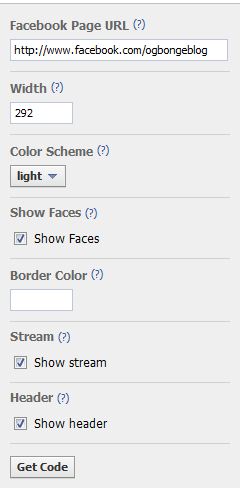
3. You will see a dynamic form to fill for you to generate the Like Box as seen in the picture below:
Facebook


4. Paste or type the url of your fan page into the “Facebook Page url” box. You should notice a preview of the Like Box by the right hand side. 

5. Feel free to adjust the width and color scheme . 

6. If you untick “show stream” , your latest Page posts will not show above the Faces in the Like Box. 

7. Once you are satisfied , click the “ Get Code ” button. 

    You should see a pop-up window displaying two codes, with the implementation set as: html5


8. Login to your Blogger blog, go to Design/Layout , then “ Page Elements “. Right on the sidebar or footer,      click on the “ Add  Gadget ” link. 

9. From the list of gadgets that will pop up, choose “ HTML/JAVASCRIPT ” gadget.

10. Paste the two codes of your Like Box into it and SAVE .

That’s all. 

View your blog and you should see the Like Box. If you are not okay with the width, you can edit it from the code copied into the “html/javascript” gadget.

If you have questions to ask or contributions to make, kindly make use of the comment form below.

In my future posts, I will be sharing more blogging tips and tricks Subscribe to my blog if you do not want to miss them.

Cheers!

Please Share :
blogger tips facebook facebook social plugins

Like What You Read?

Sign Up to get similar articles delivered to your email inbox.

Leave a Reply Cancel reply

Your email address will not be published. Required fields are marked *

3 responses to “How To Add Facebook Like Box to Blogger/blogspot Blog Using html5”

  1. Mobile Phone Avatar
    Mobile Phone
    September 29, 2011

    Thanks for your tips. i will try now… thanks very much

    Loading…
    Reply
  2. Collins Avatar
    Collins
    September 7, 2012

    Thanks alot, let me try it

    Loading…
    Reply
  3. Information and news Avatar
    Information and news
    January 21, 2021

    I am new to the blog world so thanks for sharing, also if you know how I change my comment format I would love to hear it!!I want my readers to leave their name: email: website: and then comment. All good if this is too hard to explain on here!! 🙂

    Loading…
    Reply

WANT TO ADVERTISE?

Chat on WhatsApp

RELATED POSTS

  • Facebook Social Plugins:Free Traffic Tools For Bloggers
  • How To Add Facebook Recommendation Button To Blogger Blog
  • Add Facebook Send Button plus Like Button to Blogspot Blogs

FEATURED


  • CREDICORP launches C.L.I.C.K.D. Scheme with FG’s 3MTT Programme, expanding affordable consumer credit for locally-assembled laptops and devices for digital workers

    CREDICORP launches C.L.I.C.K.D. Scheme with FG’s 3MTT Programme, expanding affordable consumer credit for locally-assembled laptops and devices for digital workers

  • What Happens to Your Online Accounts When You Die?

    What Happens to Your Online Accounts When You Die?

JOIN AI WEB DESIGN GROUP


  • AI Website Design Training Whatsapp Group by Jidetheblogger

    AI Website Design Training Whatsapp Group by Jidetheblogger

← New Facebook Comment form for Blogger/Blogspot Blogs( reply & notifications enabled)
How to add Blogger/Blogspot blog to Alexa →

Join 25,000+ subscribers

Receive our latest blog posts in your inbox.

Search

Social

Facebook

Instagram

Twitter

new ogbongeblog logo

Copyright © 2026 | About | Advertise | Featured | Sitemap | Privacy Policy | Powered by WordPress

Your cart (items: 0)

Products in cart

Product
Details
Total
Subtotal ₦0.00
Shipping and discounts calculated at checkout.
View my cart
Go to checkout

Your cart is currently empty!

Start shopping

Notifications

%d

    LIKE My Fan Page

    Privacy Policy | Copyright © 2012,OgbongeBlog.All Rights Reserved. Powered by Blogger .
    Create a Mobile Site
    View Site in Mobile | Classic
    Share by:


