
Skip to content
new ogbongeblog logo
  • Advertise
  • Blog
  • Contact

How To Add Google Adsense 970×90 ad unit to Blogger Blogs

May 6, 2013

·

Uncategorized
jidetheblogger Avatar
jidetheblogger

Recently, Google launched a new, larger 970×90 ad size , also known as ‘ super leaderboards ’, giving you the opportunity to attract brand advertisers looking for large spaces to engage with users. This larger ad size is another visually impactful placement for advertisers to promote their products and services even on wider screens.

The new super leaderboard ad unit can show up to four text ads organized in a column layout but, as with other ad sizes, the number of text ads per unit may vary per impression. This new will fit perfectly in the header or footer sections of your blog.
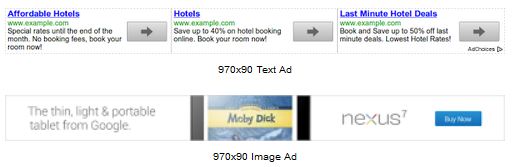
If you are interested in adding this new “ super leatherboard ” to your Blogger blog, you must ensure that the entire width of your blog is wider than 970 pixels. You can read “ How To Determine Width of Image that will fit into Blog Header ” and “How To Adjust Widths of Entire Blog and Sidebars ” for you to know the size of your blog header and how to increase your blog’s width.

Now, let me assume that your Blog header or footer is wider than 970 pixels. Follow the steps below in adding the 970×90 ad unit to your Blogger blog

==> Log in to www.google.com/adsense
==> Click on “ My Ads ” tab
==> Click the “ New Ad Unit ” button to create your ad
==> Name your ad unit and select “ 970×90 Large leatherboard ” from the “ Ad size ” drop down box
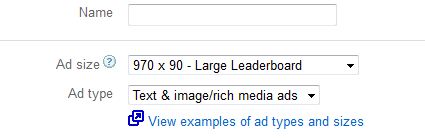
Create ad

==> Click the “ Save and get code ” button==> Copy the ad code

==> Log in to your Blogger dashboard
==> Click on “ Add a Gadget ” link in the header region of your blog
==> Click on the “ HTML/Javascript ” gadget
==> Paste the copied ad code in the box. Leave “Title” blank
==> Click “ Save “.

View your blog and you should see the ad unit on your blog.

NOTE : If you enable image and rich media ads for this unit, display ads in the size of a 728×90 unit might be displayed initially if Google doesn’t have a 970×90 rich media in their inventory.

Cheers!

Please Share :
adsense blogger tips

Like What You Read?

Sign Up to get similar articles delivered to your email inbox.

Leave a Reply Cancel reply

Your email address will not be published. Required fields are marked *

4 responses to “How To Add Google Adsense 970×90 ad unit to Blogger Blogs”

  1. Anonymous Avatar
    Anonymous
    August 9, 2013

    interesting. one;s blog width must be wider than this

    Loading…
    Reply
  2. funmikemmy Avatar
    funmikemmy
    August 28, 2013

    Is it possible for a blogger who has no google adsense account to add the code to his or her blog?

    Thanks

    Loading…
    Reply
    1. Jide Oguns Avatar
      Jide Oguns
      August 30, 2013

      If you get the code from another Adsense account.

      Loading…
      Reply
  3. Biswajit Podili Avatar
    Biswajit Podili
    February 23, 2020

    where is the code

    Loading…
    Reply

WANT TO ADVERTISE?

Chat on WhatsApp

RELATED POSTS

  • dfp Tutorial : How I Use Google DFP To Rotate Ads In One Ad Unithow to use dfp ad server for online ad network advertising
  • Adsense Now Allows Placement of 320×250 Ad Banner Above The Fold On Mobile Pages
  • Custom Adsense Channels: Track ads performance etc

FEATURED


  • CREDICORP launches C.L.I.C.K.D. Scheme with FG’s 3MTT Programme, expanding affordable consumer credit for locally-assembled laptops and devices for digital workers

    CREDICORP launches C.L.I.C.K.D. Scheme with FG’s 3MTT Programme, expanding affordable consumer credit for locally-assembled laptops and devices for digital workers

  • What Happens to Your Online Accounts When You Die?

    What Happens to Your Online Accounts When You Die?

JOIN AI WEB DESIGN GROUP


  • AI Website Design Training Whatsapp Group by Jidetheblogger

    AI Website Design Training Whatsapp Group by Jidetheblogger

← How To Earn More Revenue With Google Adsense Ad
How To Clear DSTv Error E16 On The Internet →

Join 25,000+ subscribers

Receive our latest blog posts in your inbox.

Search

Social

Facebook

Instagram

Twitter

new ogbongeblog logo

Copyright © 2026 | About | Advertise | Featured | Sitemap | Privacy Policy | Powered by WordPress

Your cart (items: 0)

Products in cart

Product
Details
Total
Subtotal ₦0.00
Shipping and discounts calculated at checkout.
View my cart
Go to checkout

Your cart is currently empty!

Start shopping

Notifications

%d

    LIKE My Fan Page

    Privacy Policy | Copyright © 2012,OgbongeBlog.All Rights Reserved. Powered by Blogger .
    Create a Mobile Site
    View Site in Mobile | Classic
    Share by:


