
Skip to content
new ogbongeblog logo
  • Advertise
  • Blog
  • Contact

How To Block Ads On Your Blog With Google Publisher Toolbar

July 24, 2012

·

Uncategorized
jidetheblogger Avatar
jidetheblogger

If you are Google Adsense publisher, you can now easily block ads while viewing your website/blog in Chrome browser using a chrome extension; Google Publisher Toolbar . When you see an ad that isn’t suitable for your audience, you’ll be able to block it immediately without needing to navigate through your account or investigate which ad or URL to block.
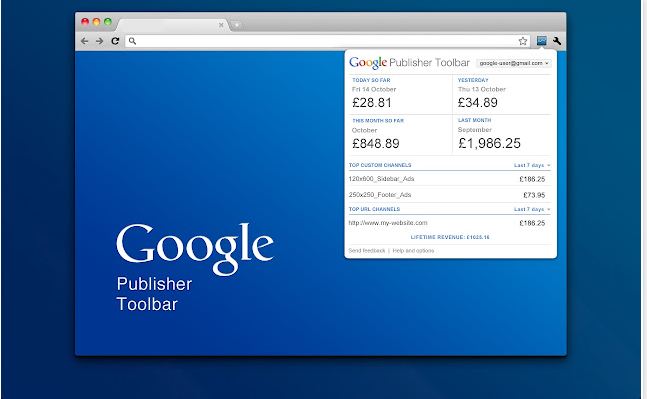
Google Publisher toolbar

Once you’ve installed the toolbar, you’ll be able to see a snapshot of your account performance via a widget in the corner of your chrome window. If you enable ad overlays , clicking on one of the ad overlays will now bring up additional information about that ad unit, including the name of the ad slot , performance metrics , the destination and display URL of the ad , and a preview of the ad . Below the ad preview, you can easily block the ad or the url. Once blocked, your action will be reflected the next time you visit the Ad Review Center. If you block a URL, it’ll be added to your URL filter list.

So, How Do I Install the Google Publisher Tool?

  1. Browse to the  Google Publisher Toolbar (by Google)  page.
  2. Click  Add to Chrome.
  3. In the dialog that appears, click  Add. The Google Publisher Toolbar icon  is added to the top right of your browser.
  4. Click the Google Publisher Toolbar icon.
  5. Click  Allow to grant the Google Publisher Toolbar access to your account.
  6. Sign in to the Google Account associated with your account.


What is an Ad Overlay and How Do I Enable It?

In-site ad overlays appear over your ads when you view your site in Chrome. Each ad overlay displays the ad unit’s name and an earnings summary for today, yesterday, and the last seven days. You can also click on an overlay to access the “ Google Publisher Toolbar – Ad Details ” window. The “Ad Details” window gives you a more detailed view of an ad as well as controls to block unsuitable ads and report problems with ads.


You can check out how to enable in-site ad overlays  at Adsense Help.


Please be assured that clicking the ad overlays generated by the toolbar is permitted, and won’t generate any invalid clicks, according to Google . Also, keep in mind that blocking any ad will lower your potential earnings, as it reduces competition for your ad space by removing advertiser bids from the auction. It’s a myth that filtering ads can prevent ‘low-paying ads’ from appearing, so as always, Google recommends blocking only those ads that you feel are unsuitable for your users .

Please Share :
adsense

Like What You Read?

Sign Up to get similar articles delivered to your email inbox.

Leave a Reply Cancel reply

Your email address will not be published. Required fields are marked *

4 responses to “How To Block Ads On Your Blog With Google Publisher Toolbar”

  1. Gabriel Avatar
    Gabriel
    July 24, 2012

    Are you sure if I click on my ad, wont generate invalid clicks? How will Google know?

    Loading…
    Reply
    1. Jide Oguns Avatar
      Jide Oguns
      July 25, 2012

      If you enable the ad overlays, clicking the ad overlays won’t generate any invalid clicks.

      Loading…
      Reply
  2. earnonlineng Avatar
    earnonlineng
    July 25, 2012

    This is good and interesting…let me fix mine

    Loading…
    Reply
  3. nigeria university news Avatar
    nigeria university news
    July 26, 2012

    very good, i have some few ads i need toblock.

    Loading…
    Reply

WANT TO ADVERTISE?

Chat on WhatsApp

RELATED POSTS

  • Add Ads.Txt File To Blogger Blogs via Settingsadsense ads.txt file for blogger blogspot blogs monetization
  • How I Make Adsense Responsive Ad Code To Display 300×250 Banner On Mobile
  • How I block ads from specific websites from displaying on my blog

FEATURED


  • CREDICORP launches C.L.I.C.K.D. Scheme with FG’s 3MTT Programme, expanding affordable consumer credit for locally-assembled laptops and devices for digital workers

    CREDICORP launches C.L.I.C.K.D. Scheme with FG’s 3MTT Programme, expanding affordable consumer credit for locally-assembled laptops and devices for digital workers

  • What Happens to Your Online Accounts When You Die?

    What Happens to Your Online Accounts When You Die?

JOIN AI WEB DESIGN GROUP


  • AI Website Design Training Whatsapp Group by Jidetheblogger

    AI Website Design Training Whatsapp Group by Jidetheblogger

← Download Scrabble Games for iPad
How To Get Etisalat Free 6 Month Free Internet Subscription →

Join 25,000+ subscribers

Receive our latest blog posts in your inbox.

Search

Social

Facebook

Instagram

Twitter

new ogbongeblog logo

Copyright © 2026 | About | Advertise | Featured | Sitemap | Privacy Policy | Powered by WordPress

Your cart (items: 0)

Products in cart

Product
Details
Total
Subtotal ₦0.00
Shipping and discounts calculated at checkout.
View my cart
Go to checkout

Your cart is currently empty!

Start shopping

Notifications

%d

    LIKE My Fan Page

    Privacy Policy | Copyright © 2012,OgbongeBlog.All Rights Reserved. Powered by Blogger .
    Create a Mobile Site
    View Site in Mobile | Classic
    Share by:


