
Skip to content
new ogbongeblog logo
  • Advertise
  • Blog
  • Contact

How To Claim $60 Flippa Coupon

June 23, 2015

·

how to
jidetheblogger Avatar
jidetheblogger

Flippa, the world’s number one marketplace for buying and selling websites, domains and apps, has turned 6 years old and as a way of celebrating this, users are allowed to claim $60 FREE Flippa credit.

With this, you could…

  • Start 3 website auctions… or 6 domain auctions!
  • Try your first upgrade!

Coupon Code: FLIPPA60


I’ve claimed mine and if you want to claim yours, follow the steps below:

==> Sign in to your account at www.flippa.com
==> Click on the “ Sell ” button to create an auction. Domain auction costs $9; established site auction costs $19. So, select the option based on what you want to sell.

==> Enter the URL of the website or domain you want to sell and click “Get Started”
==> Enter other necessary information, set your reserve price etc
==> Click “Redeem Promo Code” in the Checkout page.
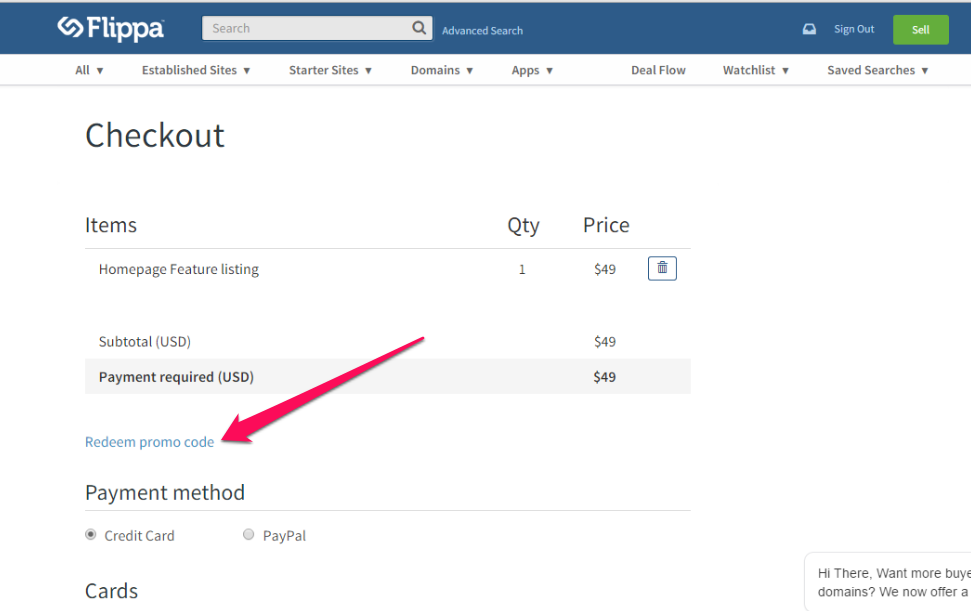
redeem flippa coupon

==> Enter the promo code “FLIPPA60” and then “Redeem”, then it will automatically be applied to your Flippa account.

You can also use redeem the coupon while upgrading an existing listing.

NOTE:

–  Offer expires June 24th, 23:59PM PST.–  A maximum of $60 credits will be provided per user.

Have you claimed yours?

Check my Flippa listings here , place a bid and click “Watch Seller”. wink**

Please Share :

Like What You Read?

Sign Up to get similar articles delivered to your email inbox.

Leave a Reply Cancel reply

Your email address will not be published. Required fields are marked *

16 responses to “How To Claim $60 Flippa Coupon”

  1. Steve Avatar
    Steve
    June 23, 2015

    Thanks for the share boss. Pls, which Nigeria credit card can I use on Flippa?

    Loading…
    Reply
    1. Jide Oguns Avatar
      Jide Oguns
      June 23, 2015

      I added my GTB Naira Mastercard and was successfully charged.

      Loading…
      Reply
  2. paxa xaxz Avatar
    paxa xaxz
    June 23, 2015

    Oga Jide how can I show my adsense below my blog title/before blog post title on mobile just like urs…any link to help

    Loading…
    Reply
    1. Jide Oguns Avatar
      Jide Oguns
      June 23, 2015

      Not related to this post. Kindly mail me or post this to my Facebook group so I can explain it to you.

      Loading…
      Reply
  3. Anonymous Avatar
    Anonymous
    June 24, 2015

    Uncle jide is it a must i sell sumtin.like a website

    Loading…
    Reply
    1. Jide Oguns Avatar
      Jide Oguns
      June 24, 2015

      Yes, website or domain name. If not, u won't be able to redeem the coupon

      Loading…
      Reply
  4. mayowa adewole Avatar
    mayowa adewole
    June 24, 2015

    Uncle jide what m i goin to include on the CVV(SECURITYCODE) and the ZIP/POSTCODE

    Loading…
    Reply
    1. Jide Oguns Avatar
      Jide Oguns
      June 24, 2015

      The cvv is the 3digits at the back of your card. Search this blog for Nigeria postcode finder. Then, use it to get your postcode

      Loading…
      Reply
  5. mayowa adewole Avatar
    mayowa adewole
    June 24, 2015

    Sir hope the website isnt going to be sold

    Loading…
    Reply
    1. Jide Oguns Avatar
      Jide Oguns
      June 24, 2015

      Which website?

      Loading…
      Reply
  6. utexta Avatar
    utexta
    June 24, 2015

    Do i need to have active listing? and do i need to verify my card

    Loading…
    Reply
    1. Jide Oguns Avatar
      Jide Oguns
      June 24, 2015

      Yes, you have to create a listing and add a card to yout account. If you already have an active listing, click to buy an upgrade for iy so you can redeem the coupon.

      Loading…
      Reply
  7. mayowa adewole Avatar
    mayowa adewole
    June 24, 2015

    They are replimg me with my card has been declined

    Loading…
    Reply
    1. Jide Oguns Avatar
      Jide Oguns
      June 24, 2015

      Which card did you use? Also ensure you have enough funds in it.

      Loading…
      Reply
  8. Techibility Avatar
    Techibility
    June 24, 2015

    Thanks so much for the info

    Loading…
    Reply
  9. TONY CRESTED Avatar
    TONY CRESTED
    July 23, 2015

    hey JIDE i have about 9 domains i want to flip among them are properestate.com, raidtour.com, wholerecord.com dellrepairer.com all of which i bought from domainking, how do i go about fliping them and what option can i use to receive the payments for this domain names

    Loading…
    Reply

WANT TO ADVERTISE?

Chat on WhatsApp

RELATED POSTS

  • Promo! Get 40% OFF on Web Hosting at DomainKing.NGdomainking web hosting promo 2017
  • SeekaHost Web Hosting Promo Codes for Black Friday & Cyber Monday 2019seekhost web hosting promo
  • How To Start a .Com Blog at ₦2699 with DomainKing.NGopen domain king account

FEATURED


  • CREDICORP launches C.L.I.C.K.D. Scheme with FG’s 3MTT Programme, expanding affordable consumer credit for locally-assembled laptops and devices for digital workers

    CREDICORP launches C.L.I.C.K.D. Scheme with FG’s 3MTT Programme, expanding affordable consumer credit for locally-assembled laptops and devices for digital workers

  • What Happens to Your Online Accounts When You Die?

    What Happens to Your Online Accounts When You Die?

JOIN AI WEB DESIGN GROUP


  • AI Website Design Training Whatsapp Group by Jidetheblogger

    AI Website Design Training Whatsapp Group by Jidetheblogger

← Alexa Forbidden, Not Opening? Try This…
Free eBook On How To Advertise to Facebook Users A Week To Their Birthday →

Join 25,000+ subscribers

Receive our latest blog posts in your inbox.

Search

Social

Facebook

Instagram

Twitter

new ogbongeblog logo

Copyright © 2026 | About | Advertise | Featured | Sitemap | Privacy Policy | Powered by WordPress

Your cart (items: 0)

Products in cart

Product
Details
Total
Subtotal ₦0.00
Shipping and discounts calculated at checkout.
View my cart
Go to checkout

Your cart is currently empty!

Start shopping

Notifications

%d

    LIKE My Fan Page

    Privacy Policy | Copyright © 2012,OgbongeBlog.All Rights Reserved. Powered by Blogger .
    Create a Mobile Site
    View Site in Mobile | Classic
    Share by:


