
Skip to content
new ogbongeblog logo
  • Advertise
  • Blog
  • Contact

How to Convert .sds files to .mp3

July 10, 2015

·

how to
jidetheblogger Avatar
jidetheblogger

Yesterday, a friend sent me a zip file containing audio files which I could use in my Whiteboard animations projects. I unzipped only to discover that the audio files end with .sds extension instead of the .mp3 extension. 

The application I use in creating the whiteboard sketch videos, won’t allow me import such files. So, I have to find a way out.

After some “ try and error “, I was able to discover a working solution, which I’ve decided to share with you.

The solution simply involves the use of “ Freemake Video Converter “

To convert .sds file to .mp3, follow the steps below:

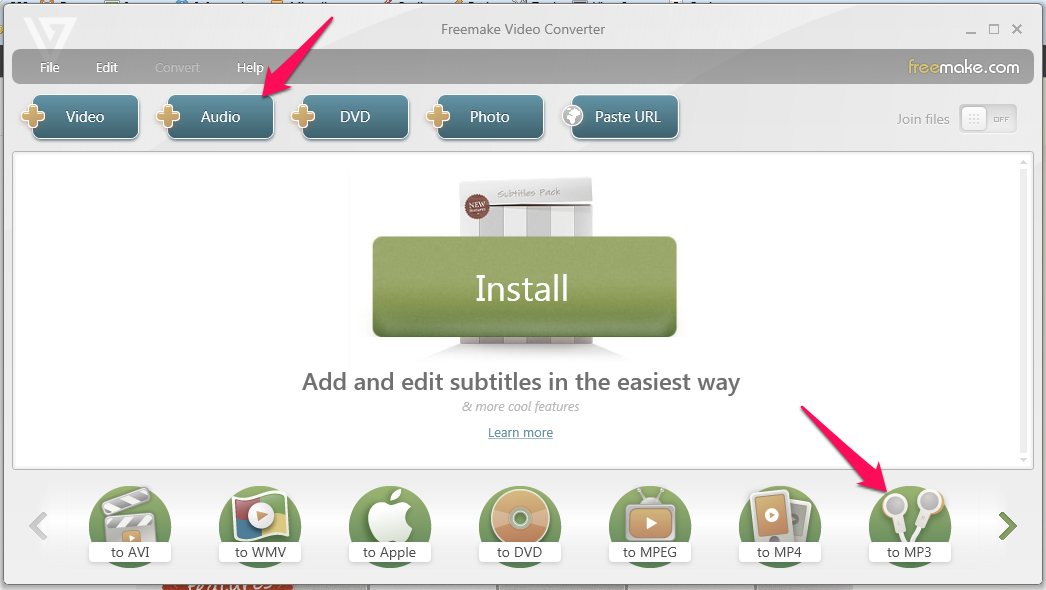
==> Download, install and launch the Freemake Video Converter==> Click the “+Audio” button
freemake video converter

==> Select “All Files” as indicated in the screenshot below :

select all files

==> Navigate to where you saved the .sds file you want to convert to .mp3
==> Select it and allow it to load in Freemake Video Converter
==> Click “to MP3” button.
==> Set your desired “Save to….” location
==> Click the “Convert” button.

That’s all.

Once the conversion completes,  check the “Save to…” location for your mp3 file.

Have fun!

NOTE:

==> Windows Media Player, Apple QuickTime Player and Nullsoft Winamp Media Player 5.6  can open .sds files.==> An SDS file is data in MIDI format.

Please Share :

Like What You Read?

Sign Up to get similar articles delivered to your email inbox.

Leave a Reply Cancel reply

Your email address will not be published. Required fields are marked *

11 responses to “How to Convert .sds files to .mp3”

  1. Techie Avatar
    Techie
    July 12, 2015

    my first time here…good/quality content

    Loading…
    Reply
  2. Ann Chetachukwu Ubah MD Avatar
    Ann Chetachukwu Ubah MD
    July 13, 2015

    i am yet to see such files

    Loading…
    Reply
  3. Victor Aben Avatar
    Victor Aben
    July 15, 2015

    Yet to see such files too. Please. What software do you use for making your whiteboard graphics?

    Loading…
    Reply
  4. livingstone Avatar
    livingstone
    July 29, 2015

    very helpful…. thanks.

    Loading…
    Reply
  5. Olami Avatar
    Olami
    November 17, 2015

    Whao, this is so helpful, have been searching for this for very long time, great post, i love it.

    Loading…
    Reply
  6. Ekene Avatar
    Ekene
    January 22, 2016

    Thanks!! just exactly what i was looking for

    Loading…
    Reply
  7. Mozarti Avatar
    Mozarti
    May 5, 2016

    Awesome Thanks so much

    Loading…
    Reply
  8. Mark Avatar
    Mark
    February 27, 2017

    pls how can i convert youtubes files to mp3?

    Loading…
    Reply
  9. jamez Avatar
    jamez
    April 9, 2017

    please i realy need help on how to convert youtubes to mp3, i have searched so many places for this

    Loading…
    Reply
    1. Jide Oguns Avatar
      Jide Oguns
      April 10, 2017

      You can use the same converter recommended in this blog post.

      Loading…
      Reply
  10. Ekene Avatar
    Ekene
    September 12, 2017

    Thanks for these tips man

    Loading…
    Reply

WANT TO ADVERTISE?

Chat on WhatsApp

RELATED POSTS

  • Download WinX Free VOB to MP4 Converter to convert .vob videos to mp4
  • How to convert movies/videos to iPad format with a FREE Software
  • How To Transfer Quickvoice Files from iPad to Computer

FEATURED


  • CREDICORP launches C.L.I.C.K.D. Scheme with FG’s 3MTT Programme, expanding affordable consumer credit for locally-assembled laptops and devices for digital workers

    CREDICORP launches C.L.I.C.K.D. Scheme with FG’s 3MTT Programme, expanding affordable consumer credit for locally-assembled laptops and devices for digital workers

  • What Happens to Your Online Accounts When You Die?

    What Happens to Your Online Accounts When You Die?

JOIN AI WEB DESIGN GROUP


  • AI Website Design Training Whatsapp Group by Jidetheblogger

    AI Website Design Training Whatsapp Group by Jidetheblogger

← InstaForex Opens Partner Office in Lagos, Nigeria
Reasons Why Promoted Video Doesn’t Show on It’s Own Facebook Page →

Join 25,000+ subscribers

Receive our latest blog posts in your inbox.

Search

Social

Facebook

Instagram

Twitter

new ogbongeblog logo

Copyright © 2026 | About | Advertise | Featured | Sitemap | Privacy Policy | Powered by WordPress

Your cart (items: 0)

Products in cart

Product
Details
Total
Subtotal ₦0.00
Shipping and discounts calculated at checkout.
View my cart
Go to checkout

Your cart is currently empty!

Start shopping

Notifications

%d

    LIKE My Fan Page

    Privacy Policy | Copyright © 2012,OgbongeBlog.All Rights Reserved. Powered by Blogger .
    Create a Mobile Site
    View Site in Mobile | Classic
    Share by:


