Skip to content
new ogbongeblog logo
  • Advertise
  • Blog
  • Contact

How To Create a Blog on Blogger For Testing Templates and Codes

February 20, 2015

·

Uncategorized
jidetheblogger Avatar
jidetheblogger

I recommend you create a blog on Blogger for testing templates and codes before making changes to your live blogspot blog. By doing this, you won’t mess up with your blog by uploading a corrupt template. I always use test blogs when testing templates, scripts and other hacks before implementing the changes on my blog.

Since text blogs are used only for experimental reasons, I set them up in a way different from the way I set up my main blogs. First of all, I ensure that they are not listed in public listing of blogger, not visible to search engines; not appear in my Google+ or blogger profile page. Atimes, I also set them up in a way that no one else can view it except me.

Luckily, Blogger allows us to set up any number of blogs for FREE and also makes it easy to create a Blog on Blogger with the settings highlighted above.


How To Get Started

==> Go to www.blogger.com and sign in with your Google account details.

create blog

==> Choose a name for your test blog e.g My Test Blog 1
==> Next you will need to choose your blog address (something.blogspot.com). Try to use an address which is unlikely to be used by other Bloggers
==> Choose one of the default templates and create your blog.

The next screen invites you to make your first post. This is actually quite important as having a few posts in your test blog will be of great benefit in seeing how your experiments will work when you try them out.

I recommend you change a few settings as explained below, before adding posts to your test blog.

1. Go to Settings tab.
2. Go to Basic sub-tab.
3. Add description for the test blog eg a test blog for testing templates and scripts.
4. Via “ Privacy “, Set ‘ No ‘ for Add your blog to our listings? option and also Set ‘ No ‘ for Let search engines find your blog? option as seen in the screenshot below:

Blogspot privacy

After configuring these settings, neither your test blog will be indexed by search engines, nor it will be displayed in public search listings of blogger blogs.

How To Restrict Readers From Viewing the Test Blog

1. Go to Settings tab.
2. Go to Basic sub-tab.
2. Scroll down to Permissions .
3. In Blog Readers section, select the “ Private – Only blog authors ” option.

Blogger Permissions

After configuring this option, no one can view your blog except you.

Disconnecting Test Blog From Google+ Profile

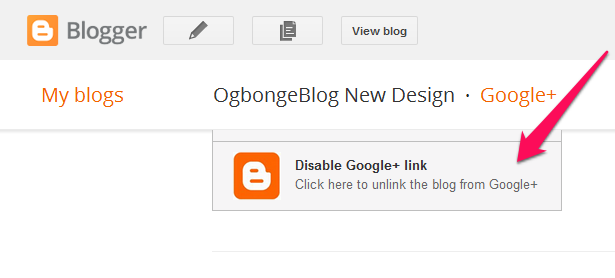
If you’ve linked your Google+ profile with your Blogger account, you can follow the steps below to disconnect your test blog from auto-sharing the posts on your test blog on Google+ :

==> Go to Google+ tab of your test blog
==> Scroll down and click on “Disable Google+ Link”

disable blogger Google

If you’re still using Blogger Profile instead of Google+ profile, go to your dashboard, click “edit profile”, select blogs to display and uncheck your test blog from the listing.

So, How Do I Add Posts To My Test Blog?

For posts in your first test blog, you can copy some individual posts (eg 10 posts) from your main blog making sure each post has at least an image in it. Also ensure you add at least one label to each post. The images and labels will be useful when testing templates with featured images and label widgets.

When creating more test blogs, you can simply import posts from your first test blog to the new test blogs.

You can also easily generate a paragraph or two of dummy text using the Lorem Ipsum generator but ensure you add images and labels to the posts.

Now you can use your test blog for whatever experiments you choose! You can upload your existing template to test new modifications, try out your scripts or codes, or even try a new Blogger template you’ve downloaded somewhere!

When you have finished using your test blog, you can easily delete it by going to Settings > Other and choosing the “Delete blog” option. Once you do this, the blog will be deleted forever. Also the blog url will be released and available for others to use instead.

Do you use test blogs ? If not, how do you manage the modifications done on your Blogger blog?

Please Share :
blogger tips blogspot tutorials

Like What You Read?

Sign Up to get similar articles delivered to your email inbox.

Leave a Reply Cancel reply

Your email address will not be published. Required fields are marked *

20 responses to “How To Create a Blog on Blogger For Testing Templates and Codes”

  1. James Avatar
    James
    February 20, 2015

    Nice one boss. I wasn't aware of such. This will now make me test many templates as desired instead of been scared of uploading directly to my blog. Thanks alot for sharing…

    Loading…
    Reply
    1. Jide Oguns Avatar
      Jide Oguns
      February 20, 2015

      You're welcome bro.

      Loading…
      Reply
  2. David Kayode Avatar
    David Kayode
    February 20, 2015

    http://youthsalary.com/?user=45767

    Loading…
    Reply
  3. Tuham Sanusi Avatar
    Tuham Sanusi
    February 20, 2015

    I do use it bro.. But sometimes i made changes directly on my main blog cos test blog sometimes ain't satisfying enough(cos they dont look exactly as my main blog).But before i do that, i do backup the template first.

    Loading…
    Reply
    1. Jide Oguns Avatar
      Jide Oguns
      February 20, 2015

      If you download your main blog and upload it to the test blog, you can make changes which if implemented on the main blog, will give you the same result.

      Loading…
      Reply
  4. Edi Dominic Ifediri Avatar
    Edi Dominic Ifediri
    February 20, 2015

    Thanks for this tips Boss, I was thinking of tweaking and testing some templates from behind Bars, this will help me make it possible.

    Loading…
    Reply
    1. Jide Oguns Avatar
      Jide Oguns
      February 20, 2015

      No mention bro. Have fun tweaking and testing…. 🙂

      Loading…
      Reply
  5. Akpene Jacob Avatar
    Akpene Jacob
    February 20, 2015

    Wao thanks bro, I have a test blog but I dont do all the settings as you instructed. I will do it now

    Loading…
    Reply
  6. Tuham Sanusi Avatar
    Tuham Sanusi
    February 20, 2015

    Thats true bro.. thanks for the tips

    Loading…
    Reply
    1. Jide Oguns Avatar
      Jide Oguns
      August 11, 2015

      You're welcome bro

      Loading…
      Reply
  7. peter Avatar
    peter
    February 22, 2015

    Nice

    Loading…
    Reply
    1. Jide Oguns Avatar
      Jide Oguns
      August 11, 2015

      Thanks

      Loading…
      Reply
  8. Marx Oduogu Avatar
    Marx Oduogu
    March 3, 2015

    Am yet to use it, though normally test on my other blogs under blogger.

    Thanks Boss! For Sharing

    Loading…
    Reply
    1. Jide Oguns Avatar
      Jide Oguns
      August 11, 2015

      You're welcome bro

      Loading…
      Reply
  9. IDEHO JOB Avatar
    IDEHO JOB
    August 11, 2015

    SIR AM AN INTERNET NEW BIE.TRIED DOWNLOADING YOUR BLOGGING EBOOK BUT IT DONT WORK.CAN YOU PLS SEND IT TO MY EMAIL jobideho@gmail.com . THANKS SIR FOR YOUR ANTICIPATED HELP.

    Loading…
    Reply
    1. Jide Oguns Avatar
      Jide Oguns
      August 11, 2015

      request for it via email and I will send it to you

      Loading…
      Reply
  10. JustMe Avatar
    JustMe
    September 14, 2015

    good idea boss, i will try this to test template n code, but how to reset template back to standard after add some widget without delete 1by1. sorry i'm new in blogging

    Loading…
    Reply
    1. Jegede Ayodeji Oluwole Avatar
      Jegede Ayodeji Oluwole
      December 24, 2015

      You just have to revert your template to default. Navigate to your template, click on EDIT HTML. Above the editor, you'll see "REVERT TEMPLATE TO DEFAULT"

      Loading…
      Reply
  11. kamoru Avatar
    kamoru
    March 14, 2016

    Great post .

    Loading…
    Reply
  12. japhet hezron Avatar
    japhet hezron
    August 3, 2016

    Nice. Bro please I have a problem in my blog. In my home page my post snippet is not showing only the image and dot appears at the home page here is my blog check it out and see if you can help http://www.edsupoint.com

    Loading…
    Reply

WANT TO ADVERTISE?

Chat on WhatsApp

RELATED POSTS

  • How To Add Reply Option To Blogspot Comments Without Javascript
  • Free Blogger Templates Adapted From WordPress
  • How To Display Adsense On Mobile Templates of Blogger/Blogspot blogs

FEATURED


  • CREDICORP launches C.L.I.C.K.D. Scheme with FG’s 3MTT Programme, expanding affordable consumer credit for locally-assembled laptops and devices for digital workers

    CREDICORP launches C.L.I.C.K.D. Scheme with FG’s 3MTT Programme, expanding affordable consumer credit for locally-assembled laptops and devices for digital workers

  • What Happens to Your Online Accounts When You Die?

    What Happens to Your Online Accounts When You Die?

JOIN AI WEB DESIGN GROUP


  • AI Website Design Training Whatsapp Group by Jidetheblogger

    AI Website Design Training Whatsapp Group by Jidetheblogger

← Buy Hands-Free Car Kit With FM Transmitter & USB Charger for Smart Phones & MP3 Players
Facebook Call To Action Button Tips For Page Owners →

Join 25,000+ subscribers

Receive our latest blog posts in your inbox.

Search

Social

Facebook

Instagram

Twitter

new ogbongeblog logo

Copyright © 2026 | About | Advertise | Featured | Sitemap | Privacy Policy | Powered by WordPress

Your cart (items: 0)

Products in cart

Product
Details
Total
Subtotal ₦0.00
Shipping and discounts calculated at checkout.
View my cart
Go to checkout

Your cart is currently empty!

Start shopping

Notifications

%d

    LIKE My Fan Page

    Privacy Policy | Copyright © 2012,OgbongeBlog.All Rights Reserved. Powered by Blogger .
    Create a Mobile Site
    View Site in Mobile | Classic
    Share by: