
Skip to content
new ogbongeblog logo
  • Advertise
  • Blog
  • Contact

How To Create a blogspot.com blog FREE

May 21, 2012

·

Uncategorized
jidetheblogger Avatar
jidetheblogger

You can blog for free, if you open a free blog. There are lots of free blogging platforms out there but the one I recommend is Blogger , powered by Google. Blogger blogs end with “ .blogspot.com “, though the .blogspot.com part can be removed if you buy a custom domain for your blog . Today, I am explaining to you, how to open a free blogspot.com blog free of charge . This is a very good tutorial for you if you are interested in how to create a blog on blogspot.com.

If you don’t know what you can use a blog for, well, you can use a blog to share anything online . You can use it to share news, tutorials, pictures, videos etc to the world and even be making money while doing it. You can read my previous post titled “ What is a Blog? ” if you need more explanation on what a blog is.

Let’s get started.

STEP 1

Go to www.blogger.com or www.blogspot.com   ( They are the same, just different addresses)

Blogger1stpage

STEP 2

Click on “ Get Started ”  as seen in the picture above. Then, you will see a page similar to the one below:

blog2
blog3

STEP 3

On the page, you will create a Google account which you will use for your blog and other Google services. If you already have a Gmail account, please click on the “ Sign in first ” link at the top of the page.  If you do not have a Gmail account, fill the form accordingly.

Display Name : This is the name that will appear under your blog posts, like a signature. You can enter your name or your nickname.

Tick the “ I accept the terms of service ” box, then click on “ Continue “.

STEP 4

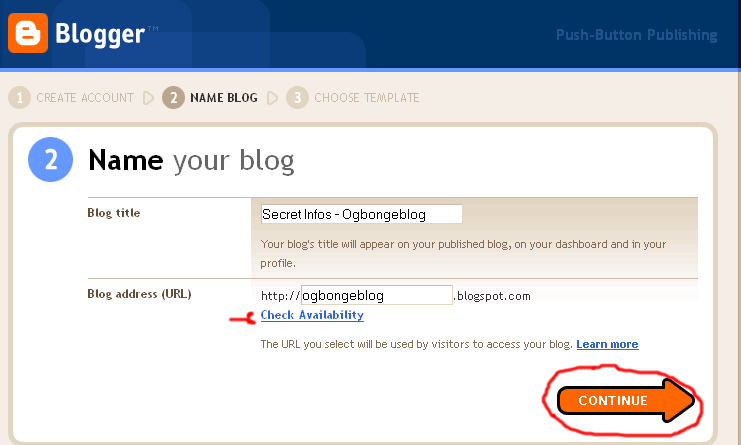
You will see a new page similar to the one below:
blog4

Blog Title : This will be seen at the top of your blog and should be relevant to what you intend posting to your blog.

Blog Address :   Let the address relate directly to what you will be blogging about.  Let’s say for example you want to be blogging about “ Fuel Subsidy “, then you can try “ fuelsubsidyinfos “. You don’t have to include your name to show people you own it.  You can click the “ check availability ” to see if your address is available for use. If not available, use another address. If available, click on “ continue “.

STEP 5

You will see a new page where you can choose your template as seen in the picture below:

blog5

Choose the template you like. It doesn’t really matter which template you choose, you can always change it at a later date but for this example, I will choose the “ Simple ” template.

Avoid the “ Dynamic Views ” for now, should in case you see it as part of the options.

Once you have chosen your template, click on “ continue “.

blog6

Your blog is now created. You can now  start blogging .

Please, take note of your address because that is what you will be sharing with people for them to be visiting your blog.

Whenever you want to login to your blog, all you just have to do is go to www.blogger.com or www.blogspot.com and log in with the Gmail details you used when you created the blog.

In my future posts, I will share with you how to write your blog posts and other tutorials. So,  subscribe  to my blog if you want to be receiving the tutorials in your email inbox even if you are not online when I post the tutorials.  Make sure you verify your subscription  by clicking on the link that will be in the mail that will be sent to you once you subscribe.

If you are on Facebook, you can join the Bloggerslab Group so you can connect with other bloggers and learn more from them.

Feel free to contribute and ask questions using the comment form below.

Kindly share this with friends…

Feel free to check out:

How To Write a Blog Post on Blogspot blogs
How To add Logo To Blogger Blog
How To Hide Blog Description on Blogger Blogs
How To Add “Follow Me on Twitter” To Blogger Blog
How To Add Labels (categories) To Blogger Po sts

and other Blogger Tutorials here .

Cheers!

Please Share :
blogger tips editorpicks

Like What You Read?

Sign Up to get similar articles delivered to your email inbox.

Leave a Reply Cancel reply

Your email address will not be published. Required fields are marked *

16 responses to “How To Create a blogspot.com blog FREE”

  1. buy term paper Avatar
    buy term paper
    January 5, 2012

    Thanks a lot for this post. It's cool!

    Loading…
    Reply
    1. Jide Oguns Avatar
      Jide Oguns
      March 11, 2012

      Thanks for the comment

      Loading…
      Reply
  2. Promise Woryi Avatar
    Promise Woryi
    March 10, 2012

    this post is cool…but i have a problem.google rejected my ads request

    Loading…
    Reply
    1. Jide Oguns Avatar
      Jide Oguns
      March 11, 2012

      You will have to reapply after some time but make sure your blog has improved alot before reapplying.

      Loading…
      Reply
  3. Larry Floor Avatar
    Larry Floor
    April 30, 2012

    I was thinking about creating a new blog on blogspot.com but I wasn't sure how. Thanks for the info!

    Loading…
    Reply
    1. Jide Oguns Avatar
      Jide Oguns
      June 21, 2012

      You welcome

      Loading…
      Reply
  4. Anonymous Avatar
    Anonymous
    May 1, 2012

    Is google still giving adsense to blogs owned by Nigerians?

    Loading…
    Reply
    1. Jide Oguns Avatar
      Jide Oguns
      June 21, 2012

      YES

      Loading…
      Reply
  5. ggg games Avatar
    ggg games
    July 26, 2012

    Thanks for the share, and for taking the time to do so. Should give me even more work to do now!

    Loading…
    Reply
  6. harzeeyz Avatar
    harzeeyz
    September 23, 2012

    Thanks for this info. Iv been feeling uneasy using wordpress. So many things seems not to be working and im getting frustrated.Please is there a way i can transfer my wordpress customised site to blogger?

    Loading…
    Reply
  7. Anonymous Avatar
    Anonymous
    March 14, 2013

    thanks dear. but how can i creat the block that fetch money once someone clicks on the blog, i realy need online job, thanks

    Loading…
    Reply
    1. Jide Oguns Avatar
      Jide Oguns
      March 20, 2013

      You will need to add Adsense code to your blog. The code will generate the ad block which visitors to your blog will have to click for you to make money from the ad block.

      Loading…
      Reply
  8. Jide Oguns Avatar
    Jide Oguns
    March 20, 2013

    I don't understand your question. Please, send me an email message.

    Loading…
    Reply
  9. Mazee Avatar
    Mazee
    March 25, 2013

    Jide, this tips has really spurred me up to create my own blog. i will let u know when I do so. Txn.

    Loading…
    Reply
  10. imran khan Avatar
    imran khan
    March 5, 2016

    I hope to continue your post

    Loading…
    Reply
  11. Abiamuwe L Avatar
    Abiamuwe L
    February 1, 2018

    pls i have a blog created recently, how do i u help me i want to grow traffic to the blog and how do i generate article to write for my blog on technology? thanks

    Loading…
    Reply

WANT TO ADVERTISE?

Chat on WhatsApp

RELATED POSTS

  • Your Blogspot address ends with .in (or any country-specific URL) instead of .com? The Solution.
  • How To Start a .Com Blog at ₦2699 with DomainKing.NGopen domain king account
  • Googe Adsense: How To Apply via Blogspot/Blogger Blog

FEATURED


  • CREDICORP launches C.L.I.C.K.D. Scheme with FG’s 3MTT Programme, expanding affordable consumer credit for locally-assembled laptops and devices for digital workers

    CREDICORP launches C.L.I.C.K.D. Scheme with FG’s 3MTT Programme, expanding affordable consumer credit for locally-assembled laptops and devices for digital workers

  • What Happens to Your Online Accounts When You Die?

    What Happens to Your Online Accounts When You Die?

JOIN AI WEB DESIGN GROUP


  • AI Website Design Training Whatsapp Group by Jidetheblogger

    AI Website Design Training Whatsapp Group by Jidetheblogger

← Wapday.com: download free themes, games, videos, wallpapers, animations to phones
bbmanimated.com: download Free BBM Animated Avatars →

Join 25,000+ subscribers

Receive our latest blog posts in your inbox.

Search

Social

Facebook

Instagram

Twitter

new ogbongeblog logo

Copyright © 2026 | About | Advertise | Featured | Sitemap | Privacy Policy | Powered by WordPress

Your cart (items: 0)

Products in cart

Product
Details
Total
Subtotal ₦0.00
Shipping and discounts calculated at checkout.
View my cart
Go to checkout

Your cart is currently empty!

Start shopping

Notifications

%d

    LIKE My Fan Page

    Privacy Policy | Copyright © 2012,OgbongeBlog.All Rights Reserved. Powered by Blogger .
    Create a Mobile Site
    View Site in Mobile | Classic
    Share by:


