
Skip to content
new ogbongeblog logo
  • Advertise
  • Blog
  • Contact

How To Delete ALL Posts on a Facebook Page

September 14, 2015

·

Uncategorized
jidetheblogger Avatar
jidetheblogger

If for some reasons, you decide to delete all published posts on your Facebook page , you can easily get it done provided you have admin access to the Page.

Just follow the steps below:

1. Go to your Facebook Page via PC
2. Click on “Settings”
3. Click on “Publishing Tools”
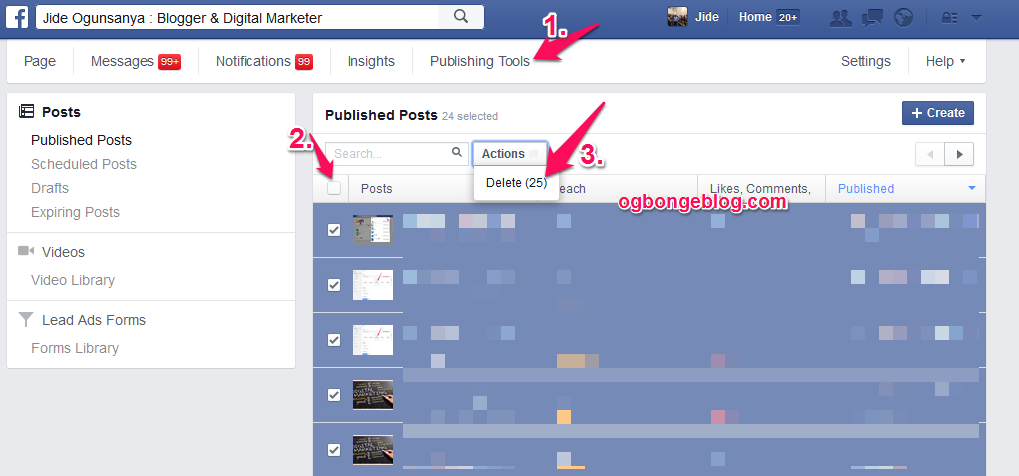
delete posts on facebook page

4. Tick the box next to “Posts” to select all4. Click on Actions button, then click on Delete.

You can delete maximum of 25 posts at Once. So, repeat same process till you delete all your posts.

You can confirm if all posts have been deleted by checking your page’s timeline.

I hope this works for you.

Check more Facebook page tips here .

Please Share :
facebook page tips

Like What You Read?

Sign Up to get similar articles delivered to your email inbox.

Leave a Reply Cancel reply

Your email address will not be published. Required fields are marked *

20 responses to “How To Delete ALL Posts on a Facebook Page”

  1. Sadiq Muhammad Avatar
    Sadiq Muhammad
    September 14, 2015

    Nice idea bosz

    Loading…
    Reply
    1. Anonymous Avatar
      Anonymous
      April 3, 2017

      Were are the publishing tools. They are not in tools

      Loading…
      Reply
  2. MS Avatar
    MS
    February 2, 2016

    Thanks for this. Very helpful.

    Loading…
    Reply
  3. Panda Gila Avatar
    Panda Gila
    July 19, 2016

    OMG.. this is easier that what I thought before. THank you, it saves my time

    Loading…
    Reply
  4. Anonymous Avatar
    Anonymous
    December 14, 2016

    where are settings?

    Loading…
    Reply
  5. Victor Vazquez Avatar
    Victor Vazquez
    December 18, 2016

    Perfect!! Thank you.

    Loading…
    Reply
  6. ABODE Avatar
    ABODE
    January 14, 2017

    thanks so much, have been finding this difficult but you simplified it and it worked thanks.

    Loading…
    Reply
  7. Chuks Amobi Avatar
    Chuks Amobi
    March 28, 2017

    Very useful. Thank you

    Loading…
    Reply
  8. alex titley Avatar
    alex titley
    April 1, 2017

    i have found settings but there are no publishing tools!!

    Loading…
    Reply
    1. Jide Oguns Avatar
      Jide Oguns
      April 3, 2017

      Once you are on your Facebook page, you should now see "publishing tools" without going through settings.

      Loading…
      Reply
    2. Zee Zee Avatar
      Zee Zee
      June 7, 2017

      Where on the page can I find publishing tools? I don't see it anywhere. Facebook is not easy to use. So much of it is not intuitive! Thanks for your help.

      Loading…
      Reply
  9. Arturs Avatar
    Arturs
    April 2, 2017

    The thing is I successfully deleted 25 posts, but I cannot delete more than 25 because I see You haven't published any posts yet." It is weird because my page have 100+ posts.

    Loading…
    Reply
    1. Jide Oguns Avatar
      Jide Oguns
      April 3, 2017

      Re-try later….

      Loading…
      Reply
  10. Lea Michele Avatar
    Lea Michele
    April 21, 2017

    There is way i can delete everything at once?

    Loading…
    Reply
    1. yves kouyo Avatar
      yves kouyo
      July 23, 2017

      Just delete your page 🙂

      Loading…
      Reply
  11. Anonymous Avatar
    Anonymous
    September 16, 2017

    Yeah, the ONLY way you can completely delete all posts all at once, is to delete your page. Of course you'll have to start over with all your friend requests, etc. The setting for "Publishing tools" is only for a business page, as I understand. If you're trying to delete posts on your personal page, you have to do each manually…or as mentioned before, delete your entire page and start over.

    Loading…
    Reply
  12. zakky Avatar
    zakky
    September 27, 2017

    awesome, thanks for sharing. very useful for beginner like me 🙂

    Loading…
    Reply
  13. Stephanie Avatar
    Stephanie
    April 5, 2018

    I have a regular page and a business page. The Publishing Tools option is on the business page only, not the regular page.

    Loading…
    Reply
  14. Ahmad Abubakar Gumel Avatar
    Ahmad Abubakar Gumel
    February 21, 2021

    It worked 100%.Thanks!

    Loading…
    Reply
  15. Mayowa Silas Adeyanju Avatar
    Mayowa Silas Adeyanju
    October 5, 2021

    Thank you for this

    Loading…
    Reply

WANT TO ADVERTISE?

Chat on WhatsApp

RELATED POSTS

  • Import Blog Posts To Facebook Notes for Free Traffic
  • How To Stop Receiving Facebook EMAIL Notifications
  • NetworkedBlogs: Get Traffic To Your Blog

FEATURED


  • CREDICORP launches C.L.I.C.K.D. Scheme with FG’s 3MTT Programme, expanding affordable consumer credit for locally-assembled laptops and devices for digital workers

    CREDICORP launches C.L.I.C.K.D. Scheme with FG’s 3MTT Programme, expanding affordable consumer credit for locally-assembled laptops and devices for digital workers

  • What Happens to Your Online Accounts When You Die?

    What Happens to Your Online Accounts When You Die?

JOIN AI WEB DESIGN GROUP


  • AI Website Design Training Whatsapp Group by Jidetheblogger

    AI Website Design Training Whatsapp Group by Jidetheblogger

← How to Edit or Delete Featured Likes On Your Facebook Page
Sure Ways To Build High Reputable Backlinks To Your Blog →

Join 25,000+ subscribers

Receive our latest blog posts in your inbox.

Search

Social

Facebook

Instagram

Twitter

new ogbongeblog logo

Copyright © 2026 | About | Advertise | Featured | Sitemap | Privacy Policy | Powered by WordPress

Your cart (items: 0)

Products in cart

Product
Details
Total
Subtotal ₦0.00
Shipping and discounts calculated at checkout.
View my cart
Go to checkout

Your cart is currently empty!

Start shopping

Notifications

%d

    LIKE My Fan Page

    Privacy Policy | Copyright © 2012,OgbongeBlog.All Rights Reserved. Powered by Blogger .
    Create a Mobile Site
    View Site in Mobile | Classic
    Share by:


