Skip to content
new ogbongeblog logo
  • Advertise
  • Blog
  • Contact

How To Download Adsense Payments Data

  1. Home
  2. Blog
  3. Uncategorized
  4. How To Download Adsense Payments Data
June 21, 2015

Written by

jidetheblogger Avatar
jidetheblogger

Last Modified :

October 8, 2017

Last year, my Adsense account was upgraded to the new AdSense payments platform . As part of this change, Google will be shutting down the old payments platform completely by the end of this month.

What this simply means is that by June 30, 2015, your payments data prior to the upgrade date (Mar-2014 in my own case) will no longer be available.

So, Google recommends that you download your data and save a copy in case you need it in the future, e.g., for tax purposes.

To download your old payments data, please follow the steps below:

    ==> Sign in to your AdSense account .
    ==> Click the gear icon and select Payments.
    ==> Scroll down to the “Previous payments” section at the bottom of the page.
    ==> Click “See your previous payments”.
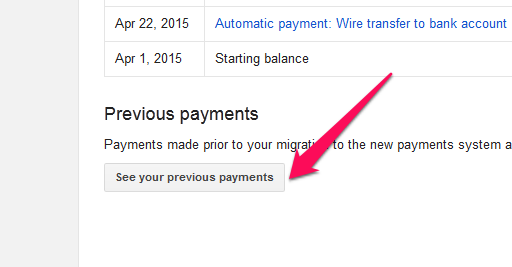
previous adsense payment data

    ==> In the “Finalized earnings and payments” section, click Export to CSV.
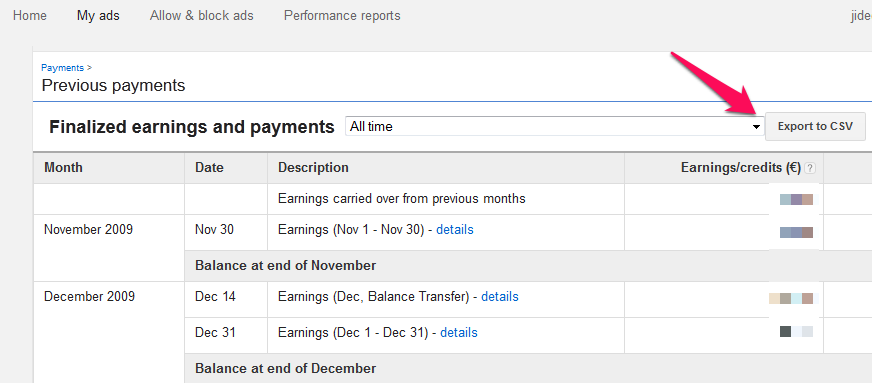
export adsense payments data

    ==> If a download prompt appears, follow the instructions in the dialog, and click Save   and it will be downloaded as a CSV file.

Note that if you don’t see the “See your previous payments” button, then you don’t have any previous payments data on our old payments system to download.

I hope this helps.

Please Share :
adsense

Like What You Read?

Sign Up to get similar articles delivered to your email inbox.

Leave a Reply Cancel reply

Your email address will not be published. Required fields are marked *

3 responses to “How To Download Adsense Payments Data”

  1. Korede Avatar
    Korede
    June 21, 2015

    Thanks for this boss. Will download asap.

    Loading…
    Reply
  2. Daayur Avatar
    Daayur
    June 22, 2015

    great post…thanks. Google rules the internet

    Loading…
    Reply
  3. Kursi Minimalis Avatar
    Kursi Minimalis
    June 24, 2015

    Great artikel sir

    Loading…
    Reply

WANT TO ADVERTISE?

Chat on WhatsApp

RELATED POSTS

  • Nigerians To Start Receiving Adsense Payments Directly Into Bank Accounts
  • How To Add GTBank Account and SWift BIC Code To Google Adsense Payment Settings
  • How To Change Your Google Adsense Bank Account Details

FEATURED


  • How to Pay Chinese Suppliers in RMB (Alipay & WeChat Pay) or Swap Naira, Kenyan Shillings, Ghana Cedis & USDT in Minutes

    How to Pay Chinese Suppliers in RMB (Alipay & WeChat Pay) or Swap Naira, Kenyan Shillings, Ghana Cedis & USDT in Minutes

JOIN AI WEB DESIGN GROUP


  • AI Website Design Training Whatsapp Group by Jidetheblogger

    AI Website Design Training Whatsapp Group by Jidetheblogger

RANDOM POSTS


    I Got One Free Month of Meta Verified After I Tried to Cancel My Subscription


    How To Make Money On Bamboo App: 5 Proven Ways


    How To Use Vibe Coding To Make Money


    How I Earn $100 Per Referral from Affiliate Marketing


    Bluetooth Printer That Connects To Phone


    Can I Use OPay Card for Facebook Ads?


    Why I Moved My Websites From Namecheap To Interserver.net


    How I Earn $50 Per Sale


MORE RANDOM POSTS
← Bibi Catering Services : Order Cakes, Small Chops Online in Nigeria
Alexa Forbidden, Not Opening? Try This… →

Join 25,000+ subscribers

Receive our latest blog posts in your inbox.

Search

Social

Facebook

Instagram

Twitter

new ogbongeblog logo

Copyright © 2026 | About | Advertise | Featured | Sitemap | Privacy Policy | Powered by WordPress

Your cart (items: 0)

Products in cart

Product
Details
Total
Subtotal ₦0.00
Shipping and discounts calculated at checkout.
View cart
Go to checkout

Your shopping cart is empty

Return to shop

Notifications

%d

    LIKE My Fan Page

    Privacy Policy | Copyright © 2012,OgbongeBlog.All Rights Reserved. Powered by Blogger .
    Create a Mobile Site
    View Site in Mobile | Classic
    Share by: