
Skip to content
new ogbongeblog logo
  • Advertise
  • Blog
  • Contact

How To Get Facebook Application ID and Secret Key

March 8, 2014

·

how to
jidetheblogger Avatar
jidetheblogger

If you look closely at the Facebook Javascript SDK generated whenever you generate the code for Facebook Like box/button and other Facebook social plugins, you will notice there is a line that contains an appID. The Facebook App ID is required if you want to integrate your site with Facebook Open Graph and Facebook Insights. 

If you also want to implement a “ share on Facebook to download ” trick on your blog, you will also need a Facebook application ID. It’s also a must-have if you want something like “Via Ogbongeblog” to be displayed in your Facebook status.

So, in this tutorial, I am showing you how to create a Facebook application to get an app ID for your blog or website.

How To Create Facebook Application

==> Go to : developers.facebook.com/setup/
==> Click on the “Create New App” button

create facebook application

==> Enter your blog/site name in the “Display Name” field
==> Leave “NameSpace” blank==> From the “Category” drop down menu, select a category for your blog site eg Entertainment
==> Click the “Create App” button

A security check might pop up asking you to enter the displayed captcha. Enter the displayed text and click “submit”. If entered correctly, you will be redirected to the dashboard of your new app which will look similar to the screenshot below;

facebook application dashboard

Take note of the AppID. You can write it down or save it somewhere you can easily access.

For the purposes of this tutorial, you won’t need your “App Secret” value.
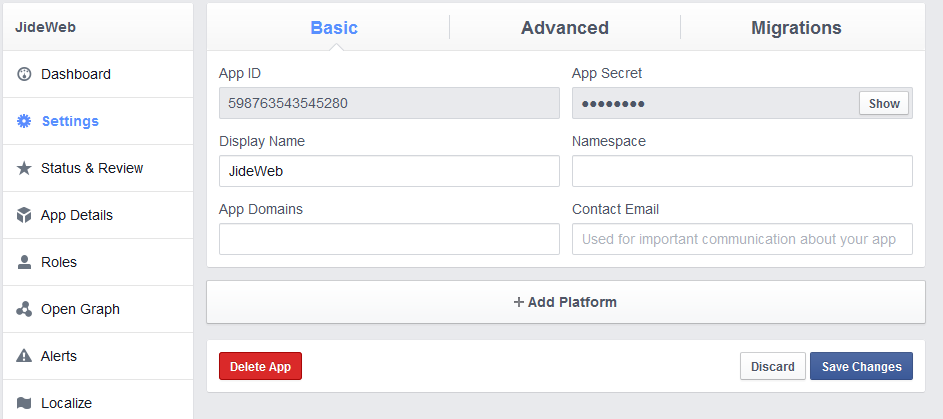
facebook application settings

==> Click on “ Settings ” > “ +Add Platform “

facebook application platforms

==> Select “ Website ” from the options. This will open up a new field as seen below:

facebook application site url

==> Enter the URL of your blog/site in the “ Site URL ” and “ Mobile Site URL ” fields as seen above.

==> Click the “ Save Changes ” button

==> Scroll up and enter your domain name in the “ App Domains ” field

facebook application app domains

==> Enter your email address in the “Contact Email” field.
==> Click the “ Save Changes ” button.

Now, we need to change the status of the app from development mode to public.

==> Click on “Status & Review”==> Click on the blank tab besides “NO” to change it to “Yes”

facebook application status

A confirmation window will pop up. Click on the “confirm” button.

That’s all.

You can click on “App details” to add description, icons, banners, contact info and demo video.

You can see all your Facebook apps at : https://developers.facebook.com/apps/ You can click on any app on the page to see the app’s ID.

I hope this helps.

Recommended : How To Add Facebook Comment Form to Blogspot Blogs

Please Share :
facebook

Like What You Read?

Sign Up to get similar articles delivered to your email inbox.

Leave a Reply Cancel reply

Your email address will not be published. Required fields are marked *

8 responses to “How To Get Facebook Application ID and Secret Key”

  1. Martins Avatar
    Martins
    March 8, 2014

    Thanks Jide. Cant wait for you to share how to do the "Via myblog" thing whenever I update my status

    Loading…
    Reply
    1. Jide Oguns Avatar
      Jide Oguns
      March 9, 2014

      I will do that soon…

      Loading…
      Reply
  2. Unwana Johnson Avatar
    Unwana Johnson
    March 8, 2014

    Now that all the steps are correctly done, if i now post on my facebook timeline will it show via Allbloggersblog ?

    Loading…
    Reply
    1. Jide Oguns Avatar
      Jide Oguns
      March 9, 2014

      Check my tutorial on "How I Update Facebook Status With "Via OgbongeBlog""

      Loading…
      Reply
  3. Omale Joseph's Blog Avatar
    Omale Joseph’s Blog
    March 8, 2014

    Thank you Mr Jide..

    I think i should be the number one person to create a Facebook Application for my Forum.. I hope they will not charge me for that… Because i once saw this dsame post at: http://www.t3.com/facebook-app-id-and-how-to-us-it.xhtml but i'm sure is Mr Jide that permited him to post that.. Well, the guy also post a link back to your blog. That's the link i followed till i reach here.. That's how things should be done.. He copied an article from Mr Jide's blog and he also post a link back telling people that he is not the owner of the post.. i like whosoever is the owner of that blog.. Thanks Mr Jide for this article.. I like it..

    Loading…
    Reply
  4. Emeka Avatar
    Emeka
    April 15, 2014

    how can one implement the 'share to download trick in a blogpost? thanks

    Loading…
    Reply
    1. Jide Oguns Avatar
      Jide Oguns
      April 29, 2014

      search this blog for my "feed dialog" tutorial or mail me so I can send u the link to the tutorial

      Loading…
      Reply
  5. imohimi julius Avatar
    imohimi julius
    July 29, 2015

    I have tried setting it up, it as if Facebook have changed there staff, I am not seeing it just as your instructions show some. Thanks for you reply

    Loading…
    Reply

WANT TO ADVERTISE?

Chat on WhatsApp

RELATED POSTS

  • New Facebook Comment form for Blogger/Blogspot Blogs( reply & notifications enabled)
  • How to add facebook Login button to blogger/blogspot blogs
  • How To Add Facebook Comment Form To Blogger Blogs (Template Designer layouts inclusive)

FEATURED


  • CREDICORP launches C.L.I.C.K.D. Scheme with FG’s 3MTT Programme, expanding affordable consumer credit for locally-assembled laptops and devices for digital workers

    CREDICORP launches C.L.I.C.K.D. Scheme with FG’s 3MTT Programme, expanding affordable consumer credit for locally-assembled laptops and devices for digital workers

  • What Happens to Your Online Accounts When You Die?

    What Happens to Your Online Accounts When You Die?

JOIN AI WEB DESIGN GROUP


  • AI Website Design Training Whatsapp Group by Jidetheblogger

    AI Website Design Training Whatsapp Group by Jidetheblogger

← Unable To Add App Domains To New Facebook Application? Try This Fix
Facebook Feed Dialog Tutorial →

Join 25,000+ subscribers

Receive our latest blog posts in your inbox.

Search

Social

Facebook

Instagram

Twitter

new ogbongeblog logo

Copyright © 2026 | About | Advertise | Featured | Sitemap | Privacy Policy | Powered by WordPress

Your cart (items: 0)

Products in cart

Product
Details
Total
Subtotal ₦0.00
Shipping and discounts calculated at checkout.
View my cart
Go to checkout

Your cart is currently empty!

Start shopping

Notifications

%d

    LIKE My Fan Page

    Privacy Policy | Copyright © 2012,OgbongeBlog.All Rights Reserved. Powered by Blogger .
    Create a Mobile Site
    View Site in Mobile | Classic
    Share by:


