
Skip to content
new ogbongeblog logo
  • Advertise
  • Blog
  • Contact

How To Make Ad Dynamo Advert Appear On Blogger Mobile View

August 28, 2013

·

Uncategorized
jidetheblogger Avatar
jidetheblogger

Recently, I redesigned the mobile view of ogbongeblog using the blogger mobile template. One of the changes was enabling Addynamo mobile ad unit to appear whenever you view my blog on a small screen especially on opera mini browser .

I decided to do this as an alternative to monetizing my Opera Mini blog’s traffic since Google ads still refuse to be displayed on Opera Mini without using mobstac .

If you are interested in making addynamo adverts to appear on the mobile view of your blogspot blog, follow the steps below:

==> Log in to your ad dynamo account to generate the code for the mobile ad unit.

*** If you want to get the code for “ 300×50 ” mobile ad unit, make sure you click the “ mobile ” tab before clicking the “ New Channel ” button. You can also try the “ 300×250 ” ad unit from the “ Web ” tab.

==> Log in to your blogger dashboard , go to “ Layout ” and click on “ Add a gadget “.

*** If you want it to appear at the top of your mobile view, add the gadget to the header section. If you want it down the mobile view, add  it to the sidebar or footer section.

==> Select the “ HTML/Javascript ” gadget, copy and paste the Ad dynamo ad code into the box, then SAVE .

==> After saving, click the “ edit ” link under the Addynamo widget. Get the widget ID (eg HTML13) from the URL bar as seen in the screenshot below and take note of it.
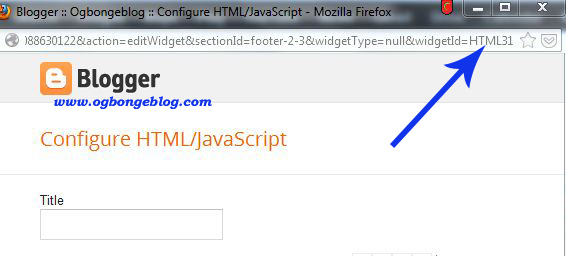
widgetID

==> Go to “ Template “. Under “ Mobile “, select “ Yes. Show mobile template on mobile devices ” and choose “ Custom ” from the “ choose mobile template ” dropdown box.

==> Save your settings.

Now, we need to activate the Addynamo ad to be displayed on the Blogger mobile view.

==> Go to “ Template ” > “ Edit HTML “

==> Click on the “ Jump to Widget ” tab and click on the widgetID of the Addynamo unit you added to your blog earlier. This will take you to the code of the widget in your HTML.

==> Add mobile=’yes’ to the line of code as seen in the screenshot below.

blogger mobile

==> SAVE your template.

View the mobile view of your blog by adding ?m=1 to your blog address eg www.ogbongeblog.com ?m=1 and you should see the Addynamo ad been displayed on the mobile view.

NOTE

If you want it to display ONLY on the mobile view and not on the desktop view, use mobile=’only’ but if you do this, you will keep seeing an error message anytime you want to re-arrange the widgets on your blog layout.

Please, relay your comments, contribution etc via the comment form below.

Do not forget to share this with your friends.

You can read more Addynamo tips here . 

Please Share :
addynamo tips blogger mobile template tips blogger tips

Like What You Read?

Sign Up to get similar articles delivered to your email inbox.

Leave a Reply Cancel reply

Your email address will not be published. Required fields are marked *

34 responses to “How To Make Ad Dynamo Advert Appear On Blogger Mobile View”

  1. Johnson Avatar
    Johnson
    August 28, 2013

    Fantastic! Will give it a try once I get my addynamo account. Your blogger mobile view is so cool. Mine look scattered and also notice the big 120×600 ad banner on the mobile view if I view it on PC and with my Blackberry browser. Can I block it from showing on mobile?

    Loading…
    Reply
    1. Jide Oguns Avatar
      Jide Oguns
      August 28, 2013

      Yes, you can. Use the "jump to widget" to locate the code for the ad banner, then add mobile='no' to it.

      Loading…
      Reply
  2. Antonio Omeihe Avatar
    Antonio Omeihe
    August 28, 2013

    Good Job Jide. I think this works for custom Mobile templates only. Clearify me if I am wrong. Thanks

    Loading…
    Reply
    1. Jide Oguns Avatar
      Jide Oguns
      August 28, 2013

      Yes bro. If you don't switch to "custom", it will not display.

      Loading…
      Reply
  3. Cyracks Zenda Avatar
    Cyracks Zenda
    August 28, 2013

    Good job my man, i have been looking for this tutorial all this while. Thanks for sharing it here.

    Loading…
    Reply
    1. Jide Oguns Avatar
      Jide Oguns
      August 28, 2013

      You're welcome bro. You are one of those that inspired me to write on it. Happy blogging!

      Loading…
      Reply
  4. AKINWEMOYE AKINBOBOLA Avatar
    AKINWEMOYE AKINBOBOLA
    August 28, 2013

    Nice one. Please how can i make related post widget appear on blogger mobile view?

    Loading…
    Reply
    1. Jide Oguns Avatar
      Jide Oguns
      August 29, 2013

      I have published the tutorial some few minutes ago. Click the next Blogger tutorials tab.

      Loading…
      Reply
  5. Kizito Akhilome Avatar
    Kizito Akhilome
    August 28, 2013

    how can i swicth to custom and where can i get custom mobile view please

    Loading…
    Reply
    1. Jide Oguns Avatar
      Jide Oguns
      August 29, 2013

      Bro, pls read the post all over again. The answers to your questions are in the post.

      Loading…
      Reply
  6. Biz Master Avatar
    Biz Master
    August 28, 2013

    Thanks bro.i followed your instructions and every thing worked out fine.thanks alot.i really appreciate

    Loading…
    Reply
    1. Jide Oguns Avatar
      Jide Oguns
      August 29, 2013

      I am glad it worked for you. Have fun

      Loading…
      Reply
  7. Unwana Johnson Avatar
    Unwana Johnson
    August 28, 2013

    pls o is it only working on blogger default templates? mine is not working o

    Loading…
    Reply
    1. Jide Oguns Avatar
      Jide Oguns
      August 29, 2013

      Probably a problem with your third-party template. You might need to reset the post template.

      Loading…
      Reply
  8. Biodun Frank Avatar
    Biodun Frank
    August 28, 2013

    It was unable to saved bro…it says anoda html widget is not unique…something like dat sha….

    Loading…
    Reply
    1. Jide Oguns Avatar
      Jide Oguns
      August 29, 2013

      Send the exact error message to my mail, maybe I can help you fix it

      Loading…
      Reply
  9. Onyema Shedrach Avatar
    Onyema Shedrach
    August 29, 2013

    Thanks Oga at the Top 4 sharing dis Info

    Loading…
    Reply
    1. Jide Oguns Avatar
      Jide Oguns
      August 29, 2013

      You're welcome bro

      Loading…
      Reply
  10. Emmanuel Obed Avatar
    Emmanuel Obed
    August 29, 2013

    Thanks. But how do i limit my post number on the mobile view?

    Loading…
    Reply
  11. AKINWEMOYE AKINBOBOLA Avatar
    AKINWEMOYE AKINBOBOLA
    August 30, 2013

    Thanks man it worked for my blog

    Loading…
    Reply
    1. Jide Oguns Avatar
      Jide Oguns
      August 31, 2013

      You're welcome bro

      Loading…
      Reply
  12. Ologundudu Opeoluwa Abraham Avatar
    Ologundudu Opeoluwa Abraham
    August 30, 2013

    My mobile custom view looks like desktop view. What can I do about it?

    Loading…
    Reply
    1. Jide Oguns Avatar
      Jide Oguns
      August 31, 2013

      Some css tweak can fix it. Guess you are using a third party template.

      Loading…
      Reply
  13. Ajetunmobi sherif Avatar
    Ajetunmobi sherif
    September 1, 2013

    Hello bro

    I already have 2 addynamo on my blog head..i added the mobile one just now and i put 'mobile only' but the ad is still there..dont know why

    Loading…
    Reply
  14. Fleep Talk Avatar
    Fleep Talk
    September 12, 2013

    Thanks for the tutorial. Pls is there a way I can make ads display at the end of each articles in mobile view?

    Loading…
    Reply
  15. Utu Akuko Avatar
    Utu Akuko
    September 20, 2013

    Thanks Bro. Please is there a way I can make addynamo display at the end of each articles in mobile view or web?

    Loading…
    Reply
  16. Dudu Republic Avatar
    Dudu Republic
    October 2, 2013

    thanks for sharing, i've just implemented that on my blog at http://dudurepublic.blogspot.com/ ……and its working fine

    Loading…
    Reply
  17. owopetu abiola Avatar
    owopetu abiola
    October 9, 2013

    my oga its not working for me ooooh, it cant even save talkless of working

    Loading…
    Reply
  18. chukwudi ezie Avatar
    chukwudi ezie
    December 13, 2013

    Error parsing XML, line 2031, column 3: Element type "b:widget" must be followed by either attribute specifications, ">" or "/>". So wat do I do bro? Wen I clcikd save das wat I got

    Loading…
    Reply
  19. Phranq Avatar
    Phranq
    December 22, 2013

    tan u bro it worked but plz my addynamo ads only show dynamo click page dont no if it activate or i did the wrong settings plz help me email me tips Mekus4livingsaint@gmail.com nd plz vist my blog to understand wot i mean http://www.phranqmekus.blogspot.com… . tanxs

    Loading…
    Reply
  20. Phranq Avatar
    Phranq
    December 22, 2013

    bro plz i dnt really no what i did … my mobile post is not dsplaying dont no what to do plz check my mobile blog xo u could help resolve this http://www.phranqmekus.blogspot.com?m=1 email me mekus4livingsaint@gmail.com

    Loading…
    Reply
  21. Ernest Sylvester Avatar
    Ernest Sylvester
    June 19, 2014

    tanks man

    Loading…
    Reply
  22. ladim bellar Avatar
    ladim bellar
    December 13, 2014

    Yoo , I have ads dynamo account but I can not get any ads cod to places in my site. How can I do it?

    Loading…
    Reply
  23. Osama Godwin Avatar
    Osama Godwin
    April 13, 2015

    Error parsing XML, line 2031, column 3: Element type "b:widget" must be followed by either attribute specifications, ">" or "/>". So wat do I do – See more at: https://www.ogbongeblog.com/2013/08/how-to-make-ad-dynamo-advert-appear-on.html#sthash.ED7mjHJn.dpuf

    Loading…
    Reply

WANT TO ADVERTISE?

Chat on WhatsApp

RELATED POSTS

  • How To Create Mobile Edition of Blogger Blog with BloggerTouch App
  • How To Remove Mobstac Code from Blogger/Blogspot Blogs
  • Dudamobile mobile version of Ogbongeblog Vs Mobstac Mobile Version

FEATURED


  • CREDICORP launches C.L.I.C.K.D. Scheme with FG’s 3MTT Programme, expanding affordable consumer credit for locally-assembled laptops and devices for digital workers

    CREDICORP launches C.L.I.C.K.D. Scheme with FG’s 3MTT Programme, expanding affordable consumer credit for locally-assembled laptops and devices for digital workers

  • What Happens to Your Online Accounts When You Die?

    What Happens to Your Online Accounts When You Die?

JOIN AI WEB DESIGN GROUP


  • AI Website Design Training Whatsapp Group by Jidetheblogger

    AI Website Design Training Whatsapp Group by Jidetheblogger

← How Can I Generate and Place Jumia Ad Banners/Links On My Blog?
How To Make Related Posts To Show On Blogger Mobile View →

Join 25,000+ subscribers

Receive our latest blog posts in your inbox.

Search

Social

Facebook

Instagram

Twitter

new ogbongeblog logo

Copyright © 2026 | About | Advertise | Featured | Sitemap | Privacy Policy | Powered by WordPress

Your cart (items: 0)

Products in cart

Product
Details
Total
Subtotal ₦0.00
Shipping and discounts calculated at checkout.
View my cart
Go to checkout

Your cart is currently empty!

Start shopping

Notifications

%d

    LIKE My Fan Page

    Privacy Policy | Copyright © 2012,OgbongeBlog.All Rights Reserved. Powered by Blogger .
    Create a Mobile Site
    View Site in Mobile | Classic
    Share by:


