
Skip to content
new ogbongeblog logo
  • Advertise
  • Blog
  • Contact

How To Make Blog Post Automatically Appear On Facebook and Twitter

  1. Home
  2. Blog
  3. Uncategorized
  4. How To Make Blog Post Automatically Appear On Facebook and Twitter
August 13, 2012

Written by

jidetheblogger Avatar
jidetheblogger

Last Modified :

October 8, 2017

Apart from organic traffic from search engine optimization , you can also be getting free traffic from social networking sites. There are loads of them out there but personally, as at the time of publishing this, I devote more time to Facebook and Twitter .

There are many tricks on how to use Facebook and Twitter in driving traffic to your blog but today, am just sharing one of the tricks. If your blog posts automatically get posted to Facebook and Twitter, you will be getting some hits to your blog, though how much traffic you get from those sites depend on some factors e.g number of friends/fans/followers you have and the number of those friends/fans/followers that are really interested in your blog updates. Will discuss more about this in my future updates.

So, How Do I Get Started?

I use two tools for now: Twitterfeed and Networkedblogs app

Twitterfeed

Once you register at www.twitterfeed.com and add your blog url/feed, you can connect your account to your Fac ebook profile , Facebook pages and Twitter account. Once authorized and connected, whenever you update your blog with a new post, the title of the blog post, with a link to the full article will be sent across automatically to Twitter and also to Facebook.

More so, you can set up a prefix or suffix e.g “ New Post: “, “ please ReTweet ” to be automatically added to the posts sent to Facebook and Twitter. Right at Twitterfeed.com, you’ll see statistics for each post, showing you just how many people clicked on them.
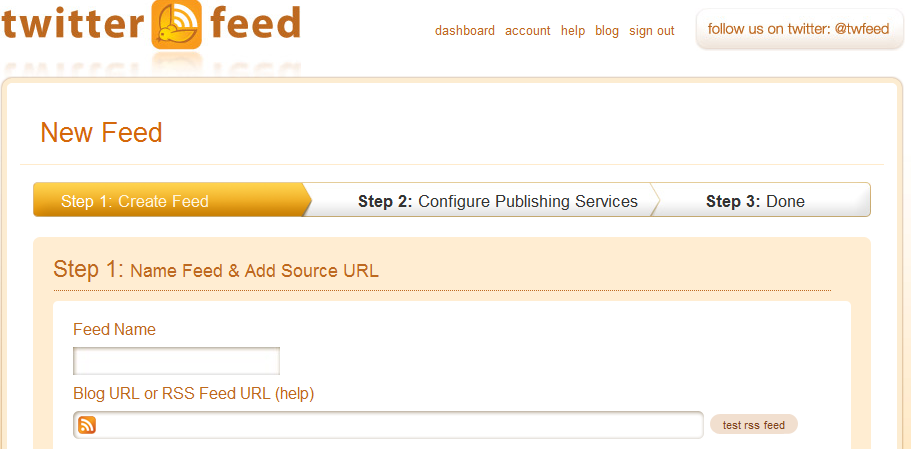
Twitterfeed dashboard

How To Use TwitterFeed

Go straight to Twitterfeed.com and sign up for your free account. Once you sign up, log in and click on the “ Add New Feed ” button.

Enter your blog name and the blog url in the respective boxes and continue to the next steps where you will have to add your Facebook and Twitter accounts. From the Advanced settings page, you can add the post prefix , post suffix , link shortening service to use etc. Feel free to customize the settings to your need.

Networkedblogs

This a Facebook app. Whenever you publish a new post on your blog, this application easily syndicates the post to your Facebook profile , Facebook Page and Twitter . Once you add this application to your Facebook Timeline, all you need to do, is to add your blog’s feed and you are good to go.

NetworkedBlogs

How To Use NetworkedBlogs app

To get started with NetworkedBlogs, go to http://www.networkedblogs.com/blog

Sign in with your Facebook account and authorize it to have access to your profile etc. Once you get to the application page, click on “ Register a Blog “.  Enter your blog link in the provided box and follow the instructions.

Once you are through adding your blog, click on the “ syndication ” link to add your Facebook and Twitter targets. Once done successfully, your blog posts will automatically be appearing on Facebook and Twitter whenever you update your blog.

Kindly, go to my own NetworkedBlogs application page and follow me. If you follow me, so I can follow you back.

If you opt for Networkedblogs app, you can also read about the Networkedblogs Panorama .

Do you know any other web app that allows you to automatically post to Facebook and Twitter?

Please Share :
blog traffic blogger tips

Like What You Read?

Sign Up to get similar articles delivered to your email inbox.

Leave a Reply Cancel reply

Your email address will not be published. Required fields are marked *

15 responses to “How To Make Blog Post Automatically Appear On Facebook and Twitter”

  1. Biodun Avatar
    Biodun
    July 29, 2012

    Nice share there. RSS Graffiti does similar thing. I do use Networkedblogs but it always stop working atimes

    Loading…
    Reply
    1. Jide Oguns Avatar
      Jide Oguns
      July 29, 2012

      Thanks for the info.

      Yes, if you do not log in to your Networkedblogs account within 60 days, it will stop syndicating till the next time you log in there. Same thing happens if you change your Facebook password. You will have to re-authorize the app.

      Loading…
      Reply
  2. emmanuel charles Avatar
    emmanuel charles
    July 30, 2012

    thanks jide i love this post.posting to social sites is great because its one of the traffic generation tool and helps to give more exposure blogs.i have connected my blog to facebook and twitter and i get lots of traffic. thanks for your time

    Loading…
    Reply
    1. Jide Oguns Avatar
      Jide Oguns
      August 6, 2012

      You welcome bro. Yes, the more fans, friends and followers you have on those social sites, the more exposure you get.

      Loading…
      Reply
  3. GistNaija Avatar
    GistNaija
    August 5, 2012

    Great info! i was looking for these info for a long time now. God bless you Jide. You are the best internet tutor in Naija. May be second to only Akin Alabi. Thanks again and God bless. From today i will not miss your site even for a day.

    Loading…
    Reply
    1. Jide Oguns Avatar
      Jide Oguns
      August 6, 2012

      Thanks for stopping by and am glad you are enjoying my posts. Happy Blogging bro.

      Loading…
      Reply
  4. Ero-Sennin Avatar
    Ero-Sennin
    September 1, 2012

    mate, you can also make use of PostCron, thanks for the share.

    Loading…
    Reply
    1. Jide Oguns Avatar
      Jide Oguns
      September 2, 2012

      Ok. I Will check it out. Thanks alot.

      Loading…
      Reply
  5. IGBALAYE OLAYEMI Avatar
    IGBALAYE OLAYEMI
    September 22, 2012

    You can also use wordpress plugin to do that work especially when you use social network auto-poster. thanks for sharing

    Loading…
    Reply
  6. adeshokan shamsudeen Avatar
    adeshokan shamsudeen
    October 2, 2012

    what a nice post,in addition to twitterfeed functionality it also work well for linkedln.twitterfeed is what am using now.social network auto poster did not work on my blog.it replies me errow message.i had to uninstall it and settle with twitterfeed.

    Loading…
    Reply
  7. Debarpan Avatar
    Debarpan
    October 4, 2012

    I have already done with network blog and rss graffiti.Now this time for twitterfeed.Let's c how good is it…..

    Loading…
    Reply
  8. Femi Olanipekun Avatar
    Femi Olanipekun
    October 8, 2012

    Thanks alot bro, great postings

    Loading…
    Reply
  9. Taye hassan Avatar
    Taye hassan
    January 11, 2013

    Cool gud job, let. Me try it u too gbasky

    Loading…
    Reply
  10. Omon Itoya Avatar
    Omon Itoya
    January 17, 2015

    Thank you so Mich Jose. Have been looking for how to do this for a long time. Extremely helpful. Have been able to synchronise my blog account with face book and twitter

    Loading…
    Reply
  11. Temmy daryour Avatar
    Temmy daryour
    November 1, 2015

    Networkedblogs says one cannot register blog…. Is there any way out?

    Loading…
    Reply

WANT TO ADVERTISE?

Chat on WhatsApp

RELATED POSTS

  • How Can I Increase My Blog Traffic for Free?
  • NetworkedBlogs: Get Traffic To Your Blog
  • Top 7 Ways You Can Create Awareness and Get Huge Followership To Your Blog

FEATURED


  • How to Pay Chinese Suppliers in RMB (Alipay & WeChat Pay) or Swap Naira, Kenyan Shillings, Ghana Cedis & USDT in Minutes

    How to Pay Chinese Suppliers in RMB (Alipay & WeChat Pay) or Swap Naira, Kenyan Shillings, Ghana Cedis & USDT in Minutes

JOIN AI WEB DESIGN GROUP


  • AI Website Design Training Whatsapp Group by Jidetheblogger

    AI Website Design Training Whatsapp Group by Jidetheblogger

RANDOM POSTS


    I Got One Free Month of Meta Verified After I Tried to Cancel My Subscription


    How To Make Money On Bamboo App: 5 Proven Ways


    How To Use Vibe Coding To Make Money


    How I Earn $100 Per Referral from Affiliate Marketing


    Bluetooth Printer That Connects To Phone


    Can I Use OPay Card for Facebook Ads?


    Why I Moved My Websites From Namecheap To Interserver.net


    How I Earn $50 Per Sale


MORE RANDOM POSTS
← Check WAEC 2012 Results and Analysis
UBA Africard: Naira Visa Prepaid Card For Online Payments →

Join 25,000+ subscribers

Receive our latest blog posts in your inbox.

Search

Social

Facebook

Instagram

Twitter

new ogbongeblog logo

Copyright © 2026 | About | Advertise | Featured | Sitemap | Privacy Policy | Powered by WordPress

Your cart (items: 0)

Products in cart

Product
Details
Total
Subtotal ₦0.00
Shipping and discounts calculated at checkout.
View cart
Go to checkout

Your shopping cart is empty

Return to shop

Notifications

%d

    LIKE My Fan Page

    Privacy Policy | Copyright © 2012,OgbongeBlog.All Rights Reserved. Powered by Blogger .
    Create a Mobile Site
    View Site in Mobile | Classic
    Share by: