
Skip to content
new ogbongeblog logo
  • Advertise
  • Blog
  • Contact

How to Reveal Hidden or Shortened URLs

January 21, 2014

·

how to
jidetheblogger Avatar
jidetheblogger

I use Twitter a lot! Using Twitter a lot comes with it’s own challenges. One of such challenges is that I get lots of Tweets from people via replies and DM (direct messages) asking me to check out some URLs (links). Due to the fact that Twitter only allows 140 characters, people choose to hide or shorten the URLs.

Some of these URLs are genuine while most are complete spam. Clicking on these links might expose your Twitter account to hacking. It might also be a source of malware to your computer, tablet or mobile device. The best way to confirm this is to find a way to reveal all hidden or shortened URLs you get on Twitter.
You should also do the same thing for all the shortened URLs you get in your email address and over the internet and social networks. This would secure you from a lot of troubles and unnecessary clicking of the URLs you are not sure of.
How Do I Reveal Hidden or Shortened URLs?
I use  UrlReveal  to achieve this. The site has been very useful for me. You can use it also. You don’t need to rush and start clicking all the hidden or shortened URLs you receive.
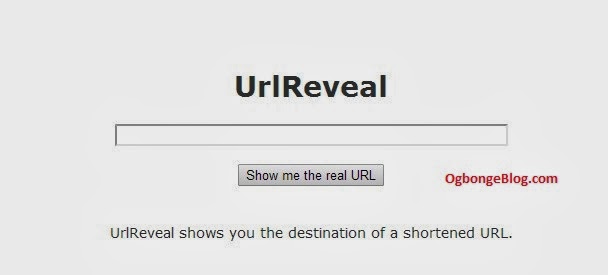
urlReveal
As shown in the image above, enter the hidden or shortened URL in the space provided and click on “Show me the real URL” button.
I hope this helps? Let me know if it does.
Follow me on Twitter at  https://twitter.com/adesojiadegbulu
Regards,
Adesoji
Please Share :
security tips

Like What You Read?

Sign Up to get similar articles delivered to your email inbox.

Leave a Reply Cancel reply

Your email address will not be published. Required fields are marked *

11 responses to “How to Reveal Hidden or Shortened URLs”

  1. Doyin Avatar
    Doyin
    January 21, 2014

    Nice share Soji but how I wish it can be revealed by just moving my mouse over the hidden link.

    Loading…
    Reply
    1. Adesoji Avatar
      Adesoji
      January 21, 2014

      Hi Doyin, most of the links hidden behind bit.ly, goo.gl and others can't be revealed by just moving the mouse over them. This is why this site comes in handy

      Loading…
      Reply
  2. Abayomi Avatar
    Abayomi
    January 21, 2014

    Thx but does this work on mobile phones?

    Loading…
    Reply
    1. Jide Oguns Avatar
      Jide Oguns
      January 21, 2014

      Yes, it works on mobile phones. You will need to copy the URL you want to reveal, open the UrlReveal site on a new tab, paste the hidden URL and click on the button. You will see the full URL of the hidden one

      Loading…
      Reply
  3. Unwana Johnson Avatar
    Unwana Johnson
    January 21, 2014

    This is a nice tips, thatnks for sharing

    Loading…
    Reply
    1. Jide Oguns Avatar
      Jide Oguns
      January 21, 2014

      You welcome.

      Loading…
      Reply
  4. Ayoola Ayobami Avatar
    Ayoola Ayobami
    January 21, 2014

    Nice one, I think i will start using it by now… Before, I will just click on any link without worrying if its gonna wreck havoc on my PC and my accounts, maybe because of my trusted Avast Internet Security. Thanks AdeSoji

    Loading…
    Reply
    1. Jide Oguns Avatar
      Jide Oguns
      January 21, 2014

      It's good to have internet security. It's also better to be sure of what you are clicking before clicking.

      Loading…
      Reply
  5. Inyavic Avatar
    Inyavic
    January 22, 2014

    Thanks. I've gotta start using that

    Loading…
    Reply
  6. FIZZY : AB Avatar
    FIZZY : AB
    January 24, 2014

    I need your contact. Email or mobile number. My email webbiz842@gmail.com

    Loading…
    Reply
  7. OKAFOR OBINNA Avatar
    OKAFOR OBINNA
    July 20, 2014

    This is a nice post Jide and it sure would help a lot of people get through the challenge of unveiling hidden urls. http://www.okaforobinna.blogspot.com

    Loading…
    Reply

WANT TO ADVERTISE?

Chat on WhatsApp

RELATED POSTS

  • How I block ads from specific websites from displaying on my blog
  • How To Detect Broken Links On Your Blog for FREE
  • How To AutoPost Your Blog Posts To Twitterbranding

FEATURED


  • CREDICORP launches C.L.I.C.K.D. Scheme with FG’s 3MTT Programme, expanding affordable consumer credit for locally-assembled laptops and devices for digital workers

    CREDICORP launches C.L.I.C.K.D. Scheme with FG’s 3MTT Programme, expanding affordable consumer credit for locally-assembled laptops and devices for digital workers

  • What Happens to Your Online Accounts When You Die?

    What Happens to Your Online Accounts When You Die?

JOIN AI WEB DESIGN GROUP


  • AI Website Design Training Whatsapp Group by Jidetheblogger

    AI Website Design Training Whatsapp Group by Jidetheblogger

← Find Location of Anyone With Glo Family and Friends Finder
Mobiz : Site Where You Can Create Mobile Site For Your Business →

Join 25,000+ subscribers

Receive our latest blog posts in your inbox.

Search

Social

Facebook

Instagram

Twitter

new ogbongeblog logo

Copyright © 2026 | About | Advertise | Featured | Sitemap | Privacy Policy | Powered by WordPress

Your cart (items: 0)

Products in cart

Product
Details
Total
Subtotal ₦0.00
Shipping and discounts calculated at checkout.
View my cart
Go to checkout

Your cart is currently empty!

Start shopping

Notifications

%d

    LIKE My Fan Page

    Privacy Policy | Copyright © 2012,OgbongeBlog.All Rights Reserved. Powered by Blogger .
    Create a Mobile Site
    View Site in Mobile | Classic
    Share by:


