
Skip to content
new ogbongeblog logo
  • Advertise
  • Blog
  • Contact

How To Save Facebook Links In News Feed To Read Later On FB

July 23, 2014

·

how to
jidetheblogger Avatar
jidetheblogger

Facebook, the world’s largest social network has announced the launch of a new feature, tagged “ SAVE “. The Facebook SAVE feature simply allows Web, Android and iOS users to save links, places, music and other things while browsing Facebook News Feed, to a list where they can view them later.

So, anytime you find all sorts of interesting items on Facebook that you don’t have time to explore right away, you can now save them to check them out later when you have more time. If you use the feature to save for later on Facebook, only you can see the things you save and you can choose if you want to share them.

You can view the items you saved at any time by going to your saved items in the “ More ” tab on mobile or by clicking the link on the left hand side of Facebook on the web . Your saved items list is organized by category and you can share each item with your friends or move it into your archive list. Right there you can as well delete each saved item.
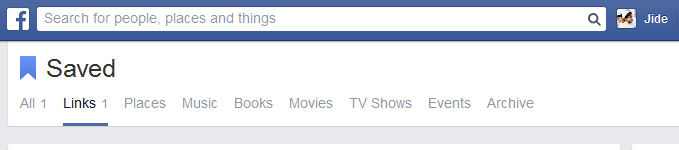
Categories of Items Saved on Facebook

How To Save on Facebook

To save something you see on Facebook (links, places, music, books, movies and TV shows), tap the Save icon or choose the Save option in the menu on posts in News Feed to save it for later.

Save items on Facebook

How To Find Saved Items

From News Feed , click on Saved in the navigation links.
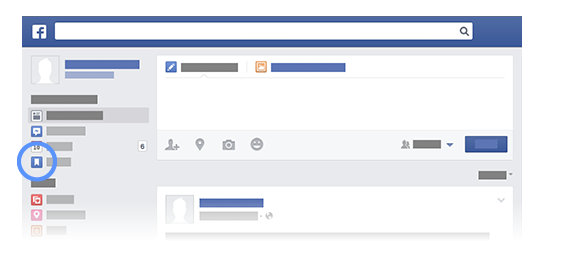
find saved items on Facebook

That’s all.

What’s your take on this new feature?

Please Share :
facebook

Like What You Read?

Sign Up to get similar articles delivered to your email inbox.

Leave a Reply Cancel reply

Your email address will not be published. Required fields are marked *

6 responses to “How To Save Facebook Links In News Feed To Read Later On FB”

  1. James Avatar
    James
    July 23, 2014

    Finally, a useful feature. Makes sense Jide.

    Loading…
    Reply
  2. Anonymous Avatar
    Anonymous
    July 23, 2014

    A feature I've really been dreaming of. So cool.

    Loading…
    Reply
  3. Anonymous Avatar
    Anonymous
    July 23, 2014

    That's cool.. Nice one there… More tech news at http://www.g3how.blogspot.co.za

    Loading…
    Reply
  4. Okechukwu Hod Ngene Avatar
    Okechukwu Hod Ngene
    July 24, 2014

    That's a cool feature from Mark Zuckerberg and his team of engineers. The feature is synonymous to 'bookmarking' feature. I like it.

    Loading…
    Reply
  5. toby allen Avatar
    toby allen
    July 24, 2014

    This new feature will be very helpful, sometimes i see some links with contents that i can't explore right away on facebook. With this, i can just sit back and relax later in the day to check them out. Thanks for sharing this

    Loading…
    Reply
  6. Terungwa Avatar
    Terungwa
    July 26, 2014

    That is as it should be: a serious business has to constantly introduce – and reintroduce great features to stay relevant. So far, this feature is surely amongst the greatest…who has the time to check out all the 'wonderful' items in one's feed at any given time?

    Always,
    Terungwa
    http://www.makemoneyonlinenigerians.com

    Loading…
    Reply

WANT TO ADVERTISE?

Chat on WhatsApp

RELATED POSTS

  • Facebook Business Suite Lets You Post To Your Business Pages On Facebook and Instagram At The Same Timefacebook business suite app download and how to use it
  • New Facebook Comment form for Blogger/Blogspot Blogs( reply & notifications enabled)
  • Facebook Shops: Helping Small Businesses Set Up Single Online Store on both Facebook and InstagramFacebook shops in Nigeria

FEATURED


  • CREDICORP launches C.L.I.C.K.D. Scheme with FG’s 3MTT Programme, expanding affordable consumer credit for locally-assembled laptops and devices for digital workers

    CREDICORP launches C.L.I.C.K.D. Scheme with FG’s 3MTT Programme, expanding affordable consumer credit for locally-assembled laptops and devices for digital workers

  • What Happens to Your Online Accounts When You Die?

    What Happens to Your Online Accounts When You Die?

JOIN AI WEB DESIGN GROUP


  • AI Website Design Training Whatsapp Group by Jidetheblogger

    AI Website Design Training Whatsapp Group by Jidetheblogger

← Monitor.us: Free Pingdom Alternative That Alerts You When Your Website is Down
13 Funny Ramadan Eid Memes (2014) →

Join 25,000+ subscribers

Receive our latest blog posts in your inbox.

Search

Social

Facebook

Instagram

Twitter

new ogbongeblog logo

Copyright © 2026 | About | Advertise | Featured | Sitemap | Privacy Policy | Powered by WordPress

Your cart (items: 0)

Products in cart

Product
Details
Total
Subtotal ₦0.00
Shipping and discounts calculated at checkout.
View my cart
Go to checkout

Your cart is currently empty!

Start shopping

Notifications

%d

    LIKE My Fan Page

    Privacy Policy | Copyright © 2012,OgbongeBlog.All Rights Reserved. Powered by Blogger .
    Create a Mobile Site
    View Site in Mobile | Classic
    Share by:


