


Sometimes ago, I explained how you can use the Facebook “ Smart Lists and Close Friends ” to organize your friends on Facebook so you can filter the stories you see in News Feed or post an update for specific people.
These Facebook lists have been useful but it’s frustrating receiving notifications of Close Friends
even when you did not comment or Like
their Status Updates.
When you add one of your friends to your Close Friends
list, you’ll automatically receive notifications about what that friend posts on Facebook. You can edit your notification preferences or turn off these extra notifications.
How To Get Started
Login to your Facebook account ( via a computer )
From your News Feed/Home Page, find your Lists in the left-column
Click on the Close Friends
list
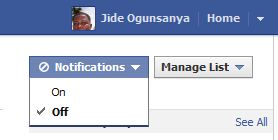
Click on the Notifications dropdown
at the top-right corner
Click on “ OFF
” as seen in the picture below:
That’s all.
I hope this helps….
Connect with me on Facebook @ www.facebook.com/jideogunsanya







Leave a Reply