
Skip to content
new ogbongeblog logo
  • Advertise
  • Blog
  • Contact

How To Submit Blog To Bing and Yahoo Search Engine

January 23, 2012

·

digital marketing
jidetheblogger Avatar
jidetheblogger

After creating your blog , I am sure you will like to see your blog appear as part of the search results displayed when Yahoo search engine is used to search for anything that you might have posted to your blog. For your blog to be listed as part of Yahoo search results, you must add your site to Yahoo. This is part of what is known as “ Search Engine Optimization “.

In my previous posts, I shared with you how to add url to Google search engine and also how to submit sitemaps via Google webmaster tools . Today, I am sharing with you, how to add your blog to Bing and Yahoo search engines, so that your blog can get listed in search results returned by Yahoo and Bing search engines.

With the completion of algorithmic transition to Bing, Yahoo! Search has merged Site Explorer into  Bing Webmaster Tools . Hence, to ensure that your blog continue to get high quality organic search traffic from Bing and Yahoo, you must also be using Bing webmaster Tools, in addition to Google webmaster Tools.

How To Get Started

==> You must have an hotmail or live email address. If you do not have one, get one for free at www.outlook.com

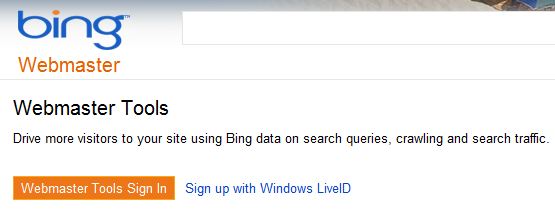
Go to :  http://www.bing.com/toolbox/webmaster

Click on “ Webmasters Tools Sign In “
Add site to google

Once logged in, enter your blog address in the “Add a Site” field and click “ ADD “

You will be redirected to a page where you will be prompted to enter your blog’s sitemap. If you know your blog’s sitemap URL, add it, if not, ignore and click “ADD”. You can add the sitemap later.

Thereafter, you will be presented with three options with which you can verify your site.

Click on “ Option 2: Copy and paste a meta tag in your default webpage “.

You will see a code. You will have to paste this code into your blog. ( Don’t close this page)

Open a new window, log in to your blogger blog and go to Design ==> Edit html (if using old dashboard) or go to Template ==> Edit html ==> Proceed ( if using new Blogger dashboard).

Once you are in the “ edit html ” mode, use  CTRL F  to find   <b:skin>

Copy and paste the code from Bing Webmaster Tools right above it.

Click on “ Save Template “

Go back to the “Bing Webmaster Tools” page and click on the “ Verify ” button.

That’s all.

You will have to wait for some days before you will start seeing some data about the blog you added.

In my future post, I will be sharing with you how to add Blogger/Blosgpot Sitemap to Bing webmaster Tools and other SEO related tutorials . So,  subscribe  to my blog if you want to be receiving the tutorials in your email inbox even if you are not online when I post the tutorials.  Make sure you verify your subscription  by clicking on the link that will be in the mail that will be sent to you once you subscribe.

Feel free to contribute and ask questions using the comment form below.

Cheers!

Please Share :
blogger tips seo

Like What You Read?

Sign Up to get similar articles delivered to your email inbox.

Leave a Reply Cancel reply

Your email address will not be published. Required fields are marked *

12 responses to “How To Submit Blog To Bing and Yahoo Search Engine”

  1. Oluwayomi Obadina Avatar
    Oluwayomi Obadina
    January 23, 2012

    Well, it is nice you are sharing this info. What I do is that I submit my post link to bing after posting and I do get some traffic from Yahoo and Bing to my Internet Investment Ideas blog.

    Loading…
    Reply
    1. Jide Oguns Avatar
      Jide Oguns
      January 24, 2012

      Instead of submitting your links one by one, it is better you submit the sitemap of your blog using bing webmaster tools

      Loading…
      Reply
  2. 9ja4life Avatar
    9ja4life
    January 26, 2012

    bros , tank u o! i don try all d expo wey u write for here, dem no get part two

    Loading…
    Reply
    1. Jide Oguns Avatar
      Jide Oguns
      January 27, 2012

      thanks man

      Loading…
      Reply
  3. Engr Abdul Avatar
    Engr Abdul
    January 27, 2012

    Is there a way i can ping yahoo? Thanks

    Loading…
    Reply
  4. Jide Oguns Avatar
    Jide Oguns
    January 27, 2012

    Just use Pinging services like Pingoat.com or Pingomatic.com and Yahoo will be pinged.

    Loading…
    Reply
  5. saka Ahmed Avatar
    saka Ahmed
    October 16, 2012

    thanks man worked fyn, you are the best

    Loading…
    Reply
  6. Lasgidi Online Avatar
    Lasgidi Online
    March 1, 2016

    Thank you for this admin, we are currently implementing this for our blog.

    http://www.lasgidionline.com.ng

    Loading…
    Reply
  7. Abraham Omaji Avatar
    Abraham Omaji
    July 24, 2016

    Trying to summit dey ask me to login Microsoft account, I did and can't access it

    Loading…
    Reply
    1. George Emmanuel Avatar
      George Emmanuel
      September 20, 2016

      You must have a Microsoft account to be able to do it. Try to register for one. It wont take more than 15 minutes.

      Loading…
      Reply
  8. ukwueze favour Avatar
    ukwueze favour
    October 27, 2016

    interesting

    Loading…
    Reply
  9. Ideas beams Avatar
    Ideas beams
    July 14, 2017

    This save my ass this time. Thanks for this info.

    Loading…
    Reply

WANT TO ADVERTISE?

Chat on WhatsApp

RELATED POSTS

  • How to Submit Blogger Sitemap to Bing Webmaster Tools
  • What is Dogpile?
  • Google Webmasters: How To Add your blog/site to Google Search Listings

FEATURED


  • CREDICORP launches C.L.I.C.K.D. Scheme with FG’s 3MTT Programme, expanding affordable consumer credit for locally-assembled laptops and devices for digital workers

    CREDICORP launches C.L.I.C.K.D. Scheme with FG’s 3MTT Programme, expanding affordable consumer credit for locally-assembled laptops and devices for digital workers

  • What Happens to Your Online Accounts When You Die?

    What Happens to Your Online Accounts When You Die?

JOIN AI WEB DESIGN GROUP


  • AI Website Design Training Whatsapp Group by Jidetheblogger

    AI Website Design Training Whatsapp Group by Jidetheblogger

← How To Print Recharge Cards/Vouchers With Software (Mtn, Glo, Airtel etc)
Microsoft Office for the iPad Free Alternative: CloudOn App →

Join 25,000+ subscribers

Receive our latest blog posts in your inbox.

Search

Social

Facebook

Instagram

Twitter

new ogbongeblog logo

Copyright © 2026 | About | Advertise | Featured | Sitemap | Privacy Policy | Powered by WordPress

Your cart (items: 0)

Products in cart

Product
Details
Total
Subtotal ₦0.00
Shipping and discounts calculated at checkout.
View my cart
Go to checkout

Your cart is currently empty!

Start shopping

Notifications

%d

    LIKE My Fan Page

    Privacy Policy | Copyright © 2012,OgbongeBlog.All Rights Reserved. Powered by Blogger .
    Create a Mobile Site
    View Site in Mobile | Classic
    Share by:


