


If you will prefer to use Google Adwords
to advertise your business, blog or website on Ogbongeblog instead of the direct advert placement option
, kindly follow the steps highlighted below:
==> Log in to www.google.com/adwords
==> Click “ New Campaign
“
==> Choose “ Display Networks Only
“.
==> Enter a campaign name e.g “Campaign On OgbongeBlog
“
==> Scroll to “ Locations and languages
” and select the country you want to target.
==> Scroll to “ Bidding and budget
” and select “ AdWords will set my bids to help maximize clicks within my target budget
“
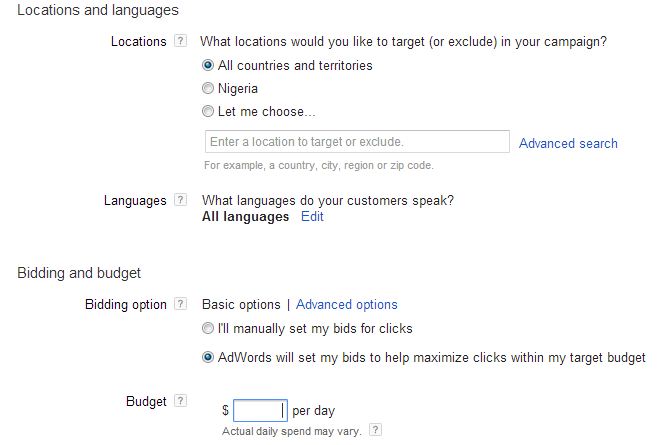
==> In the budget per day box, enter the amount you can afford to spend per day
==> Click “ Save and continue
“
==> You will see a new page. Enter a name in the “ Ad group Name
” box
==> Choose “ Use a different targeting method
“, then “ Placements
“

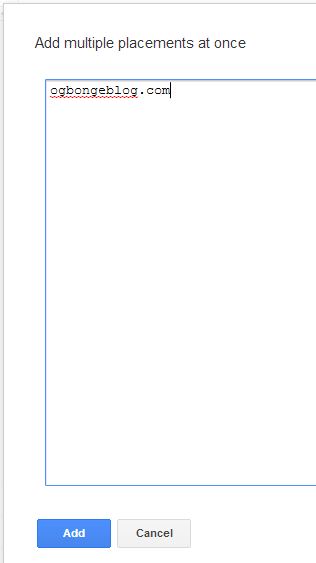
==> Under “Placements” section, click “ Add multiple placements at once
“
==> Enter “ ogbongeblog.com
” in the space provided and click “ add
“.
==> Click “ Save and continue
“
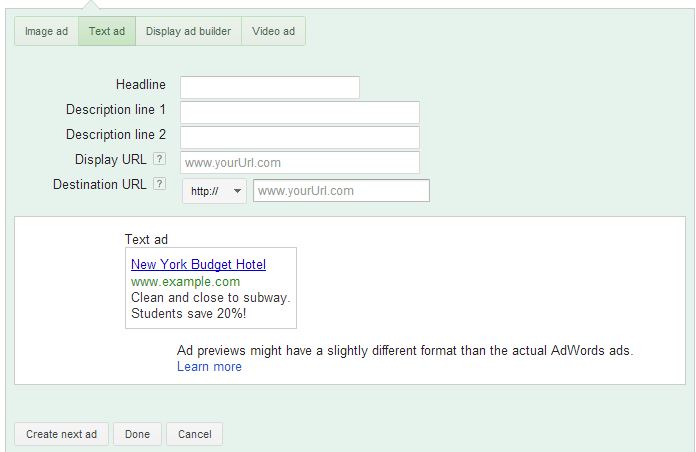
==> You will see the new page where you will create your ad. Create your ad
and click “ done
“.
==> Once Google approves your ad, it will start displaying on Ogbongeblog.
That’s all.
You can always log in to your Adwords account anytime to track the performance of your ads.
I hope this helps.
If any question, please let me know via comments.
Don’t know how to pay Google for the ads, read “ How To Pay for Ads If You Want To Advertise Using Google Adwords “.
Cheers!








Leave a Reply