
Skip to content
new ogbongeblog logo
  • Advertise
  • Blog
  • Contact

How to use Mobstac to create mobile version of blogger blog plus Adsense integration

November 2, 2011

·

Uncategorized
jidetheblogger Avatar
jidetheblogger
UPDATE: This service is no longer FREE of Charge

In one of my posts, I shared with you how to create mobile version of your blogger blog using BloggerTouch app. BloggerTouch doesn’t support Google Adsense integration, hence the reason I searched for an alternative. I found an alternative that supports Google Adsense and I have decided to share it with you. It is not totally FREE like BloggerTouch but you can still enjoy it till you reach the Pageviews limit for the free version. The Alternative am talking about is MOBSTAC .
So, what is MobStac?

Mobstac helps in  redirecting your blog page into mobile version automatically if visitors visit your blog from any mobile or tablet device even if the visitor access your blog with  Opera Mini .


I am currently using Mobstac to render my blog for mobile viewing because it supports Google Adsense Integration , supports Facebook Comment forms , provides traffic analysis of my mobile blog, allows Facebook users to easily “Like” my blog posts etc

More so, Mobstac allows you to customize your blog Navigation and also offers you the chance to use a custom domain for your mobile blog i.e use your own subdomain like m.yourdomain.com to serve as your Mobstac-powered site.
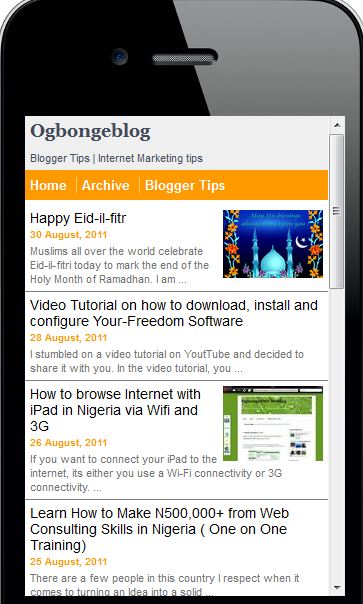

Mobstac


So, How Do I get Started?

Go to www.mobstac.com and sign up.  You can connect with your Facebook account.

Then, check your email for a verification link and click on the link to verify your registration. ( Very Important )

So What Next?


I recommend you get the nest steps done via a computer


Once you have verified your registration, login to the site and you will be presented with your dashboard.

While logged in, go to FAQs and you should see a link on how to add the mobstac plugin to your blog. Something like: “ View MobStac plugin installation instructions for: ogbongeblog “. Click on it and follow the instruction.

You will have to add a piece of code after <body>  section of your blog html  and also add another piece of code to your blog’s sidebar  via the html/javascript gadget.

When adding the sidebar code, make sure you edit the url value in the code with the link to your mobstac profile .

So, How DO I add Google Adsense to my mobile blog?

For you to integrate Google adsense into your mobstac-powered mobile blog, you will need your Adsense Publisher ID .

To get the publisher ID, login to www.google.com/adsense and look up by the top right hand corner. You should see something like  pub-xxxxxxxxxxxxxx. 


That is your Publisher ID. Copy and save it somewhere ( including the pub- part ).


So, What next?

Go to dashboard , then advertsing.  choose “Top/bottom of page”.

Choose “Google Adsense”, then enter your publiser id into the publisher id and channel id boxes. i.e your publisher id is what will be in the channel id box and also the publisher id box.

That’s all.

To view earnings from your mobstac-powered mobile blog, login to www.google.com/adsense and you should see your earnings under “Adsense for mobile content”.

You have to be aware of the fact that Mobstac shares your Adsense revenue with you. You can read more on that here .

NOTE :  make sure you set your blog Feed to  FULL  for this trick to work fine without any “read more” problem. To fix this, Login to Blogger, go to SETTINGS, “Site Feed” and make sure you set “Allow Blog Feed” to FULL.

I hope this helps..

Thumbs up to my fellow bloggers at  theLatestInfos and BJStardom for helping with infos with regards to the Adsense integration via BloggersLab .

If you have contributions to make or questions to ask, kindly make use of the comment form.

In my future posts, I will be sharing with you how to add Facebook comment form and Like button to your mobstac-powered mobile blog amongst other tutorials related to Mobstac. If you do not want to miss them, SUBSCRIBE TO OgbongeBlog.com Now!.

CLICK HERE TO SUBSCRIBE NOW!


CLICK HERE TO READ MORE GOGLE ADSENSE TIPS.


Cheers!

Please Share :
adsense blogger tips mobstac tips

Like What You Read?

Sign Up to get similar articles delivered to your email inbox.

Leave a Reply Cancel reply

Your email address will not be published. Required fields are marked *

8 responses to “How to use Mobstac to create mobile version of blogger blog plus Adsense integration”

  1. Benedict Avatar
    Benedict
    August 30, 2011

    I have been waiting for this for quite a long time now. thanks for sharing but I have stumbled on some blogs using it which are not showing the full content unlike yours. why ?

    Loading…
    Reply
  2. Jide Ogunsanya Avatar
    Jide Ogunsanya
    August 30, 2011

    This will happen if the blogger did not set his/her blog feed to FULL. I talked about it in the post above where I said the blogger should Login to Blogger, go to SETTINGS, "Site Feed" and make sure the "Allow Blog Feed" is set to FULL.

    Loading…
    Reply
  3. Olawale Daniel Avatar
    Olawale Daniel
    August 30, 2011

    I love this information.It helps though the site link is what makes me to ignore using the mobstac option. I think if the link can be in this form your-site.com/m or m.your-site.com extension. It might even be better to use it.

    BTW: Thanks for sharing this 🙂

    Loading…
    Reply
  4. Sliyng Avatar
    Sliyng
    September 1, 2011

    Your site is not live yet! Please click on the link in the email to verify your email address and publish your MobStac siteI cant find any verification email in my box

    Loading…
    Reply
  5. Jide Ogunsanya Avatar
    Jide Ogunsanya
    September 1, 2011

    @Daniel…What do you need the link for? If you want a custom domain, you can get it too.

    @sly..check your spam or login to your mobstac dashboard and see if you can request for the verification email to be resent to you

    Loading…
    Reply
  6. jaypei Avatar
    jaypei
    September 1, 2011

    Oshe…am live o… http://www.gistceleb.mobstac.com

    Loading…
    Reply
  7. Enairablog Avatar
    Enairablog
    April 13, 2012

    You are the man….Thanks for the information

    Loading…
    Reply
  8. Iyke Eche. Avatar
    Iyke Eche.
    December 20, 2017

    Hi Ogbonge, I just checked on http://www.mobstac.com but their no space for registration. Please can you help me with any another of doing it or another way to monetize my site on opera mini. Thanks

    Loading…
    Reply

WANT TO ADVERTISE?

Chat on WhatsApp

RELATED POSTS

  • How To Remove Mobstac Code from Blogger/Blogspot Blogs
  • Dudamobile mobile version of Ogbongeblog Vs Mobstac Mobile Version
  • How I Use Mobstac To Create Mobile Custom Domain (m.ogbongeblog.com)

FEATURED


  • CREDICORP launches C.L.I.C.K.D. Scheme with FG’s 3MTT Programme, expanding affordable consumer credit for locally-assembled laptops and devices for digital workers

    CREDICORP launches C.L.I.C.K.D. Scheme with FG’s 3MTT Programme, expanding affordable consumer credit for locally-assembled laptops and devices for digital workers

  • What Happens to Your Online Accounts When You Die?

    What Happens to Your Online Accounts When You Die?

JOIN AI WEB DESIGN GROUP


  • AI Website Design Training Whatsapp Group by Jidetheblogger

    AI Website Design Training Whatsapp Group by Jidetheblogger

← N950-Per-Day-System Update: Get THREE Profitable Online Businesses set up for You
How I Use Blogger.com To Host Images FREE →

Join 25,000+ subscribers

Receive our latest blog posts in your inbox.

Search

Social

Facebook

Instagram

Twitter

new ogbongeblog logo

Copyright © 2026 | About | Advertise | Featured | Sitemap | Privacy Policy | Powered by WordPress

Your cart (items: 0)

Products in cart

Product
Details
Total
Subtotal ₦0.00
Shipping and discounts calculated at checkout.
View my cart
Go to checkout

Your cart is currently empty!

Start shopping

Notifications

%d

    LIKE My Fan Page

    Privacy Policy | Copyright © 2012,OgbongeBlog.All Rights Reserved. Powered by Blogger .
    Create a Mobile Site
    View Site in Mobile | Classic
    Share by:


