
Skip to content
new ogbongeblog logo
  • Advertise
  • Blog
  • Contact

How To Use Post Office Address For Adsense Account

March 10, 2013

·

Uncategorized
jidetheblogger Avatar
jidetheblogger

Many bloggers do contact me frequently, complaining to me that Google ads have stopped displaying on their blogs. This happens if you fail to verify your Google Adsense account with your A dsense verification PIN after Google might have issued the PIN to you. This PIN comes in a white envelope, to be delivered by mail, to the contact address you provided when registering for your Adsense account.
Though I don’t really know why some bloggers don’t receive their PIN despite having their correct addresses entered in their Adsense accounts but I guess most postmen probably find it difficult in tracing some addresses or they are just been lazy to deliver the PIN to some Addresses.

One thing I have noticed is that if you use a Post office address instead of your home address, the Adsense PIN will be delivered to you at the right time. I used my dad’s postal address to receive my PIN and when I moved to Benue state, I opened my personal postal address, which I used in collecting some Adsense checks via standard delivery before changing my payment method to secure delivery which now makes my checks to be delivered to me via DHL .

So, How Do I Enter Postal Address in my Adsense Account?

If you have a postal address, which doesn’t necessarily have to belong to you, you can use it by editing the contact information in your Adsense account.

Just follow the steps below:

==> Log in to www.google.com/adsense

==> Click on “ Account Settings “

==> Under “ Account Information “, click “ edit address ” and you should see something similar to the screenshot below:
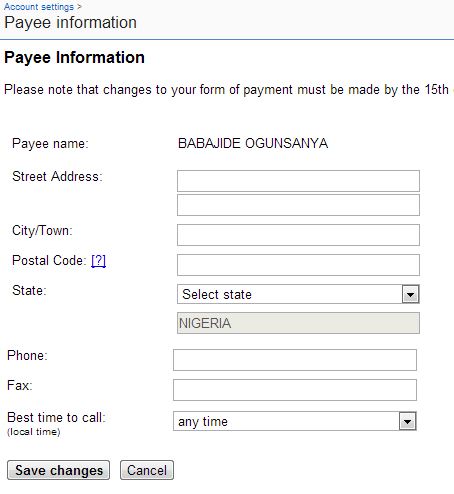
edit address

==> Enter your PO Box number in the “ Street address ” box e.g P.O BOX 123

==> Enter the town the postal box is located as the “ City/Town “

==> Click on the ? to find the postal code for the postal address at NIPOST website

==> Select your state from the drop down box and enter your phone number in the space provided (eg 08012345678)

==> Select “ any time ” as best time to call

==> Click “ Save Changes “

That’s all.

You can go ahead to request for your PIN to be reissued. I explained the process when I published: 4 Reasons Why You Haven’t Received Your Adsense PIN.

Cheers!

Make sure you check out more Adsense tips here .

Please Share :
adsense

Like What You Read?

Sign Up to get similar articles delivered to your email inbox.

Leave a Reply Cancel reply

Your email address will not be published. Required fields are marked *

5 responses to “How To Use Post Office Address For Adsense Account”

  1. Jura Avatar
    Jura
    March 10, 2013

    Thanks for this info Jide but please, can I use my church post office address?

    Loading…
    Reply
  2. Anonymous Avatar
    Anonymous
    March 10, 2013

    Thx bro but I clicked on the ? to get my postal code and it keeps leading me to a dead page. Are you aware of this?

    Loading…
    Reply
  3. Glorious Assembly Ministries Avatar
    Glorious Assembly Ministries
    May 20, 2017

    how can i get the postal address for the google adsense. i just need step to get my postal address

    Loading…
    Reply
  4. Isaac Avatar
    Isaac
    July 13, 2020

    On postal code I rlwrite my p o box

    Loading…
    Reply
  5. Lydia Avatar
    Lydia
    January 18, 2021

    Pls I have been able to get a notification from my postman to come retrieve my pin. Pls do u have ideas on how much I could be charged for the delivery?

    Loading…
    Reply

WANT TO ADVERTISE?

Chat on WhatsApp

RELATED POSTS

  • How To Use Nigeria Voter’s Card to Verify Google Adsense Account
  • Google Adsense PIN: Reasons Why You Might Have Not Received Yours
  • 4 Reasons Why You Haven’t Received Your Adsense PIN

FEATURED


  • CREDICORP launches C.L.I.C.K.D. Scheme with FG’s 3MTT Programme, expanding affordable consumer credit for locally-assembled laptops and devices for digital workers

    CREDICORP launches C.L.I.C.K.D. Scheme with FG’s 3MTT Programme, expanding affordable consumer credit for locally-assembled laptops and devices for digital workers

  • What Happens to Your Online Accounts When You Die?

    What Happens to Your Online Accounts When You Die?

JOIN AI WEB DESIGN GROUP


  • AI Website Design Training Whatsapp Group by Jidetheblogger

    AI Website Design Training Whatsapp Group by Jidetheblogger

← How I Contact AdSense Directly and Receive Support via Email
Mobile Number Portability in Nigeria: How Does It Works? →

Join 25,000+ subscribers

Receive our latest blog posts in your inbox.

Search

Social

Facebook

Instagram

Twitter

new ogbongeblog logo

Copyright © 2026 | About | Advertise | Featured | Sitemap | Privacy Policy | Powered by WordPress

Your cart (items: 0)

Products in cart

Product
Details
Total
Subtotal ₦0.00
Shipping and discounts calculated at checkout.
View my cart
Go to checkout

Your cart is currently empty!

Start shopping

Notifications

%d

    LIKE My Fan Page

    Privacy Policy | Copyright © 2012,OgbongeBlog.All Rights Reserved. Powered by Blogger .
    Create a Mobile Site
    View Site in Mobile | Classic
    Share by:


