


As at the time of publishing this post, Web4africa is giving out free .com.ng domain names. With this free .co.ng domain name, you can easily start making money from “Adsense for Domain”. I have claimed my free domain name and my Adsense for Domain is now running.
I simply earn money and get paid by Google when visitors to the site click on the ads. Period!
Steps
1
. Go to web4africa
to register for your free .com.ng domain name.
During the registration process, make sure you enter “ NG@50
” as your promotional code and validate it by clicking the “ validate code
” button before clicking on “ check out
“.
You can use www.nameboy.com for domain name suggestions. Make sure you use a domain name that makes sense, probably with high-paying keywords.
2 . Once your domain name has been approved and is active , login to your web4africa account. Click on “ My Domains “. Then, click on the active domain name you want to use for Adsense for Domain and click on the “settings” button as indicated in the picture below.

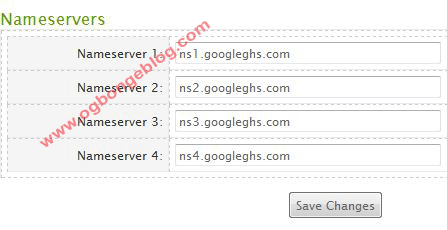
Click on the button and you should be taken to a new page. While on the new page, scroll down till you see the “Nameservers” box. Delete whatever might be there and enter the values below.
- ns1.googleghs.com
- ns2.googleghs.com
- ns3.googleghs.com
- ns4.googleghs.com
Then, click “Save changes”. Make sure you entered the right values as in the picture below.
3 . The next step is to sign in to your AdSense account and visit the AdSense Setup tab. Then, choose AdSense for domains as the product to begin setting up your domains. Click the + Add new domains link, which will take you to the Add Parked Domains page.
While on the page, you will see a text box. Enter the your domain name into the text box. Remember to specify the language of your domains as well, and note that you can add maximum of 1500 domains, one by one, inside the text box.
After the domain name has been added, it will appear under the Pending subtab of the AdSense for domains page. All domains submitted are subject to Google’s approval per program policies of Google.
Once Google approves your domain, your domain should automatically move from the Pending subtab to the Active subtab as soon as the records validate (usually 48 hours or less). If your domain remains in the Pending subtab after this time, check the validation status information page to determine why. If your domain has moved to the Disapproved subtab, learn why this may have happened .
Once your domain has been approved, you should see Google ads been displayed on the web page. When visitors click on them, you earn money but DO NOT CLICK ON ADS ON YOUR OWN SITE. Google will detect it and will ban you for life. Don’t ask me how…..just abide by the rules.
That’s all.
I hope this info helps….
If this tutorial seems complex for you to handle, I can help you set it up for just N1500 . Check the payment page and contact me. 07062918898.
Remember, NEVER CLICK ON YOUR ADS . More so, Make sure you read and abide by the Google Adsense Policies or else, Google will ban you for life once Google detects foul play from you.
Don’t be deceived by some folks posting pictures of outrageous earnings because you might earn thousands but Google might not pay you once its time for them to send you the cheque, IF THEY DETECT FRAUD IN YOUR EARNINGS.
Even if Google detects the fraud after your cheque might have been sent to you, Google can still cancel it and by the time you take it to the bank, you will be told that the payment has been canceled. So, BEWARE.
Click here to read Google Adsense Policies
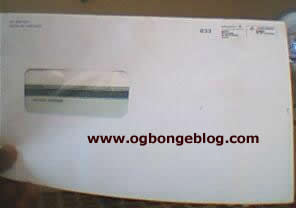
Below is a snapshot of one of my Adsense Cheques and you can read how I make €372.29 (N70, 000+) From Google Adsense in January 2011
If you have any question to ask or just have anything to say, kindly make use of the comment form below this post.
In my future articles, I will be writing about what to do if your application gets disapproved amongst other Adsense tips .
So for you not to miss those and my future free ebooks
, kindly SUBSCRIBE to this blog, so that you can be receiving future articles, freebies DIRECTLY into your email inbox, even when you are not online.
http://feedburner.google.com/fb/a/mailverify?uri=SecretInfos-Ogbongeblog
The 3 ebooks are also part of the 25 great ebooks am giving out at a very crazy price at http://ebooks.jideweb.com/ogbongeebooksbox.html
If you are a Nigerian and interested in paying for the ebooks, just text “ Adsense ” to 07062918898 . I will then reply you, to let you know if the offer is still on or not.
Wait, there is probability that you are reading this article on another website which is not my blog. If that is the case,then you will not be able to see links to the RELATED ARTICLES for this article. To check out the related articles, gently go to my blog, www.ogbongeblog.com
CLICK HERE TO DOWNLOAD MY 20 FREE EBOOKS
NOTE : If the LINKS are NOT clickable, it simple means you are not reading this at www.ogbongeblog.com. So, visit WWW.OGBONGEBLOG.COM now to read the original article.
Cheers !!!.









Leave a Reply