
Skip to content
new ogbongeblog logo
  • Advertise
  • Blog
  • Contact

How To Integrate MailMunch With Feedburner Using Custom HTML and Custom CSS (Video)

July 25, 2016

·

Uncategorized
jidetheblogger Avatar
jidetheblogger

As at the time of publsihing this post, MailMunch doesn’t have an official integration with Feedburner but by making use of the MailMunch “Custom HTML” feature, you can easily integrate your Feedburner Email subscription form with MailMunch popover, embedded form, slide boxes etc

To get started, you need to sign up for a free account at mailmunch.co and add your site. You will also have to sign in to feedburner.com to get the copy the code of your feedburner email subscription form.

I’ve published a video on my YouTube channel which explains the integration process. You can watch the video at :   https://www.youtube.com/watch?v=44vXOCb_KAs

In the video, I made mention of a custom code you can edit.

Below is the code :

<div id=”Subscription”>

<div class=”emailsub”>

<form style=”border:1px solid #ccc;padding:3px;text-align:center;” action=”https://feedburner.google.com/fb/a/mailverify” method=”post” target=”popupwindow” onsubmit=”window.open(‘https://feedburner.google.com/fb/a/mailverify?uri= mobilitaria ‘, ‘popupwindow’, ‘scrollbars=yes,width=550,height=520’);return true”><p>Enter your email address:</p><p><input type=”text” style=”width:70%” name=”email”/></p><input type=”hidden” value=” mobilitaria ” name=”uri”/><input type=”hidden” name=”loc” value=”en_US”/><input type=”submit” style=”width:70%; background : #008000 ; color: white!important;font-weight: 600;” value=”Subscribe” /><p>Delivered by <a href=”https://feedburner.google.com” target=”_blank”>FeedBurner</a></p></form>

</div></div><style type=”text/css”>

#Subscription { 

width: 100%; 

height: auto; }

#Subscription .emailsub input { 

padding: 10px; 

padding-bottom:10px; 

margin-top: 10px; 

margin-bottom:10px; 

font-size: 15px; 

font-family: open sans; 

width: 92%; 

border: 1px solid #ccc; 

border-bottom: 2px solid #ccc; 

border-radius: 5px; 

transition:border 0.15s linear 0s, box-shadow 0.15s linear 0s, color 0.15s linear 0s; 

}

</style>

Ensure you carefully REPLACE the “ mobilitaria ” in the code with your blog feedburner ID. You can get your ID via feedburner.com. Click on your feed, then click on “edit feed details”. It will be displayed as seen in the screenshot below:
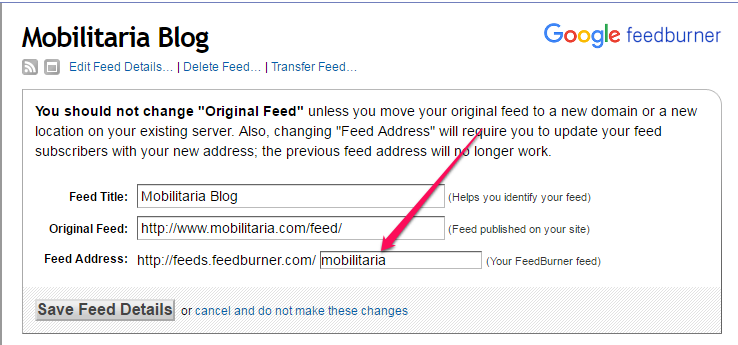
feedburner feed address

You can change the background color of the submit button if you want.

Below is a sample MailMunch form integrated with feedburner :

mailmunch feedburner sample embedded email marketing form

You can read how to use MailMunch design rules to create email list of targeted subscribers.

Have fun!

Please Share :
email marketing feedburner mailmunch video tutorials

Like What You Read?

Sign Up to get similar articles delivered to your email inbox.

Leave a Reply Cancel reply

Your email address will not be published. Required fields are marked *

15 responses to “How To Integrate MailMunch With Feedburner Using Custom HTML and Custom CSS (Video)”

  1. Terkuma John Avatar
    Terkuma John
    July 25, 2016

    Nice one boss. thanks for this

    Loading…
    Reply
  2. Inspirationaledu Avatar
    Inspirationaledu
    July 26, 2016

    okay.. thank you!

    Loading…
    Reply
  3. Raymp3 Avatar
    Raymp3
    July 26, 2016

    thank you.. really found this helpful.

    Loading…
    Reply
  4. Obioma Nnamdi Avatar
    Obioma Nnamdi
    July 26, 2016

    Tanx boss

    Loading…
    Reply
  5. Yahaya Bagudu Avatar
    Yahaya Bagudu
    July 27, 2016

    Aweesome post! Worked perfectly.. Commenting from TECHGEEZ.COM

    Loading…
    Reply
  6. damilola miracle Avatar
    damilola miracle
    August 25, 2016

    Thanks for bringing this idea closer and clearer. <a href=" http://www.damtops.com>www.damtops.com</a&gt ;

    Loading…
    Reply
  7. olusanya temitope Avatar
    olusanya temitope
    September 13, 2016

    Thank you very much for this tutorial Mr Jide. The Subscription form is now visible on my blog @ http://www.temitopepost.xyz

    Loading…
    Reply
  8. vic Avatar
    vic
    September 24, 2016

    nice one.. thanks

    Loading…
    Reply
  9. Cisca kinks Avatar
    Cisca kinks
    June 16, 2017

    Thank you so much for this

    Loading…
    Reply
  10. perob City Avatar
    perob City
    September 6, 2017

    Great tutorial, works perfectly fine for me. Thank you Oga Jide.. see the blog https://www.studentsgist.com

    Loading…
    Reply
  11. Pratik Shah Avatar
    Pratik Shah
    October 3, 2017

    Thanks Man!

    Loading…
    Reply
  12. sid Avatar
    sid
    October 18, 2017

    Great tutorial, works perfectly fine for me. Techjunglee.com

    Loading…
    Reply
  13. Daniel Avatar
    Daniel
    May 16, 2018

    Nice article but that code could be better instead of that long code this could be used

    Enter your email address:

    Did that for my upcoming blog scienceupdatesng.blogspot.com

    Loading…
    Reply
    1. Daniel Avatar
      Daniel
      May 16, 2018

      <…….form style=”border:1px solid #ccc;padding:3px;text-align:center;” action=”https://feedburner.google.com/fb/a/mailverify” method=”post” target=”popupwindow” onsubmit=”window.open(‘https://feedburner.google.com/fb/a/mailverify?uri=put your own’, ‘popupwindow’, ‘scrollbars=yes,width=550,height=520’);return true”>Enter your email address:

      </form. >

      Loading…
      Reply
  14. Daniel Avatar
    Daniel
    May 16, 2018

    Nice article helped me in doing mine @ scienceupdatesng.blogspot.com

    Loading…
    Reply

WANT TO ADVERTISE?

Chat on WhatsApp

RELATED POSTS

  • How To Add FeedBurner Email Subscription Form To Blogger/Blogspot (Pictoral Tutorial)
  • How To Add Feedburner Email Subscription Form BELOW Blog Posts of Blogger/Blogspot Blogs
  • Awesome Sidebar Feedburner Email Subscription Form For Blogger and WordPress Blogs

FEATURED


  • CREDICORP launches C.L.I.C.K.D. Scheme with FG’s 3MTT Programme, expanding affordable consumer credit for locally-assembled laptops and devices for digital workers

    CREDICORP launches C.L.I.C.K.D. Scheme with FG’s 3MTT Programme, expanding affordable consumer credit for locally-assembled laptops and devices for digital workers

  • What Happens to Your Online Accounts When You Die?

    What Happens to Your Online Accounts When You Die?

JOIN AI WEB DESIGN GROUP


  • AI Website Design Training Whatsapp Group by Jidetheblogger

    AI Website Design Training Whatsapp Group by Jidetheblogger

← MailMunch Page Level Targeting : How It Works
How To Create Pop Up Subscription Form for Feedburner →

Join 25,000+ subscribers

Receive our latest blog posts in your inbox.

Search

Social

Facebook

Instagram

Twitter

new ogbongeblog logo

Copyright © 2026 | About | Advertise | Featured | Sitemap | Privacy Policy | Powered by WordPress

Your cart (items: 0)

Products in cart

Product
Details
Total
Subtotal ₦0.00
Shipping and discounts calculated at checkout.
View my cart
Go to checkout

Your cart is currently empty!

Start shopping

Notifications

%d

    LIKE My Fan Page

    Privacy Policy | Copyright © 2012,OgbongeBlog.All Rights Reserved. Powered by Blogger .
    Create a Mobile Site
    View Site in Mobile | Classic
    Share by:


