
Skip to content
new ogbongeblog logo
  • Advertise
  • Blog
  • Contact

How To Link DomainKing Domain Name To Blogger/Blogspot Blog

November 9, 2014

·

digital marketing
jidetheblogger Avatar
jidetheblogger

Ever since DomainKing launched the cheap .com domain offer in Nigeria , many bloggers in Nigeria have been leveraging on the opportunity to get a custom domain for their blogspot blogs. Unfortunately, many of them don’t know how to use the domain name for their Blogger blogs.

Although, I offer the custom domain service for N3,000, I’ve decided to share the steps involved, for free simply because I’m a nice guy 🙂

I assume you have registered the domain name and it’s already active. If not, read : DomainKing Domain Name Registration Guide for Nigerians to get started.

If registered and active, go to domainKing website and log in.

==> Click on “ My Domains “

domainking config icon

==> Click the small arrow next to the domain name you want to use for your Blogger blog.

==> Scroll down to the Management Tools section and click on the “DKNG DNS & Free Email Panel” button

domainKing dnsbutton

==> Click “Manage DNS Records”

domainking dns2

==> Click “Continue to DNS Panel”

domainKing dns panel

 ==> Click on “A Records” tab > “Add A Record”

domainking a record

==> Leave the “Host Name” field empty

==> Enter 216.239.32.21 in the “Destination IPv4 Address” field

==> Click “Add Record”

==> Repeat same for 216.239.34.21 , 216.239.36.21 , 216.239.38.21 so you have four A Records.

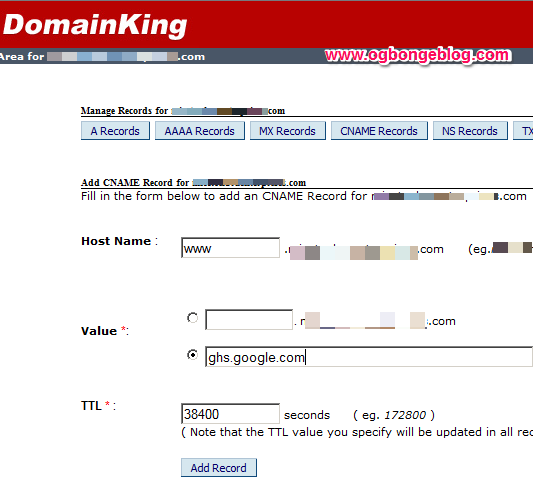
==> Click on “CName Records” tab > “Add CName Record”
domainking cname record

==> Enter www in the “Host Name” field

==> Enter “ ghs.google.com ” in the Value field. Ensure you select the second option as seen in the screenshot below:

==> Click “Add Record”

==> Open a new tab in your browser and sign in to www.blogger.com

==> Go To “Settings” > “Basic” > “Publishing”

==> Click : + Set up a third-party URL for your blog

==> Enter www.yourdomain.com in the box and save. After clicking save, you will see an error message.

blogger error

==> Copy the details of the second CNAME quoted in the error message ( Label and Target ) and paste somewhere eg notepad

==> Switch back to the domainking page, click “CName Records” > “Add CName Record”

==> Copy the “Label” and paste in the “Host Name” field

==> Copy the “Target” and paste in the “Value” field (2nd option)

==> Click “Add Record”

After 5 – 10 minutes, go back to your Blogger settings page and try saving it again.

If successful, click “edit” and tick the “redirect” option.

If still displaying the error, you might have to wait a bit more and try again.

That’s all.

I hope it works for you.

Alternatively, you can submit a support ticket and the domainKing support team will be glad to assist you with the configuration.

If you don’t want to go through all these stress, you can just hire me to set up Blogger custom domain for you.

Please, SHARE this with your friends. Do NOT copy and Paste to your blog though :p

Cheers!

Please Share :
domainking

Like What You Read?

Sign Up to get similar articles delivered to your email inbox.

Leave a Reply Cancel reply

Your email address will not be published. Required fields are marked *

29 responses to “How To Link DomainKing Domain Name To Blogger/Blogspot Blog”

  1. Franklin Avatar
    Franklin
    November 8, 2014

    You indeed a nice guy (smiles). Greedy people won't want to post this when they know they are making money from it. God bless you boss

    Loading…
    Reply
  2. Mazino Oyolo Kigho Avatar
    Mazino Oyolo Kigho
    November 8, 2014

    I have already submitted a support ticket before I found the through BL. Now with this post and the email response I got from them, it will be much easier to get the settings right. Very timely post!

    Loading…
    Reply
  3. Osuofia Avatar
    Osuofia
    November 10, 2014

    Thank you Oga jide for this tutorials, it has helped me configure mine now,i appreciate. I have many things to learn from,i will keep visiting your blog.

    Loading…
    Reply
  4. Uche Francis Avatar
    Uche Francis
    November 10, 2014

    Wow I was about preparing screenshots for this as well. But i must say as a tech king you always have a way of making things look special. The guide was properly laid for easy and better understanding.

    Meanwhile, I Actually Run==> Techdavids.com

    Loading…
    Reply
  5. Ebuka Avatar
    Ebuka
    November 11, 2014

    Hello, Which is better for;Applying for adsense using a custom domain or using the .blogspot domain?

    Loading…
    Reply
  6. ebubejude Avatar
    ebubejude
    November 20, 2014

    Thanks jide for this post its really been helpful

    Loading…
    Reply
  7. Olagbaiye Theophilus Avatar
    Olagbaiye Theophilus
    November 21, 2014

    Jide ur a Hero…. Thanks I Just did mine>> http://www.akintoms.com

    Loading…
    Reply
  8. Osakwe Jindu Avatar
    Osakwe Jindu
    November 22, 2014

    How do i setup the free email account, please help

    Loading…
    Reply
  9. Toms Avatar
    Toms
    December 3, 2014

    Worked fine again… http://Www.nigeriapromoblog.com

    Loading…
    Reply
  10. Anonymous Avatar
    Anonymous
    December 15, 2014

    it worked for me but the problem is that the address can only be seen when www is attached to it. if i type myblog.com or https://myblog.com , i will not see my blog until i use http://www.myblog.com . please how can i solve this problem. i want my blog to be seen whether prefix is attached to it or not

    Loading…
    Reply
  11. Tuham Sanusi Avatar
    Tuham Sanusi
    December 18, 2014

    @Anonymous, after you have successfully redirect & sets the DNS Record. Tick on the box "redirect non www to www"

    Loading…
    Reply
  12. Akpene Jacob Avatar
    Akpene Jacob
    February 1, 2015

    How can I then set up a .ng domain I bought from domainking?

    Loading…
    Reply
  13. DNBstories.com Avatar
    DNBstories.com
    March 8, 2015

    Nice

    Loading…
    Reply
  14. Wilfred Morrison Avatar
    Wilfred Morrison
    March 23, 2015

    The process you explained regarding linking of domain name to blogger is surely considerable. I have gone through and it really works. Thanks for illustrating this informative post in such a organized manner along with snapshots.

    Loading…
    Reply
  15. Ayodele John Avatar
    Ayodele John
    January 5, 2016

    Wow Jide.this was so helpful. I just setup my blog now, http://www.postgraduatenigeria.com God bless u plenty

    Loading…
    Reply
  16. Mathias Amodu Avatar
    Mathias Amodu
    January 7, 2016

    The process you explained
    regarding linking of domain I have gone
    through and it really works.

    Loading…
    Reply
  17. ohiri obinna Avatar
    ohiri obinna
    February 11, 2016

    You are my mentor dude. *kudos*

    Loading…
    Reply
  18. Prosper Noah Avatar
    Prosper Noah
    June 2, 2016

    Hello kindly help please i have set up .com.ng but following these procedures using my mobile phone but i keep getting "invalid login credentials".

    Please kindly help.

    Loading…
    Reply
    1. Prince John Okosun Avatar
      Prince John Okosun
      February 23, 2017

      i also experienced that. What you need to do is click on My services instead of my domains

      Loading…
      Reply
  19. I_am Prime Avatar
    I_am Prime
    June 19, 2016

    The same thing here – i have set up .com.ng but following these procedures using my mobile phone but i keep getting "invalid login credentials" – What should i do?

    Loading…
    Reply
  20. Anonymous Avatar
    Anonymous
    July 21, 2016

    please Prince use PC for best results

    Loading…
    Reply
  21. MICROSOFT TUTORIALS Avatar
    MICROSOFT TUTORIALS
    July 27, 2016

    Thanks a lot. You are indeed a stress saver. Once again, a million thanks. Please review my young blog at http://www.microsofttut.com

    Loading…
    Reply
  22. Izzy Blaze Avatar
    Izzy Blaze
    October 4, 2016

    thanks a lot…www.easyblazeblog.com

    Loading…
    Reply
  23. joshua ken Avatar
    joshua ken
    December 19, 2016

    oga jide God bless you i just linked my blog http://www.phacemash.com

    thank you all the way

    if there is anyway i can help you just contact me joshuaken6@gmail.com

    Loading…
    Reply
  24. Admin Avatar
    Admin
    January 15, 2017

    Mr jide please come to my aid my own is showing me error after clicking manage DNS records please help me

    Loading…
    Reply
    1. Prince John Okosun Avatar
      Prince John Okosun
      February 23, 2017

      What you need to do is set it up from My Services instead of My Domains.

      blogger @ http://www.obhiabablog.com.ng

      Loading…
      Reply
    2. Goodluck Okereke Avatar
      Goodluck Okereke
      May 29, 2017

      Me too mr jide….

      Loading…
      Reply
  25. jerry Avatar
    jerry
    March 22, 2018

    i followed the process but usually get stuck after clicking continue to DNS management.it shows me an error message of invalid login credential

    Loading…
    Reply
  26. Tugis Avatar
    Tugis
    March 2, 2019

    I hope it works, each time I connect my blog to a custom domain, it displays only a few hours daily. Most times it is offline (saying it can’t reach the server or time out)… All the hosting companies that know the solution to this problem and it makes me lose traffic.

    Loading…
    Reply

WANT TO ADVERTISE?

Chat on WhatsApp

RELATED POSTS

  • Promo: .NG Domain for ₦499 at DomainKing.NGregister cheap ng domain name in nigeria
  • How To Use DomainKing Nameservers for WhoGoHost Domain Namedomainking nameservers for whogohost domain name
  • How To Start a .Com Blog at ₦2699 with DomainKing.NGopen domain king account

FEATURED


  • CREDICORP launches C.L.I.C.K.D. Scheme with FG’s 3MTT Programme, expanding affordable consumer credit for locally-assembled laptops and devices for digital workers

    CREDICORP launches C.L.I.C.K.D. Scheme with FG’s 3MTT Programme, expanding affordable consumer credit for locally-assembled laptops and devices for digital workers

  • What Happens to Your Online Accounts When You Die?

    What Happens to Your Online Accounts When You Die?

JOIN AI WEB DESIGN GROUP


  • AI Website Design Training Whatsapp Group by Jidetheblogger

    AI Website Design Training Whatsapp Group by Jidetheblogger

← DomainKing Domain Name Registration Guide for Nigerians
Instagram Widget For WordPress With A Follow Button →

Join 25,000+ subscribers

Receive our latest blog posts in your inbox.

Search

Social

Facebook

Instagram

Twitter

new ogbongeblog logo

Copyright © 2026 | About | Advertise | Featured | Sitemap | Privacy Policy | Powered by WordPress

Your cart (items: 0)

Products in cart

Product
Details
Total
Subtotal ₦0.00
Shipping and discounts calculated at checkout.
View my cart
Go to checkout

Your cart is currently empty!

Start shopping

Notifications

%d

    LIKE My Fan Page

    Privacy Policy | Copyright © 2012,OgbongeBlog.All Rights Reserved. Powered by Blogger .
    Create a Mobile Site
    View Site in Mobile | Classic
    Share by:


