
Skip to content
new ogbongeblog logo
  • Advertise
  • Blog
  • Contact

Using MailMunch PopUp On Your Blog? Here Is How To Avoid Google’s Punishment

  1. Home
  2. Blog
  3. Uncategorized
  4. Using MailMunch PopUp On Your Blog? Here Is How To Avoid Google’s Punishment
August 28, 2016

Written by

jidetheblogger Avatar
jidetheblogger

Last Modified :

October 8, 2017

In an effort to improve the mobile search experience, Google has announced that starting from January 10, 2017, your site might not rank as highly if popups frustrate users from easily accessing your content on transition from the mobile search results.

Hence, if you’ve integrated popups on your blog, you might have to review the integration. If you’ve added popup to your blog after reading my tutorial on how to create MailMunch popups , don’t panic!

MailMunch makes it very easy to avoid the punishment. The team at MailMunch published a post on their blog, highlighting the options you can explore in other to avoid been hammered by Google.

Option A) Turn off the Popup for mobile devices and use a Top Bar

Edit your pop up, click on “Behavior” tab, click on “Display Rules”, turn off the popup on mobile and tablet devices and click on publish form > Finish.
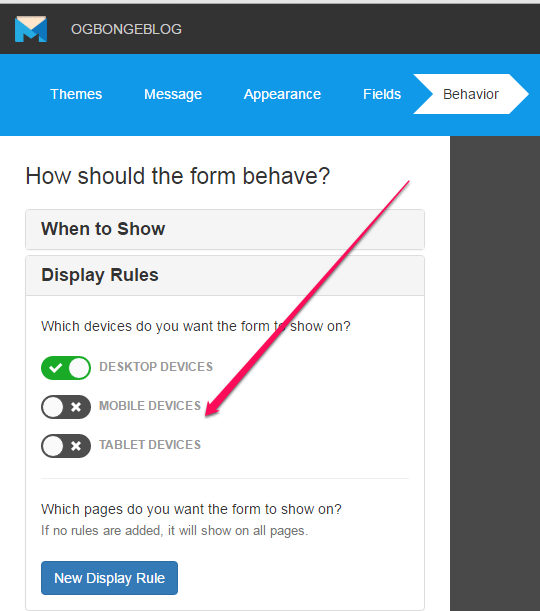
turn off pop up on mobile devices


Option B) Make your Popups smarter

Target users who are exiting your site not those that arrive your site on page load. You can set this via “When To Show” in “Behavior” step of the MailMunch popup form editor.
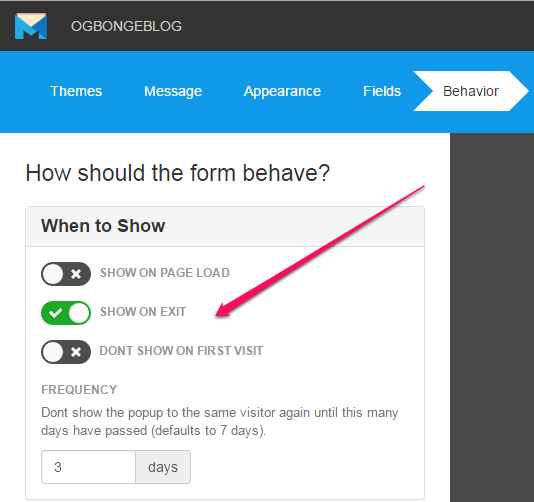
show pop up on exit

Also, you can use click triggers to trigger your popups on click of a button or link. You can read how I create MailMunch popup button .

Option C) Use Embed forms for mobile devices

For mobile devices, you can use embed forms instead of popup forms. Mailmunch offers a great variety of beautiful embed forms that can be placed any where on your site. You can put them above, below or in between your content.

Option D) Use Top bars for mobile devices

For mobile devices, you can choose to show a small bar or banner that sticks on top or bottom of your site and politely asks for the email.
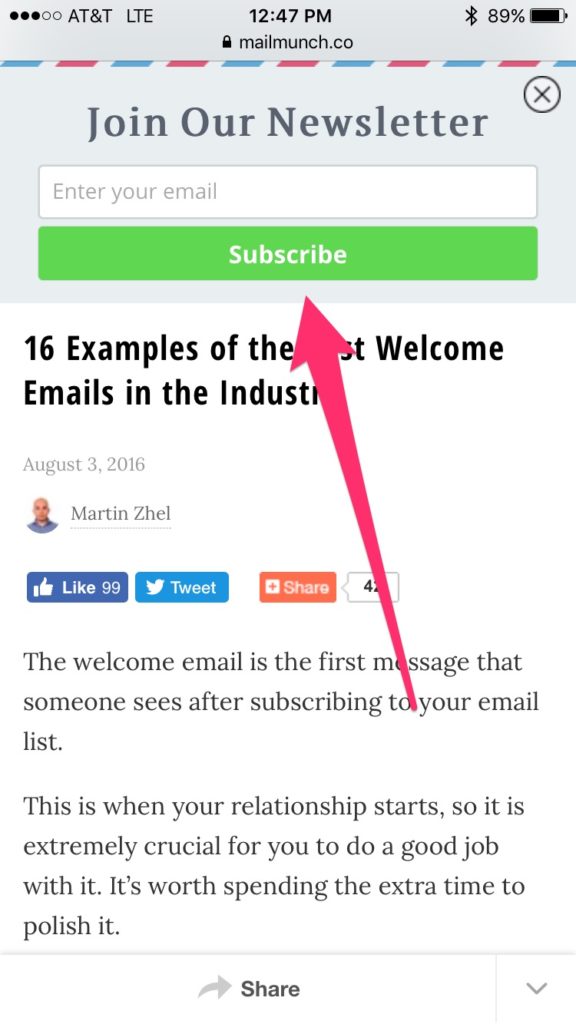
mailmunch top bar email marketing

As you can see in the screenshot above, it does not block the content, does not take much space and is not intrusive. Ensure you keep the text light so it doesn’t take more space.

If you are using another service or a custom built solution, now is the time to consider switching to MailMunch.

As long as you are not spamming and legitimately converting users, you should be fine.

Please Share :
email marketing mailmunch

Like What You Read?

Sign Up to get similar articles delivered to your email inbox.

Leave a Reply Cancel reply

Your email address will not be published. Required fields are marked *

10 responses to “Using MailMunch PopUp On Your Blog? Here Is How To Avoid Google’s Punishment”

  1. Uthman Saheed Avatar
    Uthman Saheed
    August 28, 2016

    Thanks for this updates. I was planning to implement it before, let me just suspend that for now.

    Loading…
    Reply
  2. UpGhetto Avatar
    UpGhetto
    August 28, 2016

    Noted. Please Oga Jide, which video app do you use to make videos for your YouTube videos?

    Loading…
    Reply
  3. Akpene Jacob Avatar
    Akpene Jacob
    August 29, 2016

    Thanks Jide, I actually removed mine but I will go and put it back and follow your method.

    Loading…
    Reply
  4. Tochukwu Amadi Avatar
    Tochukwu Amadi
    August 29, 2016

    Nice post

    http://www.proudlygeeks.com

    Loading…
    Reply
  5. Naija Avatar
    Naija
    August 30, 2016

    The fourth option works for me and I'm sure most mobile users won't mind.

    Loading…
    Reply
  6. Kingsley Umeh Avatar
    Kingsley Umeh
    August 30, 2016

    Thanks for this post I will make some changes on my own too

    Loading…
    Reply
  7. Henry Avatar
    Henry
    September 1, 2016

    It's even good i never implemented it.

    Loading…
    Reply
  8. Sam Avatar
    Sam
    September 2, 2016

    I have already removed mine. thanks for the info, I will add it back

    Loading…
    Reply
  9. Anonymous Avatar
    Anonymous
    September 28, 2016

    Tanks Brother, was so worried on how to arrange it for my blog http://www.hitgist.com.ng

    Loading…
    Reply
  10. Linda Thomas Avatar
    Linda Thomas
    July 17, 2017

    Hy,I has enabled this plugin in my wordpress site to show an exit pop-up. In the 'When to show' section, I selected 'Show on exit'. But the pop-up is showing when I loads the page not when I am about to leave.

    Loading…
    Reply

WANT TO ADVERTISE?

Chat on WhatsApp

RELATED POSTS

  • What is MailMunch ?
  • How To Create Pop Up Subscription Form for Feedburner
  • MailMunch Page Level Targeting : How It Worksmailmunch page level targeting for email marketing

FEATURED


  • How to Pay Chinese Suppliers in RMB (Alipay & WeChat Pay) or Swap Naira, Kenyan Shillings, Ghana Cedis & USDT in Minutes

    How to Pay Chinese Suppliers in RMB (Alipay & WeChat Pay) or Swap Naira, Kenyan Shillings, Ghana Cedis & USDT in Minutes

JOIN AI WEB DESIGN GROUP


  • AI Website Design Training Whatsapp Group by Jidetheblogger

    AI Website Design Training Whatsapp Group by Jidetheblogger

RANDOM POSTS


    I Got One Free Month of Meta Verified After I Tried to Cancel My Subscription


    How To Make Money On Bamboo App: 5 Proven Ways


    How To Use Vibe Coding To Make Money


    How I Earn $100 Per Referral from Affiliate Marketing


    Bluetooth Printer That Connects To Phone


    Can I Use OPay Card for Facebook Ads?


    Why I Moved My Websites From Namecheap To Interserver.net


    How I Earn $50 Per Sale


MORE RANDOM POSTS
← Beauty Lies In the Eye Of The Gionee F103 Pro
Photos : Facebook Founder, Mark Zuckerberg Is In Nigeria To Meet Nigerian Entrepreneurs →

Join 25,000+ subscribers

Receive our latest blog posts in your inbox.

Search

Social

Facebook

Instagram

Twitter

new ogbongeblog logo

Copyright © 2026 | About | Advertise | Featured | Sitemap | Privacy Policy | Powered by WordPress

Your cart (items: 0)

Products in cart

Product
Details
Total
Subtotal ₦0.00
Shipping and discounts calculated at checkout.
View cart
Go to checkout

Your shopping cart is empty

Return to shop

Notifications

%d

    LIKE My Fan Page

    Privacy Policy | Copyright © 2012,OgbongeBlog.All Rights Reserved. Powered by Blogger .
    Create a Mobile Site
    View Site in Mobile | Classic
    Share by: