


With the Blogger’s “ Templates Designer “, you can turn your blogspot blog to a stunning one with some few clicks. With this tutorial, you should be able to change your blog to something similar or better than www.naijaipfreedom.blogspot.com
Note
: You have to do this using a computer
. Easier using Firefox browser
.
Login to your blog and click on “ Layout “. Then, click on “ Customize “
After clicking on “Customize”,you should see something similar to the picture below:
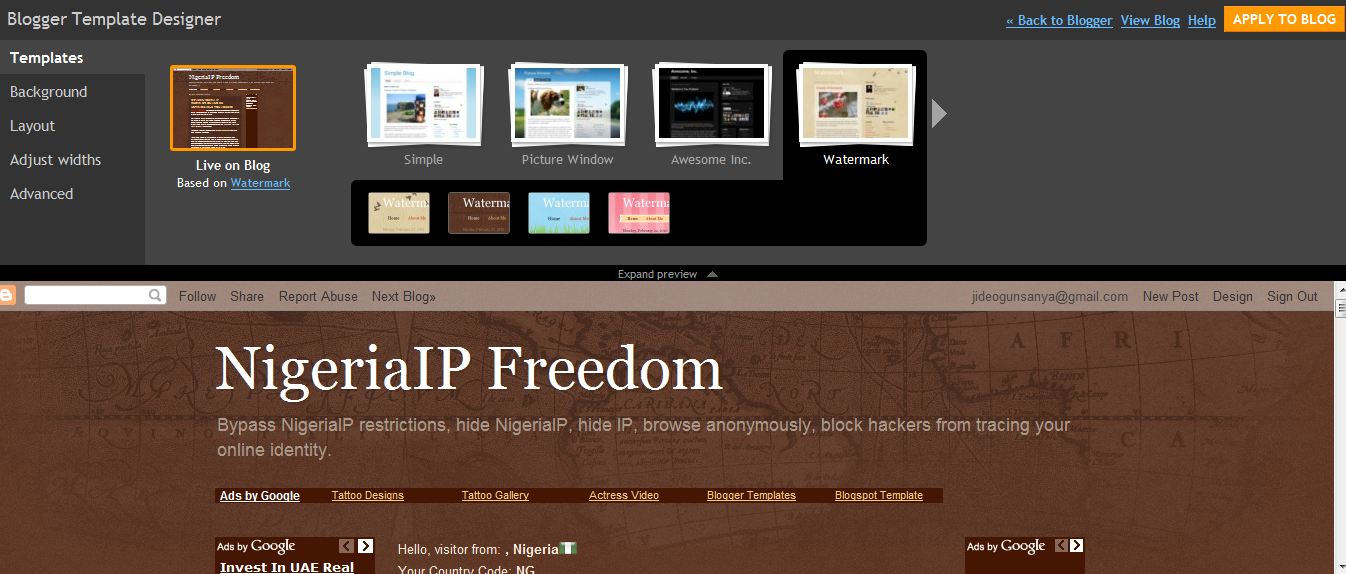
Take note of the “ Templates “, “ Background “, “ Layout “, “ Adjust Widths ” and “ Advanced ” Links”. You can click on them to make some custom adjustments to your blog. I will explain how to use them briefly.
Also take note of the “ Apply to blog
” link at the top right corner. You must click on it to apply any change you make to your blog.
Templates
When you are on the “Templates” page, you should see:
Right there, you can choose from the different available templates. The preview is always shown down the page. Each Templates group has sub-templates which you can choose from. Just choose the one you like.
Background When you click on “Background”, you should see:
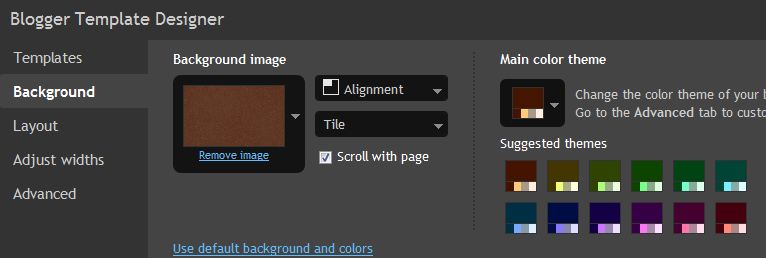
Right there, you can remove/change the background image and also change the main color theme. You can really make your blog stand out with the options here especially with the background image.
Layout When you click on “Layout”, you should see:

Right there, you can change the layout of your blog, to lets say “ 3 columns “, ( one side bar by the right and the other sidebar by the left). You can also change the layout of the “Footer” region to 3 columns so you can easily give space for your widgets and even Adsense ads.
Adjust Widths When you click on “Adjust widths”, you should see:

Right there, you can adjust the width of your blog and the sidebars. To me, the default size is OK. Hence, you can just leave it as it is.
Advanced
When you click on “Advanced”, you should see;

Right there, you can make a lot of changes especially with regards to color combination and Font types.
That’s all.
I believe you should be able to add glamour to your blog now. Just be creative!
Remember : You have to do this using a computer . Easier using Firefox browser .
If you want to appreciate this, have questions to ask or have anything to contribute, kindly use the comment form below. More so, Kindly use the “Like”, “Recommend” and other share buttons to share this tutorial with your friends.
Remember to click on “ Apply to Blog ” after making your changes.
If you want to use an Header Image for your blog just as I did for www.ogbongesms.blogspot.com , read: https://www.ogbongeblog.com/2010/12/how-to-create-banner-for-blogswebsites.html
You might also be interested in changing your blog favicon and also change your blogspot address to dot com just as i changed www.ogbongeblog.blogspot.com to www.ogbongeblog.com.
Do not forget to check out other Blogging tutorials and also Subscribe to my blog so you will not miss other future tips even when you are not online.
In my future posts, I will be sharing with you, more blogging and money-making tutorials. So, Subscribe Now , if you don’t want to miss them.








Leave a Reply