Skip to content
new ogbongeblog logo
  • Advertise
  • Blog
  • Contact

How To Make Your Facebook Ads To Display On Blogs and Mobile Apps ( For Advertisers )

  1. Home
  2. Blog
  3. Uncategorized
  4. How To Make Your Facebook Ads To Display On Blogs and Mobile Apps ( For Advertisers )
February 8, 2016

Written by

jidetheblogger Avatar
jidetheblogger

Last Modified :

October 8, 2017

Facebook Audience Network was recently expanded to include support for mobile web; now making it possible for Facebook advertisers to extend the scale of their Facebook campaigns beyond Facebook, mobile apps and into mobile websites.

What this simply means is that if you advertise on Facebook, you can make your ads to display on Facebook, in mobile apps and on the mobile view of blogs.

For you to advertise on Facebook Audience Network , you must enable “ Mobile News Feed ” placement and the ad type must be one of the types below :

==> mobile app install ads,
==> mobile app engagement ads,==> website conversion ads and
==> website click ads.

If you’re already running mobile News Feed campaigns, all new campaigns will automatically be opted-in to the Audience Network. You don’t need to upload new creative (your ad’s images and text). Ads in the Audience Network use the same images and text as Facebook ads that run in News Feed.

Keep in mind that the Audience Network is designed to extend Facebook ad campaigns and can’t be purchased by themselves. So, you cannot enable your ad to run ONLY on Audience Network for now. You must opt in for “Mobile News Feed”.
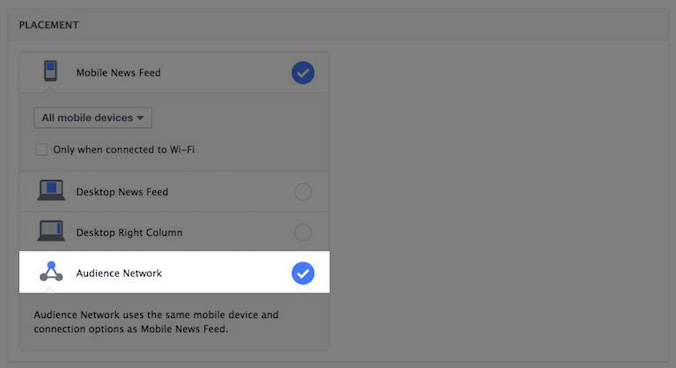
Facebook audience network placement

You can add a call-to-action button to your creative. The mobile ad will show the specific call to action that you chose while creating your ad. For example, if you selected “Play Now” when creating your ad, the button on the Audience Network will also say “Play Now”.

If no call-to-action button is selected, install ads will default to “Install Now” and engagement ads will default “Open Link”. The link ad will also keep the same call to action that you chose when creating the ad. If no call to action is selected, it’ll default to Open Link.

I hope this helps.

If you don’t know how to create a Facebook ad, you can watch my video here.

You can read how to opt out of Facebook Audience Network ad placement and how to measure performance of ads on the F.A.N.

I will also try to come up with a new video where I will show you how to create Facebook ads that display on mobile apps and blogs. Till then, keep reading Ogbongeblog and make sure you are subscribed to email updates.

My next post on F.A.N will be a tutorial on how a blog owner can generate and place Facebook Audience Network ad codes on his/her blog.

Please Share :
facebook ads

Like What You Read?

Sign Up to get similar articles delivered to your email inbox.

Leave a Reply Cancel reply

Your email address will not be published. Required fields are marked *

6 responses to “How To Make Your Facebook Ads To Display On Blogs and Mobile Apps ( For Advertisers )”

  1. Bella Avatar
    Bella
    February 8, 2016

    Bro Jide, I do not really Understand, What are the steps to Apply so i can display the facebook ads on my blog mobile view?

    Loading…
    Reply
  2. Victor Kachi Avatar
    Victor Kachi
    February 8, 2016

    Thanks sir..
    .
    Entclass.com

    Loading…
    Reply
  3. Omon Danny Avatar
    Omon Danny
    February 8, 2016

    Nice tutor Bros.

    I rep http://www.techsvibe.com

    Loading…
    Reply
  4. Skamod Stuks Avatar
    Skamod Stuks
    February 8, 2016

    My next post on F.A.N will be a tutorial on how a
    blog owner can generate and place Facebook
    Audience Network ad codes on his/her blog.

    This is my target

    wap2all.com

    Loading…
    Reply
  5. Get it Right Nigerians Avatar
    Get it Right Nigerians
    February 21, 2016

    the facebook ads never works for me, is there something im doing wrong?

    Loading…
    Reply
  6. Lucky Avatar
    Lucky
    June 29, 2018

    Hi guys, i created a facebook ad specifying my audience as US, but i don’t get website clicks, views or engagement at all. But doing same, with Nigerian Audience i’ll get clicks, views and engagements. Please what could be the problem?

    Loading…
    Reply

WANT TO ADVERTISE?

Chat on WhatsApp

RELATED POSTS

  • FAN Ads Now Let You Earn Money From Your Mobile WebSites
  • Mobilitaria Nigeria Tech Blog Approved To Display Facebook Ads
  • Opera Ads – a Content-based Native Advertising Platform That Lets You Advertise on Opera Mini etcopera ads advertise on opera mini news homepage

FEATURED


  • How to Pay Chinese Suppliers in RMB (Alipay & WeChat Pay) or Swap Naira, Kenyan Shillings, Ghana Cedis & USDT in Minutes

    How to Pay Chinese Suppliers in RMB (Alipay & WeChat Pay) or Swap Naira, Kenyan Shillings, Ghana Cedis & USDT in Minutes

JOIN AI WEB DESIGN GROUP


  • AI Website Design Training Whatsapp Group by Jidetheblogger

    AI Website Design Training Whatsapp Group by Jidetheblogger

RANDOM POSTS


    I Got One Free Month of Meta Verified After I Tried to Cancel My Subscription


    How To Make Money On Bamboo App: 5 Proven Ways


    How To Use Vibe Coding To Make Money


    How I Earn $100 Per Referral from Affiliate Marketing


    Bluetooth Printer That Connects To Phone


    Can I Use OPay Card for Facebook Ads?


    Why I Moved My Websites From Namecheap To Interserver.net


    How I Earn $50 Per Sale


MORE RANDOM POSTS
← Mobilitaria Nigeria Tech Blog Approved To Display Facebook Ads
A Right Moment To Grow Small Business In Nigeria →

Join 25,000+ subscribers

Receive our latest blog posts in your inbox.

Search

Social

Facebook

Instagram

Twitter

new ogbongeblog logo

Copyright © 2026 | About | Advertise | Featured | Sitemap | Privacy Policy | Powered by WordPress

Your cart (items: 0)

Products in cart

Product
Details
Total
Subtotal ₦0.00
Shipping and discounts calculated at checkout.
View cart
Go to checkout

Your shopping cart is empty

Return to shop

Notifications

%d

    LIKE My Fan Page

    Privacy Policy | Copyright © 2012,OgbongeBlog.All Rights Reserved. Powered by Blogger .
    Create a Mobile Site
    View Site in Mobile | Classic
    Share by: