
Skip to content
new ogbongeblog logo
  • Advertise
  • Blog
  • Contact

MaxSlider : Free Easy To Use, Responsive WordPress Slider Plugin

December 14, 2016

·

Uncategorized
jidetheblogger Avatar
jidetheblogger

Setting up a slider in WordPress is not as easy as it may seem. There are literally hundreds of free & premium plugins out there trying to tackle this problem.

Most of them are trying to cover every possible scenario and this is where things get complicated. Tons of options, convoluted interfaces, complex user flows are getting in your way when all you need is a simple slider.

With MaxSlider, you can now add a custom responsive slider to any page of your website with ease as things are kept as simple as possible. You can create unlimited sliders with unlimited slides and custom settings per slider/slide! It is GPL licensed which means that you can use it however you like in both personal and commercial projects.

You can view demo  here .

Features

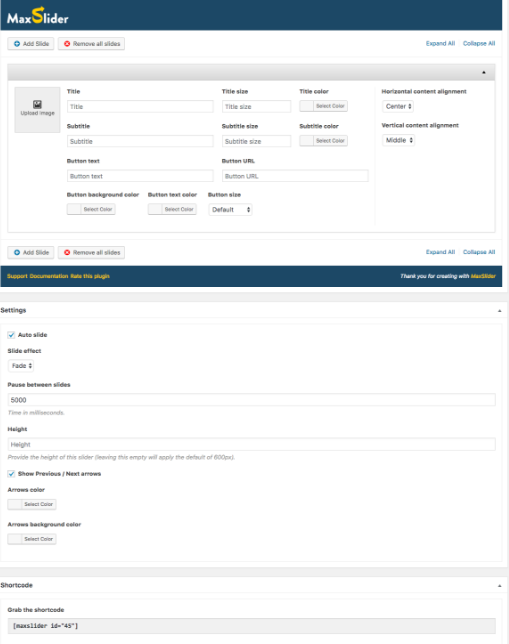
Responsive layouts
Flexible settings per slide/slider
Auto-slide option
Slide effects
Set the pause between slides
Set a custom height per slider
Show/Hide Previous/Next Arrows
Set Background/Foreground arrow colors
Set title text, title size and title color per slide
Set subtitle text, subtitle size and subtitle color per slide
Set button text, background color, text color, URL per slide
Set horizontal and vertical content alignment per slide
Grab the shortcode and show your sliders anywhere on your pages
maxslider wordpress slider plugin


How To Add Maxslider Shortcodes To Your WordPress Site

  • Install the MaxSlider plugin through the WordPress plugins screen
  • Activate the plugin through the “Plugins” screen in WordPress
  • In the WordPress admin dashboard you should see a new post type named “MaxSlider”
  • Navigate to the new MaxSlider post type and add your slides!
  • Grab the id of the slider and use it in the shortcode below :

[maxslider id=”11017″] 

Replace 11017 with the id of your slide. You can copy the shortcode above in a text widget but if you want to add the shortcode inside a template file, use the code below:

<?php echo do_shortcode(“[maxslider id=’11017′]”); ?>

I hope this helps.

Please Share :
wordpress plugins

Like What You Read?

Sign Up to get similar articles delivered to your email inbox.

Leave a Reply Cancel reply

Your email address will not be published. Required fields are marked *

5 responses to “MaxSlider : Free Easy To Use, Responsive WordPress Slider Plugin”

  1. Alpha Muhammad Avatar
    Alpha Muhammad
    December 16, 2016

    Nice Post! Kiki!

    Loading…
    Reply
  2. Beatsonb Beats Avatar
    Beatsonb Beats
    December 17, 2016

    Nice Commenting From Dtechbaze.Com

    Loading…
    Reply
  3. miracle edet Avatar
    miracle edet
    December 18, 2016

    cool sha….. http://www.1960tech.com.ng

    Loading…
    Reply
  4. www.braintech.com.ng Avatar
    www.braintech.com.ng
    December 18, 2016

    helpful thanks boss

    Loading…
    Reply
  5. D.light Avatar
    D.light
    December 19, 2016

    Nice blog ! This plugin is very useful.is there any plugin for post template free ?

    Loading…
    Reply

WANT TO ADVERTISE?

Chat on WhatsApp

RELATED POSTS

  • WPB Woocommerce Product Slider Plugin Lets You Display Products As Slider On WordPress
  • Download Uncle Hummer – Responsive WordPress Building Theme
  • Download Rare Theme For WordPress For Free

FEATURED


  • CREDICORP launches C.L.I.C.K.D. Scheme with FG’s 3MTT Programme, expanding affordable consumer credit for locally-assembled laptops and devices for digital workers

    CREDICORP launches C.L.I.C.K.D. Scheme with FG’s 3MTT Programme, expanding affordable consumer credit for locally-assembled laptops and devices for digital workers

  • What Happens to Your Online Accounts When You Die?

    What Happens to Your Online Accounts When You Die?

JOIN AI WEB DESIGN GROUP


  • AI Website Design Training Whatsapp Group by Jidetheblogger

    AI Website Design Training Whatsapp Group by Jidetheblogger

← Why Are MMM Nigeria Participants Blaming Nigerian Bloggers?
My Infinix Zero 4 Plus : Unboxing Photos, Specifications and Price →

Join 25,000+ subscribers

Receive our latest blog posts in your inbox.

Search

Social

Facebook

Instagram

Twitter

new ogbongeblog logo

Copyright © 2026 | About | Advertise | Featured | Sitemap | Privacy Policy | Powered by WordPress

Your cart (items: 0)

Products in cart

Product
Details
Total
Subtotal ₦0.00
Shipping and discounts calculated at checkout.
View my cart
Go to checkout

Your cart is currently empty!

Start shopping

Notifications

%d

    LIKE My Fan Page

    Privacy Policy | Copyright © 2012,OgbongeBlog.All Rights Reserved. Powered by Blogger .
    Create a Mobile Site
    View Site in Mobile | Classic
    Share by:


