
Skip to content
new ogbongeblog logo
  • Advertise
  • Blog
  • Contact

MTN MoMo Agent Code You Can Use To Create and Manage MoMo Wallet In Nigeria

November 6, 2020

·

tech
Ogbongeblog Staff Avatar
Ogbongeblog Staff

You can become MTN mobile money services agent in Nigeria simply by dialing the MTN MoMo Agent code : *502# on your registered MTN number.

A prompt will be displayed asking you if your MTN SIM registration details can be used for your MoMo Agent account registration. Accept and follow the menu/prompt.

By dialing the momo agent ussd code on your MTN line, it converts your MTN Phone number into a MoMo wallet where you can store funds and you can also use it to send money, pay bills, buy airtime etc

Once your MoMo agent wallet is successfully created, you will receive confirmation SMS from MTN.

The message will be sent in the format : “ Congrats, [your name] Your MoMo Agent wallet has been opened . Your Phone number 080******** is now your account number. Please transfer fund to your wallet to commence! “

Thereafter, you can dial *502# to carry out financial transactions from your MoMo wallet.

After dialing the, you will see options similar to what you see in the screenshot below :
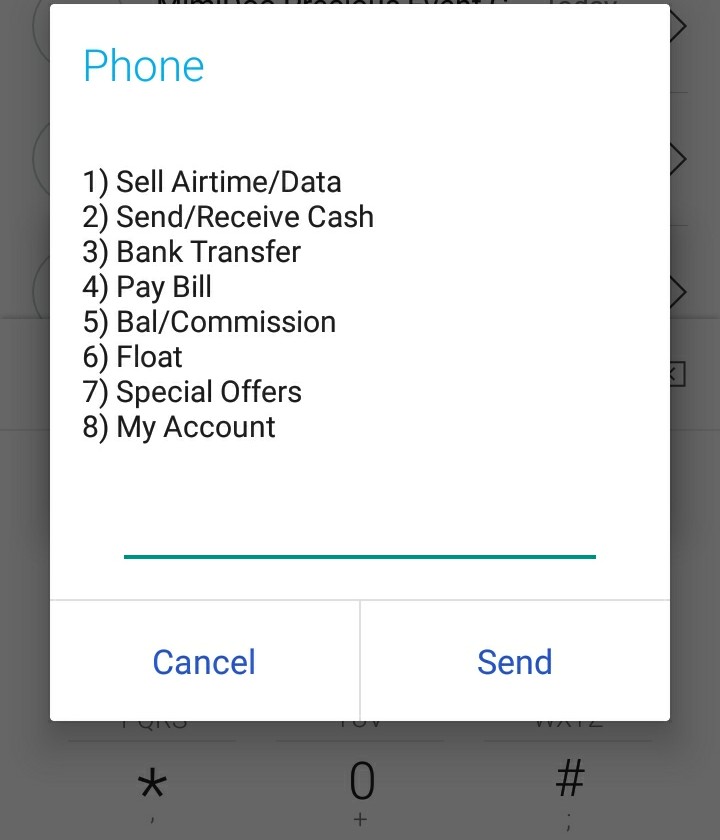
mtn momo agent code to create momo wallet in nigeria for mobile money services

To perform any transaction, just enter the number next to the transaction and press “Send”

For example,

if you want to sell MTN airtime or data, enter 1 and press “Send”
if you want to send or receive cash with MTNT MoMo , enter 2 and press “Send”
if you want to pay bills (PHCN, DsTV, Startimes etc), enter 4 and press “Send”
if you want to check mtn momo agent commission or balance, enter 5 and press “Send”

NOTE

To complete your registration as MTN MoMo agent in Nigeria, kindly visit nearest MTN office to fill the MoMo Agent form. Kindly go along with a passport photograph and photocopy of your means of identification (National ID card/Voter’s card/Driver License/ International Passport).

mtn momo agent ussd code to locate list of momo agents in nigeria

There is also MTN Momo Agent USSD Code you can use to locate MoMo agent close to you. The code is *223#

Please Share :
mobile money services mobile tech MTN mtn momo

Like What You Read?

Sign Up to get similar articles delivered to your email inbox.

Leave a Reply Cancel reply

Your email address will not be published. Required fields are marked *

WANT TO ADVERTISE?

Chat on WhatsApp

RELATED POSTS

  • Become MTN MoMo Agent In Nigeria and Make Money From Mobile Money Servicesbecome mtn momo agent in nigeria for mtn mobile money services
  • How To Fund MoMo Agent Account In Nigeriafund momo agent account in nigeria
  • How To Send and Receive Money At MTN MoMO Agent Outlet In Nigeriamtn momo agents in nigeria lagos abuja

FEATURED


  • CREDICORP launches C.L.I.C.K.D. Scheme with FG’s 3MTT Programme, expanding affordable consumer credit for locally-assembled laptops and devices for digital workers

    CREDICORP launches C.L.I.C.K.D. Scheme with FG’s 3MTT Programme, expanding affordable consumer credit for locally-assembled laptops and devices for digital workers

  • What Happens to Your Online Accounts When You Die?

    What Happens to Your Online Accounts When You Die?

JOIN AI WEB DESIGN GROUP


  • AI Website Design Training Whatsapp Group by Jidetheblogger

    AI Website Design Training Whatsapp Group by Jidetheblogger

← How To Send and Receive Money At MTN MoMO Agent Outlet In Nigeria
How To Fund MoMo Agent Account In Nigeria →

Join 25,000+ subscribers

Receive our latest blog posts in your inbox.

Search

Social

Facebook

Instagram

Twitter

new ogbongeblog logo

Copyright © 2026 | About | Advertise | Featured | Sitemap | Privacy Policy | Powered by WordPress

Your cart (items: 0)

Products in cart

Product
Details
Total
Subtotal ₦0.00
Shipping and discounts calculated at checkout.
View my cart
Go to checkout

Your cart is currently empty!

Start shopping

Notifications

LIKE My Fan Page

Privacy Policy | Copyright © 2012,OgbongeBlog.All Rights Reserved. Powered by Blogger .
Create a Mobile Site
View Site in Mobile | Classic
Share by:

