
Skip to content
new ogbongeblog logo
  • Advertise
  • Blog
  • Contact

New and Simplest way of creating Favicon for Blogger Blogs

  1. Home
  2. Blog
  3. Uncategorized
  4. New and Simplest way of creating Favicon for Blogger Blogs
July 11, 2011

Written by

jidetheblogger Avatar
jidetheblogger

Last Modified :

October 8, 2017

You can now create a custom favicon for your blogger blog, right from your Blogger dashboard. This means you can now use any picture to serve as your own custom favicon instead of the blogger icon which is the default for blogger blogs. Blogger automatically generates the favicon for you from any picture you upload without you adding any code to your blog.

If you use Mozilla Firefox or Chrome as your browser, you can just take a look of the favicon next to the web address of my blog in the URL bar of the browser. You might not see it if you browse with Internet Explorer 6 but Internet Explorer 7 and above supports it.
Having a favicon for your blog have loads of advantages and you can bet that it also adds to the beauty of blogs and websites. 

So. How do I do this?

Login to your blogger blog.
Go to Design and click on the “ Page Elements ” tab. You should see the “Favicon” as seen in the picture below:
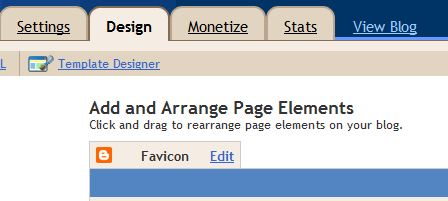
Favicon2

Click on “ Edit “

Another window will pop up. Click on the “ choose File ” button

Select the picture you want to use from your computer.

Then click SAVE .

That’s all.

You should now be seeing your custom favicon next to your blog address in your browser.

NOTE : if you see error message that your image is not a square image, go to  http://tools.dynamicdrive.com/favicon/  to convert your image to an icon. Download it to your pc, then re-upload it to your blog as explained above.

Feel free to check out other Blogger tricks here .

Kindly share this with your friends using the Like/Tweet/share buttons.

If you have any question to ask or just want o say something with regards to this, feel free to use the comment form.

You can click here to preview and validate if your favicon is working or not.

Cheers!

Please Share :
blogger tips

Like What You Read?

Sign Up to get similar articles delivered to your email inbox.

Leave a Reply Cancel reply

Your email address will not be published. Required fields are marked *

4 responses to “New and Simplest way of creating Favicon for Blogger Blogs”

  1. Keji Avatar
    Keji
    July 11, 2011

    Nice one. Blogger keeps coming up with more great features, to make things easier for Blogger users. One can even easily change it without the stress of generating and uploading the ico file somewhere. I love this…thx for sharing

    Loading…
    Reply
  2. Anonymous Avatar
    Anonymous
    February 6, 2012

    I tried this but got an error message : 'NOT A SQUARE IMAGE' what should i do?

    Loading…
    Reply
    1. Jide Oguns Avatar
      Jide Oguns
      February 6, 2012

      first go to: http://tools.dynamicdrive.com/favicon/ to generate your favicon from your picture, then follow this tutorial to upload the generated favicon

      Loading…
      Reply
  3. Hayaanda Lawal Avatar
    Hayaanda Lawal
    March 3, 2014

    pls hw can i make a blob page like yoursi mean your home page how you divide your post

    Loading…
    Reply

WANT TO ADVERTISE?

Chat on WhatsApp

RELATED POSTS

  • Favicon from pictures: How to create a favicon for your Blog
  • Favicon Validator That Previews and Tests Icons
  • How To Confirm Or Validate That Your Favicon Is Working

FEATURED


  • How to Pay Chinese Suppliers in RMB (Alipay & WeChat Pay) or Swap Naira, Kenyan Shillings, Ghana Cedis & USDT in Minutes

    How to Pay Chinese Suppliers in RMB (Alipay & WeChat Pay) or Swap Naira, Kenyan Shillings, Ghana Cedis & USDT in Minutes

JOIN AI WEB DESIGN GROUP


  • AI Website Design Training Whatsapp Group by Jidetheblogger

    AI Website Design Training Whatsapp Group by Jidetheblogger

RANDOM POSTS


    I Got One Free Month of Meta Verified After I Tried to Cancel My Subscription


    How To Make Money On Bamboo App: 5 Proven Ways


    How To Use Vibe Coding To Make Money


    How I Earn $100 Per Referral from Affiliate Marketing


    Bluetooth Printer That Connects To Phone


    Can I Use OPay Card for Facebook Ads?


    Why I Moved My Websites From Namecheap To Interserver.net


    How I Earn $50 Per Sale


MORE RANDOM POSTS
← Ebuddy: chat with Facebook friends on PC and Phones
Pictures of Google Adsense Formats →

Join 25,000+ subscribers

Receive our latest blog posts in your inbox.

Search

Social

Facebook

Instagram

Twitter

new ogbongeblog logo

Copyright © 2026 | About | Advertise | Featured | Sitemap | Privacy Policy | Powered by WordPress

Your cart (items: 0)

Products in cart

Product
Details
Total
Subtotal ₦0.00
Shipping and discounts calculated at checkout.
View cart
Go to checkout

Your shopping cart is empty

Return to shop

Notifications

%d

    LIKE My Fan Page

    Privacy Policy | Copyright © 2012,OgbongeBlog.All Rights Reserved. Powered by Blogger .
    Create a Mobile Site
    View Site in Mobile | Classic
    Share by:


