Skip to content
new ogbongeblog logo
  • Advertise
  • Blog
  • Contact

Pixlr.com Editor: Create Banners and Edit Images Online

  1. Home
  2. Blog
  3. Uncategorized
  4. Pixlr.com Editor: Create Banners and Edit Images Online
January 29, 2012

Written by

jidetheblogger Avatar
jidetheblogger

Last Modified :

October 8, 2017

Pixlr Editor is an online utility which you can use to create ad banners and edit images online, free of charge. It is a very good Adobe Photoshop alternative, which you can make use of on the internet without having to install it to your computer.

Pixlr Editor  is built for both non-professionals and professional users with editing needs such as editing web images to be posted on social networks like Facebook, MySpace, Bebo, or image sites like Flickr, Fotolog, Photobucket etc.  It is an online image editor built in flash which means you need to have installed flash plugin in your browser to get it to work.

Go to : http://pixlr.com/editor/  to get started now.

If you want to create a 125 x 125 banner, click on “ Create a new image ” , set the size ( e.g Height =125, width =125) and use your creativity to design the banner.
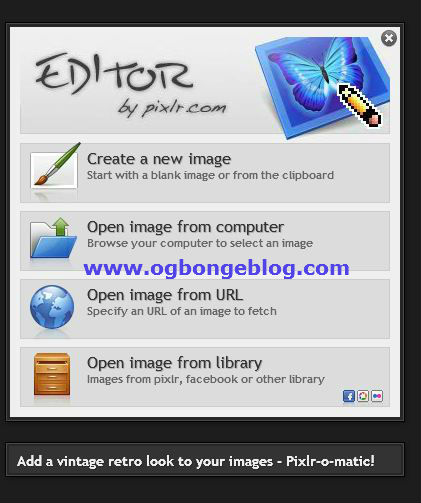
In my future posts, I will share with you how to create a 125×125 ad banner using the Pixlr Editor . You can always check out the Pixlr.com blog for tips and updates.

If you know other web apps or softwares similar to the Pixlr editor, feel free to share them using the comment form below.

Cheers!

Please Share :
graphic design online tools

Like What You Read?

Sign Up to get similar articles delivered to your email inbox.

Leave a Reply Cancel reply

Your email address will not be published. Required fields are marked *

5 responses to “Pixlr.com Editor: Create Banners and Edit Images Online”

  1. Abdul Avatar
    Abdul
    January 30, 2012

    Thanks for this information bro, I have seen its even easier than banner fans.

    Loading…
    Reply
    1. Jide Oguns Avatar
      Jide Oguns
      January 13, 2013

      Yea

      Loading…
      Reply
  2. Anonymous Avatar
    Anonymous
    January 7, 2013

    I dnt understand

    Loading…
    Reply
    1. Jide Oguns Avatar
      Jide Oguns
      January 13, 2013

      which part?

      Loading…
      Reply
  3. Emmanuel Avatar
    Emmanuel
    January 8, 2018

    Hi Jide, I created logo using logo maker when I uploaded it on my blog, it became too small. help!!!by the way. your Pixlr app is for photo I don’t see any logo creation

    Loading…
    Reply

WANT TO ADVERTISE?

Chat on WhatsApp

RELATED POSTS

  • Video Tutorial on How To Make Header Banner using Pixlr Online Editor
  • FotoFlexer.com: Online Alternative To Picnik, PicStory and PicMix
  • How To Add Text To Pictures Online at Pixlr.com

FEATURED


  • How to Pay Chinese Suppliers in RMB (Alipay & WeChat Pay) or Swap Naira, Kenyan Shillings, Ghana Cedis & USDT in Minutes

    How to Pay Chinese Suppliers in RMB (Alipay & WeChat Pay) or Swap Naira, Kenyan Shillings, Ghana Cedis & USDT in Minutes

JOIN AI WEB DESIGN GROUP


  • AI Website Design Training Whatsapp Group by Jidetheblogger

    AI Website Design Training Whatsapp Group by Jidetheblogger

RANDOM POSTS


    I Got One Free Month of Meta Verified After I Tried to Cancel My Subscription


    How To Make Money On Bamboo App: 5 Proven Ways


    How To Use Vibe Coding To Make Money


    How I Earn $100 Per Referral from Affiliate Marketing


    Bluetooth Printer That Connects To Phone


    Can I Use OPay Card for Facebook Ads?


    Why I Moved My Websites From Namecheap To Interserver.net


    How I Earn $50 Per Sale


MORE RANDOM POSTS
← How To Change Back To Old Blogger Dashboard
Sharemobile.ro: Download Java, Symbian Applications and Games →

Join 25,000+ subscribers

Receive our latest blog posts in your inbox.

Search

Social

Facebook

Instagram

Twitter

new ogbongeblog logo

Copyright © 2026 | About | Advertise | Featured | Sitemap | Privacy Policy | Powered by WordPress

Your cart (items: 0)

Products in cart

Product
Details
Total
Subtotal ₦0.00
Shipping and discounts calculated at checkout.
View cart
Go to checkout

Your shopping cart is empty

Return to shop

Notifications

%d

    LIKE My Fan Page

    Privacy Policy | Copyright © 2012,OgbongeBlog.All Rights Reserved. Powered by Blogger .
    Create a Mobile Site
    View Site in Mobile | Classic
    Share by: