
Skip to content
new ogbongeblog logo
  • Advertise
  • Blog
  • Contact

How To Place Links On Texts in Nairaland Posts (Video)

June 24, 2016

·

Uncategorized
jidetheblogger Avatar
jidetheblogger

When you create a post on Nairaland.com, you can as well link to your blog post or anywhere on the web by copying and pasting your link directly in the post or by creating hypertext. If you don’t know what hypertext means, it means text with hyperlink. In computing, hyperlink is a text or an image you can click on, and jump to another document. Links allow users to click their way from page to page.

Below is a screenshot of how I smartly linked to my blog post in a comment on Nairaland.com without exposing the URL. This is good for search engine optimization blah blah blah…lol
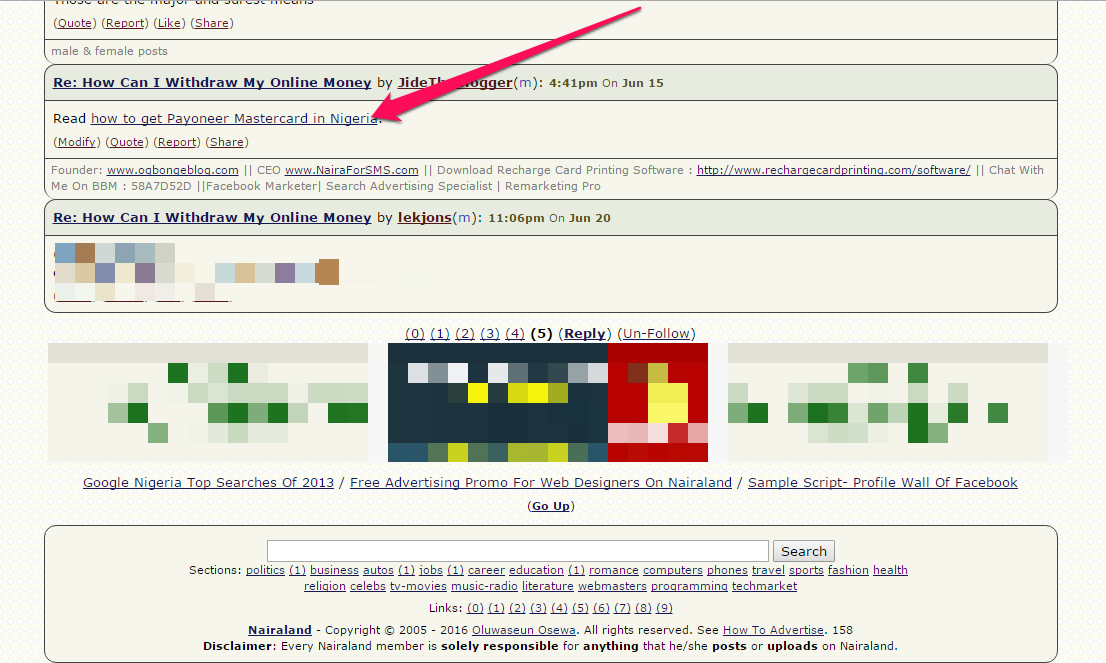
add hyperlink on Nairaland forum posts and comments

If you’re finding it hard to place links on texts in Nairaland posts or comments, I’ve created a short video tutorial that will guide you. You can watch the video at :  https://youtu.be/eI-jCTkoSts

Using hyperlinks in Nairaland posts is smarter than pasting links directly on the site. The moderators of the Nairaland forum can even see it as spamming, which can make them ban you from the site. So, be smart as you use the forum to drive traffic to your blogs.

About NairaLand.com

Nairaland.com is an online community created by Seun Osewa in March 2005. It is targeted at Nigerians but the biggest in Africa. You can follow me on Nairaland via : www.nairaland.com/jidetheblogger

Please Share :
nairaland video tutorials

Like What You Read?

Sign Up to get similar articles delivered to your email inbox.

Leave a Reply Cancel reply

Your email address will not be published. Required fields are marked *

23 responses to “How To Place Links On Texts in Nairaland Posts (Video)”

  1. Ezekiel Odebright Avatar
    Ezekiel Odebright
    June 24, 2016

    Thanks. I will like to kw if its possible to insert image(s) where necessary, when making post on Nairaland.

    Loading…
    Reply
    1. Jide Oguns Avatar
      Jide Oguns
      June 24, 2016

      You mean without having to use the upload button?

      Loading…
      Reply
    2. Ansa John Avatar
      Ansa John
      June 28, 2016

      Yes without using the upload button – I am also interested to know. thanks

      Loading…
      Reply
  2. Saminu Abass Ola Avatar
    Saminu Abass Ola
    June 24, 2016

    Thanks for sharing this informative post. However, Master Jide I find it difficult to use the href link stuff on other site with my url http://www.sabtrends.com

    I will be glad if you can help. When I post using href, it does not direct back to my blog. It will only show not found. Pls help

    Loading…
    Reply
    1. Jide Oguns Avatar
      Jide Oguns
      June 24, 2016

      How do you do it?

      Loading…
      Reply
  3. BLACKBERRYBABES.COM Avatar
    BLACKBERRYBABES.COM
    June 24, 2016

    nice post..well written by the master himself

    But place text links wisely on that forum…or else some moderators will ban you till 2070, when they are not sure they will be alive to lift the ban..lolzzzzzzzzzzzzzz

    Loading…
    Reply
    1. NAIJA REBRANDER Avatar
      NAIJA REBRANDER
      July 8, 2016

      Thanks Mr Jide i will try it soon

      Loading…
      Reply
  4. Blessing Noah Avatar
    Blessing Noah
    June 24, 2016

    Very informative post. Keep up the good work, boss.

    Loading…
    Reply
  5. free healthcare and fitness ideas Avatar
    free healthcare and fitness ideas
    June 24, 2016

    thanks bro….i really appreciate this. i will try the hyperlink stuff

    Loading…
    Reply
  6. Omotola Dose Avatar
    Omotola Dose
    June 27, 2016

    this is not working for me, infront of what did you past the link? inside the fist [url] or outside? and did you type the = sigh inside the [url] or outside it? Thank you

    Loading…
    Reply
  7. Akpene Jacob Avatar
    Akpene Jacob
    June 28, 2016

    It's good to get free traffic from Nairaland but those mods can frustrate one.

    Lasgidionline.com.ng

    Loading…
    Reply
  8. Ilorincity Media Avatar
    Ilorincity Media
    June 29, 2016

    Thanks Bro, Love this tutorial visit http://www.ilorincitymedia.com

    Loading…
    Reply
  9. Christian Ejike Avatar
    Christian Ejike
    June 29, 2016

    Nice one

    i blog @ Gisttrace

    Loading…
    Reply
  10. emma Avatar
    emma
    July 1, 2016

    THIS IS REALLY GOING TO BE HELPFUL

    Loading…
    Reply
  11. Ayomikun Avatar
    Ayomikun
    July 9, 2016

    Thanks a lot for the info boss.No wonder… Some of my links there aren't 'clickable'.

    Besides the moderators there ban people a lot

    Loading…
    Reply
  12. Ajet Omotola Avatar
    Ajet Omotola
    July 15, 2016

    Thanks Jide. I really appreciate this perfect idea.
    Wanna try this
    [url=www.ajetomsblog.com]Ajetoms-Blog[/url]

    Loading…
    Reply
  13. Techsonite Admins Avatar
    Techsonite Admins
    September 29, 2016

    Thanks Jide! Been looking for how my fellow bloggers always get this done! This is an eye opener brother! Appreciate your good work!

    Loading…
    Reply
  14. Leke Sonde Avatar
    Leke Sonde
    November 12, 2016

    Thanks for this tutorial, it is an eye opener tips, I posted my blog Mycoacharticle.com. in the members profile and it brings error 404 page, but thus tips has enlightened me. thanks very much.

    Loading…
    Reply
  15. Odira Avatar
    Odira
    April 7, 2017

    Thanks for the tutorial. That was helpful. Now I can make my posts on nairaland look more mature 🙂

    Loading…
    Reply
  16. Codedwap Avatar
    Codedwap
    April 8, 2017

    i love ogbongeblog mehn

    Loading…
    Reply
  17. Cool Hubs Avatar
    Cool Hubs
    June 6, 2017

    Thanks a lot boss.
    U re the best.
    Am from Coolhubs
    Web.
    Thanks one again

    Loading…
    Reply
  18. Duke Avatar
    Duke
    August 29, 2018

    this one na special nairaland html hahaha!

    Loading…
    Reply
  19. Chidera stephen Avatar
    Chidera stephen
    April 26, 2020

    Thanks for this

    Loading…
    Reply

WANT TO ADVERTISE?

Chat on WhatsApp

RELATED POSTS

  • How To Advertise on Nairaland
  • Nairaland Essay Contest: Win N60, 000 Cash prize
  • How To Insert LINKS Into Blogger Posts

FEATURED


  • CREDICORP launches C.L.I.C.K.D. Scheme with FG’s 3MTT Programme, expanding affordable consumer credit for locally-assembled laptops and devices for digital workers

    CREDICORP launches C.L.I.C.K.D. Scheme with FG’s 3MTT Programme, expanding affordable consumer credit for locally-assembled laptops and devices for digital workers

  • What Happens to Your Online Accounts When You Die?

    What Happens to Your Online Accounts When You Die?

JOIN AI WEB DESIGN GROUP


  • AI Website Design Training Whatsapp Group by Jidetheblogger

    AI Website Design Training Whatsapp Group by Jidetheblogger

← Konga Commission Rates Reviewed. Check Out The Latest Rates
Meet Me At Abuja Today at Empower3600 Launch →

Join 25,000+ subscribers

Receive our latest blog posts in your inbox.

Search

Social

Facebook

Instagram

Twitter

new ogbongeblog logo

Copyright © 2026 | About | Advertise | Featured | Sitemap | Privacy Policy | Powered by WordPress

Your cart (items: 0)

Products in cart

Product
Details
Total
Subtotal ₦0.00
Shipping and discounts calculated at checkout.
View my cart
Go to checkout

Your cart is currently empty!

Start shopping

Notifications

%d

    LIKE My Fan Page

    Privacy Policy | Copyright © 2012,OgbongeBlog.All Rights Reserved. Powered by Blogger .
    Create a Mobile Site
    View Site in Mobile | Classic
    Share by:


