
Skip to content
new ogbongeblog logo
  • Advertise
  • Blog
  • Contact

How I Recover Deleted Facebook Messages 2014

  1. Home
  2. Blog
  3. how to
  4. How I Recover Deleted Facebook Messages 2014
April 25, 2014

Written by

jidetheblogger Avatar
jidetheblogger

Last Modified :

January 20, 2025

I woke up this morning to check my Facebook messages on my PC and was surprised when I discovered that my recent messages are no longer in my inbox. I started wondering what might caused it and I later realised that they might have been deleted when I deleted them from the Blackberry hub of my Blackberry Q10 smarthpone .

This is so annoying because I thought deleting the messages from the hub will only delete them from the BB and not from my Facebook account inbox. My BB Q10 runs on Blackberry 10 OS 10.2.0 which doesn’t have any option to control how messages are deleted on the device and messaging server. I guess this is now possible with the “Delete ON” Blackkberry Hub option featured in Blackberry 10 OS version 10.2.1.

Guess what?

While clicking all the links in my Facebook Inbox, I discovered that the missing messages were “ Archived “. I was so happy when I discovered this. Instantly, I “ Unarchived ” all the messages and they were all restored back to the inbox. 🙂
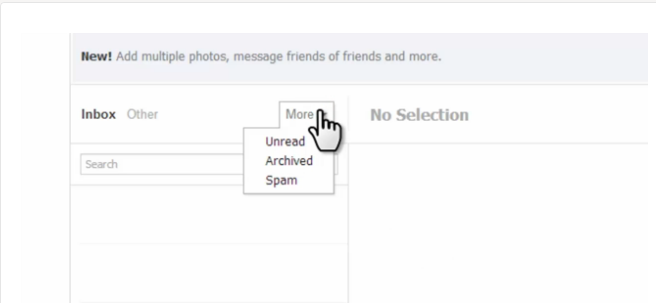
Facebook Messages Inbox

So, if you want to retrieve deleted Facebook messages, you can click on the “ More ” > “ Archived ” link via your Facebook Inbox (ON PC). Beside each archived message is the “unarchive” icon which you can click to restore the message to your Facebook inbox.

NOTE : You cannot retrieve messages that you’ve permanently deleted.

I hope this helps.

Kindly share with Friends especially on Facebook.

Cheers!

Please Share :
facebook

Like What You Read?

Sign Up to get similar articles delivered to your email inbox.

Leave a Reply Cancel reply

Your email address will not be published. Required fields are marked *

One response to “How I Recover Deleted Facebook Messages 2014”

  1. Anonymous Avatar
    Anonymous
    April 25, 2014

    Nice share. Congrats bro

    Loading…
    Reply

WANT TO ADVERTISE?

Chat on WhatsApp

RELATED POSTS

  • How To Access Archived Emails in GMail
  • How To Delete Call History On Blackberry
  • How I Use Blackberry AutoText To Add Smileys,Emoticons To SMS Messages and BBM Chat

FEATURED


  • How to Pay Chinese Suppliers in RMB (Alipay & WeChat Pay) or Swap Naira, Kenyan Shillings, Ghana Cedis & USDT in Minutes

    How to Pay Chinese Suppliers in RMB (Alipay & WeChat Pay) or Swap Naira, Kenyan Shillings, Ghana Cedis & USDT in Minutes

JOIN AI WEB DESIGN GROUP


  • AI Website Design Training Whatsapp Group by Jidetheblogger

    AI Website Design Training Whatsapp Group by Jidetheblogger

RANDOM POSTS


    I Got One Free Month of Meta Verified After I Tried to Cancel My Subscription


    How To Make Money On Bamboo App: 5 Proven Ways


    How To Use Vibe Coding To Make Money


    How I Earn $100 Per Referral from Affiliate Marketing


    Bluetooth Printer That Connects To Phone


    Can I Use OPay Card for Facebook Ads?


    Why I Moved My Websites From Namecheap To Interserver.net


    How I Earn $50 Per Sale


MORE RANDOM POSTS
← Can I Receive Adsense Payment With Naira Savings Account?
How Long Does Adsense Wire Transfer Reflects In Bank Accounts? →

Join 25,000+ subscribers

Receive our latest blog posts in your inbox.

Search

Social

Facebook

Instagram

Twitter

new ogbongeblog logo

Copyright © 2026 | About | Advertise | Featured | Sitemap | Privacy Policy | Powered by WordPress

Your cart (items: 0)

Products in cart

Product
Details
Total
Subtotal ₦0.00
Shipping and discounts calculated at checkout.
View cart
Go to checkout

Your shopping cart is empty

Return to shop

Notifications

%d

    LIKE My Fan Page

    Privacy Policy | Copyright © 2012,OgbongeBlog.All Rights Reserved. Powered by Blogger .
    Create a Mobile Site
    View Site in Mobile | Classic
    Share by: