
Skip to content
new ogbongeblog logo
  • Advertise
  • Blog
  • Contact

Sharing Tab Missing in Network Properties Of Your Windows 7 Starter Netbook? This is Why

October 6, 2013

·

Uncategorized
jidetheblogger Avatar
jidetheblogger

I am trying to create a wiFi hotspot on my HP 2140 Mini-Notebook PC running Windows 7 Starter so I can wirelessly share my internet connection on the net-book with my iPad 3. I set up wireless internet connection on the netbook by typing “ adhoc ” into the Windows search bar in the Start Menu; yet my iPad 3 won’t connect to the internet.

One thing that I found to be strange was that the iPad3 connects fine to the wireless connection I created using the same “ adhoc ” trick on my HP Compaq laptop running Windows 7 Home Premium . After messing around with the netbook and laptop, I noticed that the “sharing” tab is missing in the properties of the internet adapter on my netbook.
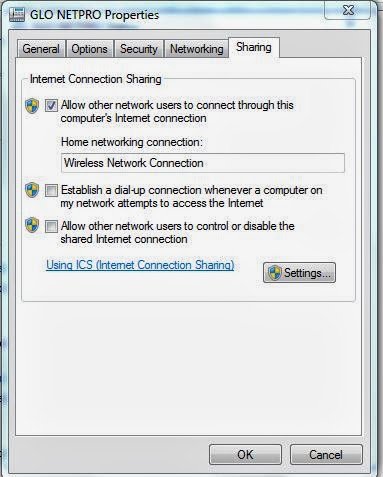
Windows 7 Home Premium Sharing tab

As you can see from the screenshot above from my HP Compaq laptop, the tab is where you will have to enable other network users to connect through to the computer’s internet connection but the netbook is missing the “sharing” tab. I think that this might be the problem.

I decided to google how I can enable the sharing tab on my netbook. After reading through different forum thread and blog posts, I was able to find out that Microsoft took out the Internet Connection Sharing feature in Windows 7 starter, the same way the company buried the Snipping tool in the OS. I also stumbled on this wikiPedia chart where it is clearly stated that Windows 7 Starter OS doesn’t support internet sharing.

So, How Do I Share Internet Connection on My Netbook?

To share your wireless connection on your netbook, I suggest you upgrade your Win 7 Starter OS to the one that supports the feature or you install Windows XP on a separate partition on the netbook.

Are you experiencing similar problem? Are you able to share your the internet on your netbook running Windows 7 Starter? Please, let me hear from you via comments.

Cheers!

Please Share :
PC tips

Like What You Read?

Sign Up to get similar articles delivered to your email inbox.

Leave a Reply Cancel reply

Your email address will not be published. Required fields are marked *

2 responses to “Sharing Tab Missing in Network Properties Of Your Windows 7 Starter Netbook? This is Why”

  1. Folarin Avatar
    Folarin
    October 8, 2013

    Thought your iPad3 has SIM slot. Why worrying yourself over wifi connection from your netbook?

    Loading…
    Reply
    1. Jide Oguns Avatar
      Jide Oguns
      October 9, 2013

      There are some things and apps I can only use with wiFI.

      Loading…
      Reply

WANT TO ADVERTISE?

Chat on WhatsApp

RELATED POSTS

  • Price of Samsung Solar Mini Laptop in Nigeria
  • What is MTN Education Bundle?
  • Download Instant WordPress: Free Portable Software That Lets You Develop WordPress Sites Offline

FEATURED


  • CREDICORP launches C.L.I.C.K.D. Scheme with FG’s 3MTT Programme, expanding affordable consumer credit for locally-assembled laptops and devices for digital workers

    CREDICORP launches C.L.I.C.K.D. Scheme with FG’s 3MTT Programme, expanding affordable consumer credit for locally-assembled laptops and devices for digital workers

  • What Happens to Your Online Accounts When You Die?

    What Happens to Your Online Accounts When You Die?

JOIN AI WEB DESIGN GROUP


  • AI Website Design Training Whatsapp Group by Jidetheblogger

    AI Website Design Training Whatsapp Group by Jidetheblogger

← Samsung Galaxy Note 3 and Gear SmartWatch Price in Nigeria
How Can I Identify the Apple iPad 3? →

Join 25,000+ subscribers

Receive our latest blog posts in your inbox.

Search

Social

Facebook

Instagram

Twitter

new ogbongeblog logo

Copyright © 2026 | About | Advertise | Featured | Sitemap | Privacy Policy | Powered by WordPress

Your cart (items: 0)

Products in cart

Product
Details
Total
Subtotal ₦0.00
Shipping and discounts calculated at checkout.
View my cart
Go to checkout

Your cart is currently empty!

Start shopping

Notifications

%d

    LIKE My Fan Page

    Privacy Policy | Copyright © 2012,OgbongeBlog.All Rights Reserved. Powered by Blogger .
    Create a Mobile Site
    View Site in Mobile | Classic
    Share by:


